

You need a questionnaire and you do not want to start from a blank page. That makes sense, because the time sink is not thinking up the questions. It is the formatting.
A questionnaire template takes exactly that part off your hands. You download a finished sample as a Word file, delete the questions that do not fit your goal, add one or two of your own, and you have a clean questionnaire in half an hour. On this page you get six templates to download plus ready-made samples for online surveys.
📌 Key takeaways
- Six questionnaire templates as Word files, free and without signup.
- The Word files are in German, so use them as a structural blueprint.
- Every template opens in Word, Pages and LibreOffice.
- For online surveys there are ready-made templates inside the tool.
- On paper you retype every answer, online the tool analyzes them for you.
- You always have to adapt the introduction and the tone.
Create a survey for free
With empirio.ai you can create a modern online survey in minutes — free to start.
- AI-built survey
- Adjust by drag & drop
- Real-time analysis
What our questionnaire templates contain
Every template on this page is a complete questionnaire with an introduction, question blocks sorted by topic, consistent answer scales and a closing section. So you do not have to build anything. You only shorten and adapt.
All the samples follow the same logic, because that is what works in practice: easy questions first, sensitive questions late, open questions right at the end. Ask about salary halfway through and you lose participants. Put the open question at the start and you get one-word answers.
The answer scales are deliberately built the same way across the whole questionnaire. A questionnaire that jumps between five-point and four-point scales is tiring for respondents and makes the later analysis needlessly complicated. Which scale suits which purpose is covered in question types and answer options, and if you want to build the questionnaire from scratch, the method is in the guide on how to create a questionnaire.
💡 Tip
Read the template out loud once before you send it. Questions where you stumble yourself are unclear for respondents too. It takes five minutes and replaces half a pretest.
Online survey or questionnaire download?
The choice between an online survey and a downloaded questionnaire comes down to a single question: who types up the answers afterwards? With a printed questionnaire that is you. With an online survey the tool does it.
Everything else is secondary. Both routes start from the same questionnaire, and both give you usable results. The table shows when each route is the faster one.
| Criterion | Questionnaire download | Online survey |
|---|---|---|
| Preparation | adapt the template and print it | pick a template and share the link |
| Distribution | on site, by mail or as a PDF | by link, QR code or email |
| Data capture | type in every answer by hand | happens automatically |
| Analysis | build the table yourself | charts from the first answer on |
| Best for | small groups and surveys on site | anything from about 20 participants |
In practice the math tips over faster than you would think. Even 30 completed paper forms mean several hours of typing, and mistakes creep in that nobody spots in the results later.
Six questionnaire templates to download
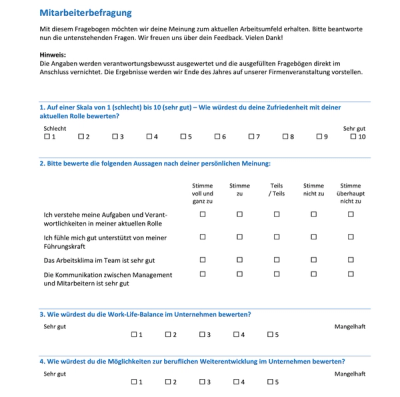
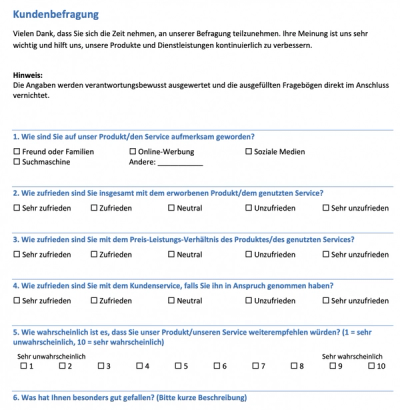
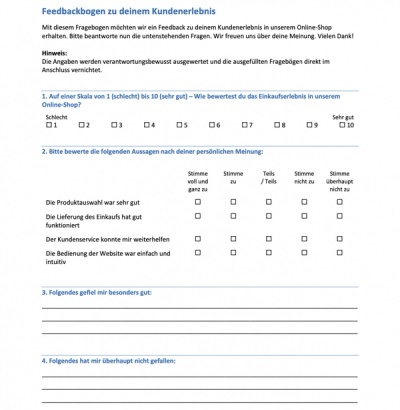
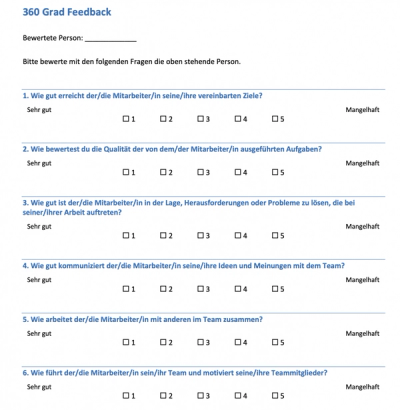
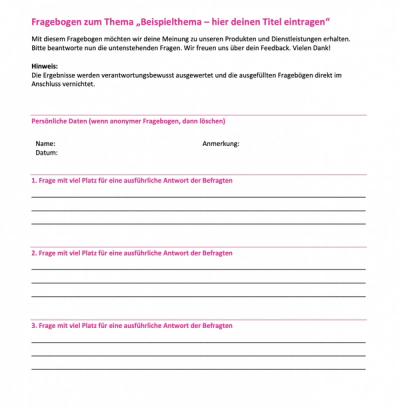
You can download the following six templates as Word files for free and edit them right away. Each one opens in Word, Pages and LibreOffice, and you do not need an account. The files are in German, so treat them as a structural blueprint: the layout, the order of the blocks and the answer scales work in any language.
The files are hosted on Online-Umfrage.org. That is a partner site that belongs to the same company as empirio.ai. Click a preview image or the link below it and the download starts.
 |
 |
 |
 |
 |
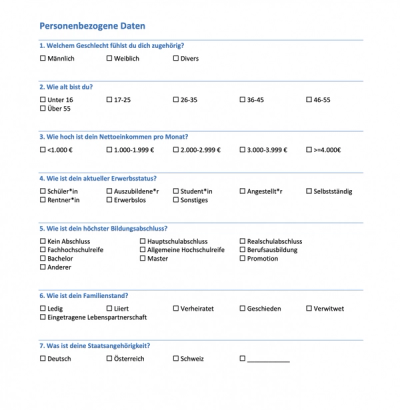 |
The demographic questions are not a questionnaire of their own. They are a building block. You attach them to the end of another questionnaire, because age and gender put people off at the start and bother almost nobody at the end.
⚠️ Careful
Demographic details can cancel out anonymity in small groups. Department plus age plus gender is often enough to trace single answers back to a person in a team of twelve. When in doubt, ask only for what you really need for the analysis.
Ready-made templates for online surveys
For the digital route you do not need a file. You need a template inside the tool. You pick a sample, adapt the questions and send out a link, and the answers flow straight into the analysis.
If you work in English, this is the better route, because you start right in the tool instead of translating a German Word file first. The advantage shows up at the latest when you start counting. Sorted by purpose, 90+ ready-made templates for online surveys are available:
- templates for employee surveys
- templates for customer feedback
- templates for market research
- templates for HR and recruiting
- templates for events
On top of those come templates for education, for forms and for a handful of special cases such as medical practices, clubs and local government. Every single one of them is listed in the overview at the end of this page.
This is what a finished survey looks like to participants if you click through an example survey.
What the digital route takes off your hands
- Answers are captured right away, with no retyping.
- Charts are created automatically from the first answer on.
- You never have to touch formatting or layout.
- The questionnaire works just as well on a phone.
- Anonymous participation can be secured technically.
Whether a survey really stays anonymous is not decided by the promise in your cover note but by the setting in the tool, and that is worth a look at the guide to running an anonymous survey.
Create a survey for free
With empirio.ai you can create a modern online survey in minutes — free to start.
- AI-built survey
- Adjust by drag & drop
- Real-time analysis
What you have to adapt in every template
A template is a starting point, not a finished questionnaire. There are three places you have to touch in every sample, otherwise every respondent notices right away that this came off the shelf.
The effort is manageable. Work through the three points and you rarely need more than half an hour, and afterwards you have a questionnaire that fits your own situation.
The introduction is yours to write
Two or three sentences are enough. Why does this survey exist, how long does it take to fill in, and what happens to the answers? Those three pieces of information decide whether somebody starts or clicks away. A template cannot supply them, because it does not know your reason for asking.
The tone has to match your organization
A stiff, formal questionnaire feels alien in a team where everybody uses first names. The other way round is even more awkward. Go through the template once from top to bottom and make the tone consistent, including the answer options and the closing text.
Cutting questions matters more than adding them
The big temptation with a finished template is to leave everything in and pack a bit more on top. Do it the other way round. Delete every question where you cannot say which decision the answer will help you make. A questionnaire with twelve carefully chosen questions beats one with forty.
All 90+ templates at a glance
The overview below lists every template the tool has ready, sorted by what you would use it for. All of them are free and none sits behind an upgrade. One click opens a template with all its questions, and you can take it over and adapt it right away.
Customer Feedback
Twelve templates for everything that happens after the purchase: satisfaction, service, recommendation and churn. Collected in one place you find them in the templates for customer feedback.
| Template | What it is good for |
|---|---|
| NPS Survey Template | Measuring willingness to recommend, with an open reason |
| Customer Satisfaction Template (CSAT) | Satisfaction at every single touchpoint |
| Product Feedback Template | Usage, satisfaction and product-market fit |
| Support Feedback Template | Feedback right after every support ticket |
| Website Feedback Template | Usability, findability and reasons for leaving |
| Cancellation Survey Template | Why customers leave and what wins them back |
| Online Shop Order Process Template | Checkout, delivery and returns from the customer side |
| Customer Effort Score Template (CES) | How effortlessly an issue got resolved |
| Restaurant and Hospitality Feedback Template | Quick feedback at the table by QR code |
| Hotel Guest Feedback Template | Check-in, room, breakfast and service after the stay |
| Customer Survey Template | The classic, with expectations, recommendation and repurchase |
| Customer Feedback Survey Template | CSAT, service quality, effort and NPS in one |
Employee Surveys
Eight templates for the mood inside your own organization, from the annual survey down to a short pulse check. The whole area sits in the templates for employee surveys.
| Template | What it is good for |
|---|---|
| Employee Satisfaction Template | The anonymous annual survey, including eNPS |
| Pulse Survey Template | Five questions for a regular mood check |
| Leadership Feedback Template | Structured feedback on a single manager |
| Onboarding Survey Template | Reviewing the first 90 days in the job |
| Exit Interview Template | Why people leave and what would have kept them |
| Remote and Hybrid Work Template | Equipment, availability and days on site |
| Psychosocial Risk Assessment Template | Assessing psychosocial working conditions systematically |
| Training Needs Assessment Template | Skill gaps and the learning formats people prefer |
Market Research
Seven templates for the questions you settle before a launch: audience, price, brand and concept. Gathered together they sit in the templates for market research.
| Template | What it is good for |
|---|---|
| Target Audience Analysis Template | The data behind sharply drawn personas |
| Willingness to Pay Template (Van Westendorp) | Finding the price your offer can carry |
| Brand Awareness Template | From spontaneous recall through to recommendation |
| Concept and Product Test Template | Testing an idea or a claim before launch |
| Competitive Comparison Template | Your brand against its rivals along the funnel |
| Advertising Effectiveness Test Template | What your campaign achieved after exposure |
| Product Test Template | Having a product judged in real use |
Education
Seventeen templates for schools, universities, daycare and further training, from the course evaluation through to the knowledge test. The complete area is listed in the templates for education.
| Template | What it is good for |
|---|---|
| Course Evaluation Template | Lecture, seminar or class at university standard |
| Classroom Feedback Template | Ten questions on the quality of your teaching |
| Parent Survey Template | School quality seen through the parents' eyes |
| School Climate and Well-Being Template | Safety, belonging and bullying, asked anonymously |
| Thesis Questionnaire Template | Scientific structure, coded for SPSS and R |
| Student Feedback on Teaching Template | Anonymous feedback along the core teaching dimensions |
| Daycare Parent Survey Template | Settling in, staff, rooms and opening hours |
| Evaluation Form Template | Universal for courses, projects and events |
| Knowledge Test Template | Checking what was learned, with five question types |
| Quiz Template | A playful knowledge quiz with a tie-breaker |
| Campus and Canteen Survey Template | Food, waiting times and places to study |
| Academic Questionnaire Template | Consent, reverse-keyed items and control questions |
| Course Rating Template | Content, pace, instruction and practical use |
| Seminar Evaluation Template | Content, facilitation, organization and transfer |
| Lecturer Evaluation Template | Expertise, method and availability, with a grade |
| Likert Scale Survey Template | Ready scales for agreement, frequency and importance |
| Teaching Evaluation Template | Classroom management, support and cognitive activation |
HR and Recruiting
Twelve templates covering the whole employee journey, from the job posting to the annual review meeting. Side by side you find them in the templates for HR and recruiting.
| Template | What it is good for |
|---|---|
| Employee Review Meeting Template | Giving the annual review a common thread |
| 180-Degree Feedback Template | Self-perception set next to the outside view |
| 270-Degree Feedback Template | Three angles on the same manager |
| 360-Degree Feedback Template | Feedback from every direction on identical blocks |
| Applicant Feedback Template | How applicants experienced your hiring process |
| Candidate Experience Template (cNPS) | The standard metric after interviews and assessments |
| Recruitment Process Template | Speed, transparency and communication when hiring |
| Interview Scorecard Template | Judging every candidate against the same criteria |
| Performance Appraisal Template | Consistent criteria plus a development plan |
| Job Ad Check Template | Whether your posting lands with its target group |
| Manager Assessment Template | Leadership behavior rated anonymously by the team |
| Employee Questionnaire Template | The all-rounder for your annual employee survey |
Events
Five templates that follow an event from the first registration to the feedback afterwards. Together they sit in the templates for events.
| Template | What it is good for |
|---|---|
| Event Registration Template | Sign-ups with only two required fields |
| Attendee Feedback Template | Program, organization, venue and an NPS question |
| Trade Show Feedback Template | Qualifying every lead from your booth |
| Webinar Feedback Template | Feedback collected right after the stream |
| Conference Program Planning Template | Which topics and formats your audience wants |
Forms
Seventeen templates for the cases where you collect data rather than opinions, from a registration form to an online election. The whole area is gathered in the templates for forms.
| Template | What it is good for |
|---|---|
| Registration Form Template | Complete sign-ups for courses and seminars |
| Job Application Form Template | Structured applications without the unlawful questions |
| Order Form Template | Taking orders without a shop system |
| Meal Order Form Template | Meal choice, portions and allergens in one place |
| Attendance List Template | Recording attendees and exporting the list |
| Guest List Template | Acceptances, extra guests, meals and rooms |
| New Employee Data Form Template | Collecting the master data of new hires digitally |
| Medical History Form Template | The medical history taken before the appointment |
| Photo Release Form Template | Consent for photos, split by intended use |
| Data Protection Consent Form Template | GDPR consent gathered for each purpose separately |
| Onboarding Checklist Template | Documenting onboarding step by step |
| Online Election Template | Anonymous votes in a club or a team |
| Feedback Form Template | Praise, criticism and suggestions in one place |
| Complaint Form Template | Recording defects and the remedy a customer wants |
| Newsletter Sign-Up Template | GDPR sign-ups with a double opt-in note |
| Contact Form Template | Inquiries with only a few required fields |
| Scheduling Poll Template | Agreeing on a date with your team fast |
More Surveys
Thirteen templates for everything that fits none of the areas above, from a medical practice to the town hall. They are collected in the templates for other surveys.
| Template | What it is good for |
|---|---|
| Patient Satisfaction Template | Appointments, waiting time, team and treatment |
| Post-Discharge Patient Survey Template | An inpatient stay from admission to discharge |
| Club Member Survey Template | Activities, dues and willingness to volunteer |
| Volunteer Survey Template | Motives, workload and the support volunteers need |
| Citizen Participation Survey Template | Residents on quality of life and transportation |
| Seminar and Training Feedback Template | Content, trainer and transfer into everyday work |
| Workshop Feedback Template | Return on time invested as the headline number |
| Trainer Evaluation Template | Four competence areas with an overall grade |
| General Feedback Form Template | The classic sheet for events, training and projects |
| Ideas and Improvement Suggestions Template | Collecting proposals, anonymously if people prefer |
| Supplier Evaluation Template | Scoring suppliers and sorting them A to C |
| Satisfaction Survey Template (General) | An importance-performance analysis from two matrices |
| Question Catalog Template | Proven questions to pick from, sorted by topic |
Conclusion
A questionnaire template does not save you the thinking, but it saves you the formatting, and that is the part that eats the most time. Take the sample that comes closest to your situation, cut boldly and write the introduction yourself. Whether you print in the end or survey online depends on one thing only: who sorts through the answers.
The best template is the one that ended up with half of it deleted.
Where to go next
- Want to build the questionnaire on solid method? How to create a questionnaire properly
- Looking for the right question format? Question types and answers at a glance
- Want to know which tool fits? The best survey tools compared
Rather go digital than retype everything?
With empirio.ai, an online survey tool made in Germany, you move one of these templates into an online survey in a few minutes and get the analysis automatically. Create a survey for free