

More often than not, the questions for your next survey have been written already. They might be in the Word file the parish council sent round for last year's residents' survey, in a PDF exported from a survey tool you've since grown tired of, or scattered across a shared document that the whole committee has been adding to for weeks. Keying every one of them in again by hand is a slog, and it uses up hours that would be far better spent on getting responses.
You import a survey into empirio.ai by clicking New survey on your dashboard, picking Import a survey and uploading your file as a PDF, DOCX, XLSX, PPTX, CSV or TXT, and the AI then reads it, spots the questions and answer options and copies them 1:1 into an online questionnaire that's ready to go.
We'll show you the situations in which an import saves the most effort, which kinds of file are accepted and which details deserve your attention when a paper form goes digital or when your survey moves house from another tool to empirio.ai.
📌 The key points at a glance
- With empirio.ai you import existing surveys and documents in a few clicks.
- Questions, answer options and scales are copied 1:1 by the AI.
- PDF, DOCX, XLSX, PPTX, CSV and TXT files work, up to 10 MB.
- Ideal when changing tool, digitising paper or reusing a committee draft.
- Check the result for five minutes, then share the link.
Create a survey for free
With empirio.ai you can create a modern online survey in minutes — with hosting in the EU.
- AI-built survey
- Adjust by drag & drop
- Real-time analysis
When should you import a survey?
An import is the quickest route whenever your questions are already on paper or on screen somewhere and you'd rather not retype or rephrase them. We see four typical cases, and there's a good chance one of them sounds familiar:
- You're moving to a new survey tool. Your survey is online already, yet your current provider has put its prices up, no longer does what you need or keeps your data outside Europe, so you download the questionnaire as a PDF or Word file and hand that file to empirio.ai.
- Colleagues have pooled their ideas. At an away day or a committee meeting, everybody's questions were collected on slides or in a shared file, and rather than copying that list across line by line you upload the file as it stands and carry on from there.
- Your questionnaire still lives on paper. Perhaps the forms are handed round at your cricket club, left on the reception desk of your GP surgery or slipped under the doors of guests at your B&B, and from now on nobody should be sitting with a pile of forms, counting ticks and typing up handwriting.
- The form has always travelled by email. Each year the parent survey for your school went out as a Word attachment and trickled back into somebody's inbox, whereas with an online survey every reply arrives in one place and you can look at the figures as soon as they come in.
Whichever of these applies to you, the process stays the same: you upload your material and our AI creates a digital questionnaire from it, leaving the wording of each question exactly as you wrote it and choosing a matching question type with the right answer options.
When another starting point works better
With no questions written yet, an import has nothing to work with, since the AI copies only what is already in your file. You'll get further with Create with AI, where a sentence or two about your plans is enough for a first draft, or by opening one of our ready-made templates. Planning a strong questionnaire from a blank page is covered step by step in our guide on how to create a questionnaire.
Which file formats can you import?
The import accepts PDF, DOCX, XLSX, PPTX, CSV and TXT files of up to 10 MB, one file per import. Clear wording helps a great deal here, because the better your questions are separated from each other, the closer the questionnaire that empirio.ai generates will be to what you had in mind.
How do I create a survey from a Word document?
Plenty of questionnaires begin life in Word, so a DOCX file is often the obvious thing to upload. You'll get the neatest result when each question has a line to itself and its answer options follow straight below it, much as they would on a printed sheet. Files in the old .doc format need saving as .docx first, which takes a moment in Word itself.
How do I create a survey from a PDF?
PDFs go straight in as well, whether that's an export from the tool you're leaving or the print version of a paper form. empirio.ai pulls the questions out of the document and turns them into an online questionnaire with its own link, so instead of gathering filled-in PDFs from everyone you simply wait for the responses to collect themselves.
How do I create a survey from an Excel spreadsheet?
An XLSX spreadsheet suits question lists, for example the question bank your HR team keeps for the annual staff survey. Keep to one question per row and put the answer options in the neighbouring columns, and the structure will be easy for the AI to follow.
How do I create a survey from a PowerPoint presentation?
When a workshop or project kick-off ended with the questions sitting on a set of slides, save the deck as PPTX and upload it as it is. The AI takes the questions off the slides and places them in your questionnaire, which spares you from pasting everything into a separate document beforehand.
How do I create a survey from a CSV or text file?
Plain formats are fine too. CSV is handy if your questions come out of another system or spreadsheet programme, while anything you scribbled in a notes app or an email can be pasted into a TXT file and uploaded without tidying up the formatting.
What the import can't handle
- Photos and screenshots of a questionnaire are images, and images aren't read by the import.
- Web addresses can't be opened by the AI, so save an online survey as a PDF instead of pasting its link.
- Files kept in online office apps have to be downloaded as DOCX, XLSX or PPTX beforehand.
- Paper forms are best imported from the original file they were printed from, assuming it still exists.
Import a survey in 3 steps
Only a handful of clicks separate your file from a working questionnaire: select the import on your dashboard, upload the document and you're given a finished survey to share immediately or polish in the editor. An empirio.ai account is the one thing you need beforehand.
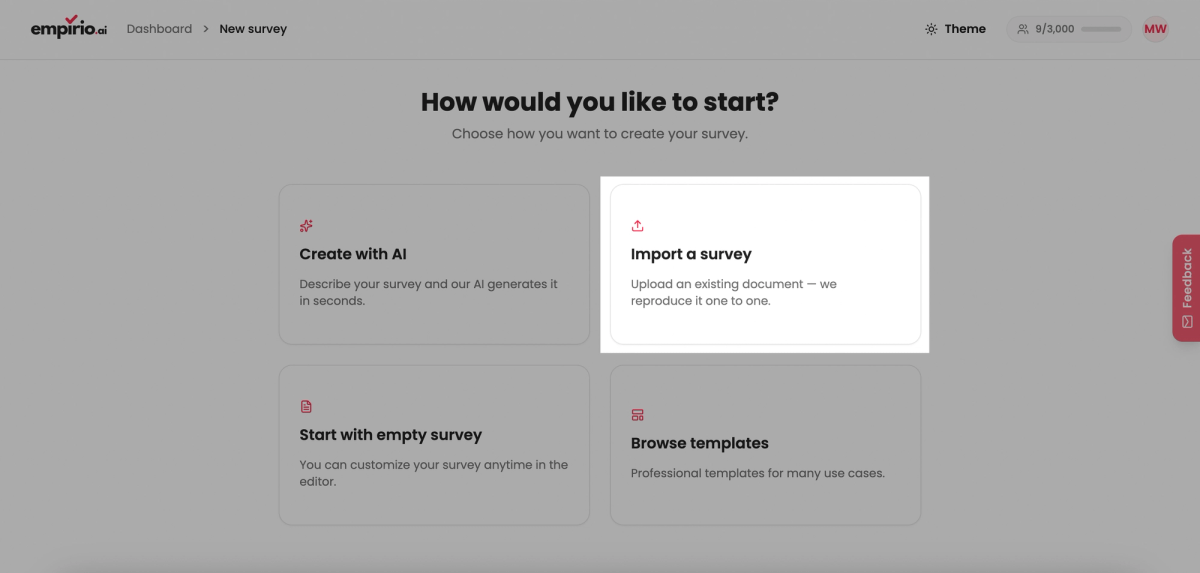
Step 1: Select "Import a survey" on your dashboard
Start with New survey on your dashboard. You'll land on a page headed How would you like to start? with four tiles, namely Create with AI, Import a survey, Start with empty survey and Browse templates, and for an import you go for Import a survey.
Step 2: Add your file and leave the rest to the AI
Drop your document onto the field labelled Drag a file here or click to choose, or click the field and browse to it on your computer, then press Create survey. From that point the AI works through your document, identifying questions, answer options and scales and assembling your questionnaire piece by piece, and the notice AI is creating your survey stays on screen until it has finished.
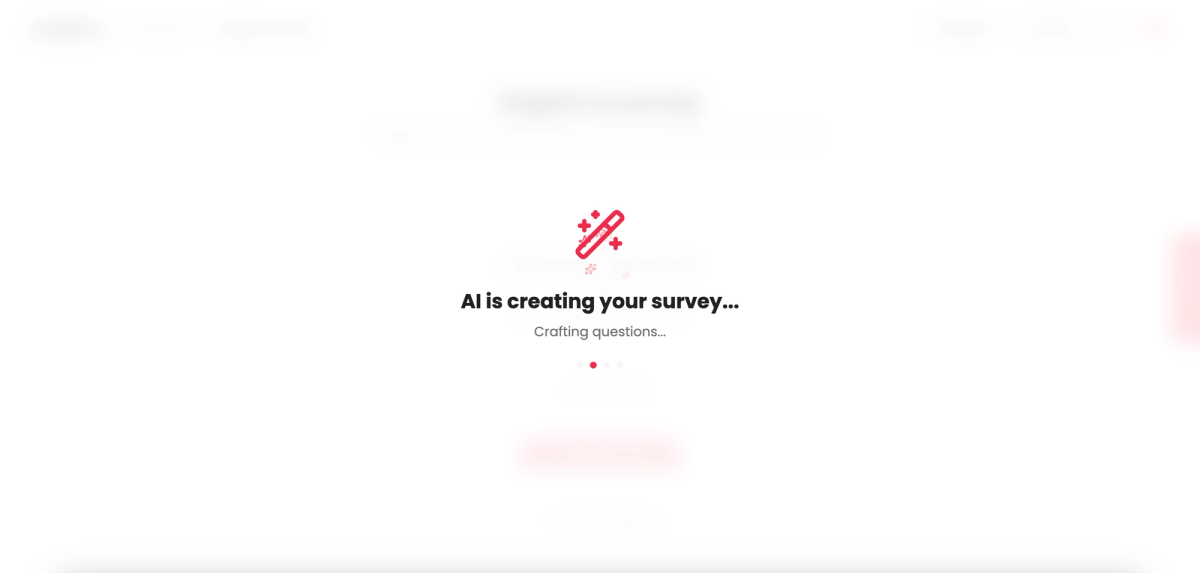
Step 3: Have a look and go live
Once the AI is done, your questionnaire is waiting for you. Send it out at once by link or with a QR code, or head into the editor to reword a question, shuffle the order, pick another question type or apply a design you like. The preview lets you see the survey through your respondents' eyes whenever you want.

Create a survey for free
With empirio.ai you can create a modern online survey in minutes — with hosting in the EU.
- AI-built survey
- Adjust by drag & drop
- Real-time analysis
Checking your imported survey before it goes out
Although the AI copies your questionnaire 1:1, it has no way of knowing every intention behind each question. A short review is therefore time well spent before anybody receives the link, and in most cases five minutes covers the following:
- Each question uses a suitable question type.
- No answer option has gone missing.
- Scale end points and labels match your original.
- Only genuinely essential questions are compulsory.
- Welcome page and end page fit the occasion.
- A trial run on your mobile goes without a hitch.
Question types are where a second glance matters most. A rating printed on paper as a row of tick boxes ought to become a proper scale online, not a multiple choice question, and our overview of question types in a questionnaire explains which type belongs with which question. Old routing notes such as "If no, go to question 7" turn into logic and branching online, available on the Lite plan and above. Setting the right tone at the start is the job of the Welcome page, and our piece on the survey welcome text offers phrases you can adapt.
Tip: get two people to try it first
Before the official launch, pass the preview link to a couple of people from your target group. Fresh eyes usually catch within minutes what you've stopped seeing after reading it three times yourself, and our tips for online surveys have more pointers like this.
Digitising a paper questionnaire: what to bear in mind
Going digital with a paper questionnaire is simplest when you start from the file the form was originally printed from. Upload it as usual and share the result as an online survey, so your questions remain as they were while filling in and counting are no longer done by hand.
Anyone planning to compare new results with previous paper rounds should leave the wording and answer scales well alone. When the Office for National Statistics prepared Census 2021, which was mostly completed online but still offered a paper form, its question and questionnaire development overview set out that questions should be designed so that people interpret and answer them consistently across all modes, and it checked whether wording, answer options and instructions differed between the versions. Because web and paper are both filled in without an interviewer, the GESIS Survey Guidelines on mixed-mode surveys also judge the risk of mode effects lower for that pairing than for any mix with interviews. They don't disappear entirely, so read a sudden jump on one question with some care.
Some elements of a paper form are still worth changing, because online they either serve no purpose or get in the way on a small screen:
- Name and signature boxes rarely belong in an online survey. For anonymous feedback, take them out and look first at what an anonymous survey needs.
- Big grids with many rows are awkward on a mobile, so break them up into several short questions.
- Filling-in instructions such as "Tick one box only" or "Use block capitals" can go altogether.
Transferring paper forms that have already been filled in
Completed forms from a round that's still under way are not brought across by the import, as it reads only the questionnaire and never the answers written on it. What you can do is type each form in afterwards via your online survey link, so that eventually all responses sit side by side in the same results. Whether going online is the right call for your project in the first place is something our article on the advantages and disadvantages of online surveys helps you weigh up.
Reaching people who aren't online
Even Census 2021 in England and Wales, where 88.9% of households responded online, kept a paper option for those who preferred it. To keep reaching the people who used to be handed a form, pin a poster with a QR code to the noticeboard or leave a few small cards at reception, and they'll get to the online survey in seconds.
Changing survey tool: taking your questionnaire with you
Moving providers is less work than many people expect, because all you carry over is a file that you upload to empirio.ai. There's no need for an export format tailored to us, as an ordinary PDF or Word document does the job, and the move goes most smoothly in four stages:
- Download the questionnaire. Save it from your current provider as a PDF or Word file, or print the preview to PDF if no export option is offered.
- Keep a copy of your results. Download the responses gathered so far as an Excel or CSV file as well, since only the questionnaire comes across in the import and your earlier answers stay behind.
- Bring it into empirio.ai. Choose New survey followed by Import a survey, add the file and give the outcome a brief once-over in the editor.
- Update every link. Put the new link wherever the old one was, from emails and your website to posters and QR codes, and close the old survey afterwards so that no more responses land there.
For a survey that comes round regularly, perhaps every spring, the gap between two rounds is the ideal moment to switch. Otherwise you risk one round's answers being split across two tools and having to stitch them together later.
Mind the data protection side
Exported responses from your old provider frequently include personal data, which falls under the UK GDPR. Store the file securely and remove the data from the old tool once it's no longer needed there, in line with the ICO's guidance on storage limitation. Our article on data protection in surveys goes into more detail on the rules, though it can't replace legal advice.
Conclusion
Questions that already exist don't need writing a second time. Hand the document to empirio.ai, let the AI create an online questionnaire from it and review it briefly before sharing. Our recommendation is to give that review five honest minutes, including a trial run on your mobile, after which your survey can quite often go live on the same day.
Where to go next
- Keen to sharpen your questionnaire? How to create a questionnaire, with practical tips
- Need responses from people offline as well? Set up a survey with a QR code
- Organising a survey for colleagues? The employee survey guide
Fancy having your questionnaire online within minutes?
Upload your document to empirio.ai and let the AI create your survey from it, free, with 100% EU hosting, AI included.