

You ask how people rated the summer fete, and a third of the answers come from people who never turned up. That is exactly what survey logic is for.
Survey logic is an if-then rule inside a questionnaire: if the answer to a question meets a set condition, the questionnaire jumps to a different question, shows or hides another question, or ends the survey early. Survey researchers call the whole arrangement routing or filtering. By the end of this article you will know which branches sharpen your data and which ones quietly distort it.
📌 The key points at a glance
- Survey logic ties a condition to an action.
- Filter questions spare people everything that does not concern them.
- Ask a follow-up after every yes and more people answer no.
- UK government guidance tells analysts to use filtering where they can.
- In empirio.ai all logic sits in the first paid plan.
Create a survey for free
With empirio.ai you can create a modern online survey in minutes — with hosting in the EU.
- AI-built survey
- Adjust by drag & drop
- Real-time analysis
What survey logic and branching mean
Branching in a survey is a rule that makes the rest of the questionnaire depend on an answer already given. One fixed order for everyone turns into several paths, and each respondent walks down exactly one of them.
Five words have grown up around this single idea, and vendor help pages use them almost interchangeably. Keep them apart once and every set of instructions becomes readable, whatever the field happens to be called.
| Term | What it means |
|---|---|
| Filter question | the question whose answer decides the route |
| Condition | the comparison that is either true or false |
| Action | what happens once the condition is met |
| Skip logic | the questionnaire jumps past a set of questions |
| Display logic | a question appears only under a condition |
Skipping and displaying sound almost identical and feel very different once you build them. A skip moves the respondent forward and passes over everything in between. Display logic leaves the order untouched and unlocks single questions for particular groups. Skip a lot and you soon lose track of your own questionnaire. Work with display logic and you stay close to the structure described in our guide to survey structure.
Logic does not change the questions. It changes who gets to see them.
Not every survey tool offers the same logic
Logic is not simply logic: how finely you can branch depends on the tool, and often on the plan you pay for. Design a questionnaire around a branch first and check what the tool allows afterwards, and you will build it twice.
The widest gap runs between form builders and dedicated survey tools. Even among the dedicated ones the distances are considerable, because many vendors spread their logic across several price tiers. Three examples show the range (as of September 2026).
- Google Forms: jumps go to whole sections, meaning complete pages, and only from multiple choice or dropdown questions. Showing or hiding a single question is not part of the design, so a questionnaire built there has to be planned in blocks rather than in individual questions.
- SurveyMonkey: limited logic starts with the Standard plan, a few more rules arrive with Extra, and the full set only comes with Premium, which is sold as an annual package. Every criterion side by side sits in our comparison of SurveyMonkey and empirio.ai.
- empirio.ai: all logic is included in the Lite plan, the first paid tier. There is no second step that unlocks more. Complete filtering therefore sits one price tier below SurveyMonkey's limited version.
For planning purposes that boils down to a single question: does your tool jump to individual questions or only to whole pages? If it only handles pages, think of the questionnaire in blocks rather than single questions, and give every block a fixed destination at its end.
When branching is worth it
Branching pays off whenever a question can only be answered by part of your sample. Everyone else guesses, and a guess looks exactly like a considered answer once it lands in the dataset.
Official UK practice says the same thing in plainer words. The questionnaire design guidance published by the Government Analysis Function and owned by the ONS Data Quality Hub tells analysts to use filtering where they can, and gives the reason in its own example: someone born in the UK should not be asked the follow-up questions written for people born overseas. The same guidance treats filtering as something to test during piloting, alongside format and length, rather than something to fix after launch.
Three situations come up again and again.
- Only part of the invited group is affected. After the summer fete, questions about the programme go only to those who were there.
- The detailed question hangs off a basic one. Anyone who says they cancelled their membership gets the question about why. Nobody else ever sees it.
- A group needs to be screened out. In a dissertation with a narrow target group, the first question ends the survey for everyone outside it.
The counterweight belongs here too: every branch is a path you have to build, test and eventually analyse. Three well-considered rules do more for you than twelve that get in each other's way.
One consequence is easy to miss. The tighter you filter, the smaller the group that sees a given question. If only a handful of people end up in one branch, an answer becomes traceable to a person even without a name field. Our article on the anonymous survey covers what to watch for.
If and then: how every rule is built
Every logic rule is made of two halves: a condition that inspects an answer already given, and an action that follows from it. Keep those halves apart in your head and even a heavily nested set of filters stays manageable.
Both halves sit next to each other in every survey tool, only the labels change. Once you know what belongs in which field, you can find your way around any editor.
The condition: what a rule looks at
A condition is a comparison with exactly two possible outcomes, true or false. Which comparisons are available depends on the question type: a choice question allows different ones from a number field. Five of them cover practically everything that appears in a questionnaire.
| Condition | What it checks |
|---|---|
| is | the answer matches exactly one given value |
| is not | the answer does not match that value |
| contains | the selection or the text includes a term |
| is greater than | the number sits above a threshold |
| is less than | the number sits below a threshold |
The action: what a rule triggers
An action is the second half of the rule, the part that happens once the condition is met. Four of them are enough for almost any questionnaire, and they differ mainly in how much the respondent notices.
- Jump to question: the questionnaire moves straight on and leaves out everything in between.
- Show question: an otherwise hidden question appears because the condition is met.
- Hide question: a question disappears for this one person.
- End survey: the interview finishes early and the remaining questions never appear.
Jumping and hiding often reach the same outcome, and the choice still matters. A jump reads well as long as it points forward and the order of questions is settled. As soon as you add or move a question later, a jump target easily points at the wrong place. Showing and hiding are attached to the individual question and travel with it.
💡 Tip
Write the rules out one sentence per line before you build them: “If question 2 is No, jump to question 8.” Anything that cannot be phrased that way is usually not a rule but a question that still needs splitting.
Create a survey for free
With empirio.ai you can create a modern online survey in minutes — with hosting in the EU.
- AI-built survey
- Adjust by drag & drop
- Real-time analysis
Setting up survey logic and branching in empirio.ai
In empirio.ai, an online survey tool from Germany, branches are created in the Logic area without rebuilding the questionnaire around them. The questions stay in their order and the rules sit underneath as a separate layer.
The routine repeats for every rule: pick the question to be inspected, set the condition, choose what should happen. The rule then appears in a list and stays editable or removable at any point. Logic jumps belong to the Lite plan and are therefore complete from the first paid tier onwards: every condition, every action, no more expensive step for the harder rules (as of September 2026).
Step 1: Create the first rule
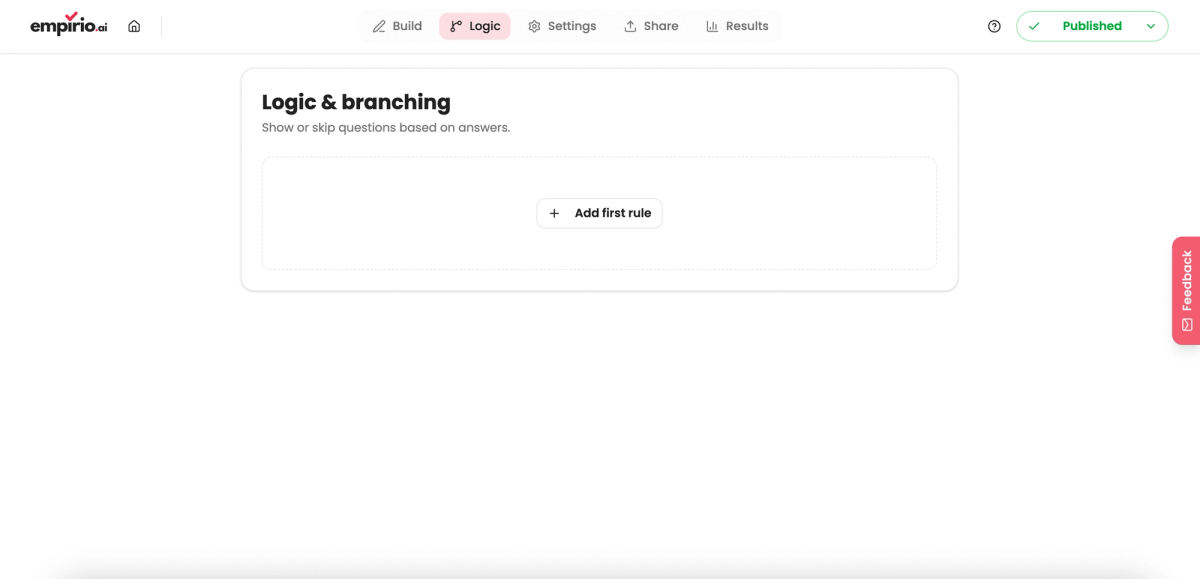
While no rule exists, the Logic area is empty and shows nothing but the button to add one. A single click creates the first, still empty rule. The whole structure is visible immediately: the question being inspected, the condition and the action. Those three fields are what you fill in next.
Step 2: Choose the condition and the action
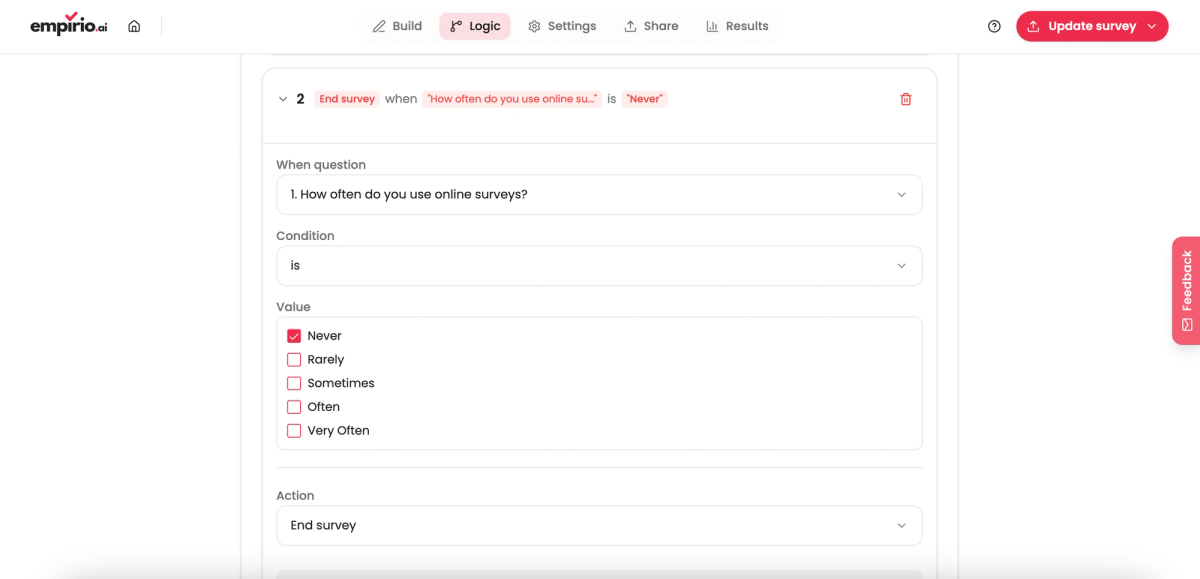
A finished rule comes together from two halves. First you select the question, then the comparison, meaning is, is not, contains, is greater than or is less than, and finally the value it is compared against. The action follows: jump to a question, show a question, hide a question or end the survey.
Step 3: Check the rules and update the survey
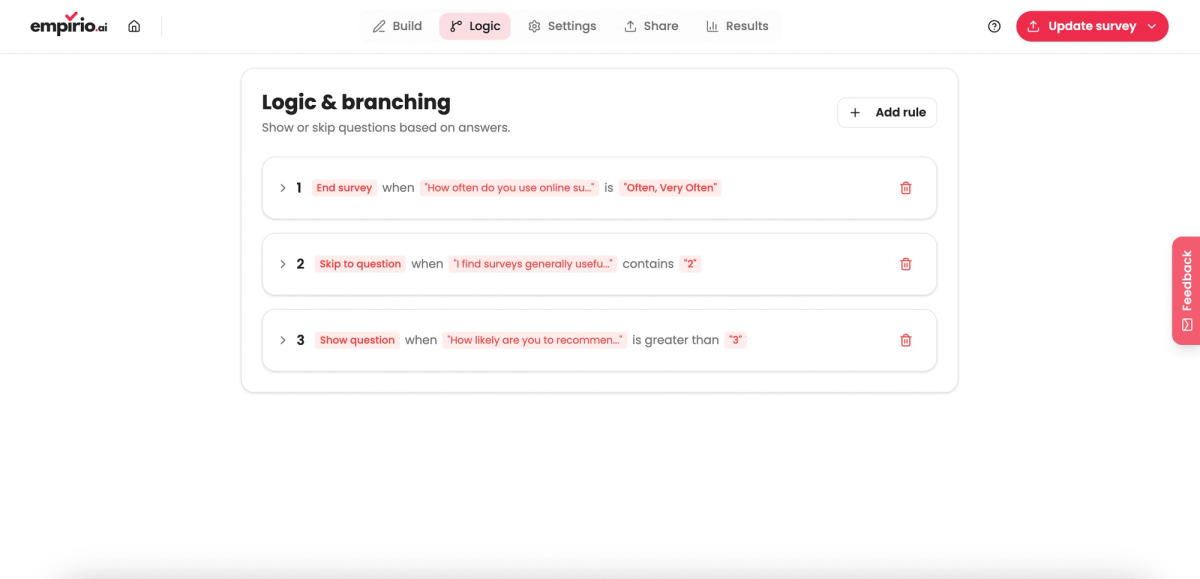
Once every rule is in place, they appear beneath one another in an overview. Read them top to bottom and watch for two rules that treat the same question in opposite ways. Any line can be reopened, changed or removed afterwards, even while the survey is already collecting answers.
One step is routinely overlooked when logic is set up, and it costs real responses. The rules are stored in the editor as soon as you save, but that alone does not put them into the published survey.
⚠️ Careful
New and edited rules only reach a running survey once you update the survey. Forget that step and you keep collecting answers under the old rules, and you will not notice until you analyse them.
The honest limit: the free plan in empirio.ai has no logic jumps at all (as of September 2026). A short survey without branches runs fine on the free plan, but the moment you want to filter you need Lite.
Test your branches before the survey starts
You test a branch by clicking through every path yourself, not by reading the rules in the overview. On paper nearly every rule looks right, and the faults only surface in a live run.
The reason lies in the order of evaluation: the questionnaire works through the rules one after another, and two rules that are each correct on their own can cancel out together. Budget two run-throughs per path and plan that time in advance rather than repairing a live survey later. If your study runs in several languages, every language version gets its own run-through, as described in our guide to the multilingual survey.
The test run in six points
- Every path has been clicked through from start to finish.
- The route where everything is answered no ends cleanly.
- No question appears twice on any one path.
- No mandatory question sits inside a skipped section.
- The preview link shows the same order as the editor.
- The survey has been updated since the last change.
The mandatory question inside a skipped section is the costliest of those six. A hidden mandatory question can block the next button with nothing on screen to explain why. What breaks is not the questionnaire as a whole but precisely the one path nobody took during a quick check.
Common mistakes with branching
The most common mistake with branching is not the badly built rule, it is the rule too many. A questionnaire carrying fifteen conditions does not measure more precisely, it becomes a construction nobody can survey.
Four mistakes turn up especially often. Three of them show up during testing at the latest, the first one only becomes visible in the data.
Too many filter questions in a row
Follow every yes with an immediate set of questions and part of your sample starts answering no. Stephanie Eckman and her research team (2014) examined the effect in Public Opinion Quarterly and matched the answers against administrative records. In the interleafed version, where each filter question drags its follow-ups along immediately, fewer affirmative answers appear than in the grouped version, where all filter questions come first and the follow-ups afterwards. The grouped version produced the more accurate answers. The team also records that the effect does not occur in every survey. In practice: with several filter questions on the same topic, ask all the filters first and the follow-ups after.
The dead end nobody escapes
A jump points at a question that is itself hidden, or a path ends without completing the survey. The people affected cannot go on and abandon the survey, and it is precisely that group missing from your analysis. Dead ends nearly always appear after the fact, when a question a rule still points to has been deleted or moved.
Changing the logic while the survey is live
Rebuild the filtering after fifty responses and you end up with two datasets in one table. The first fifty people saw a different questionnaire from everyone after them, and the two groups are only comparable up to a point. If a change cannot be avoided, record the date it takes effect and split the analysis there.
The filter question itself is vague
A filter question decides the route, so it has to be clearer than any other question. Imprecise time references such as “recently” or “often” mean different things to different people: some think of the past few days, others of the past few months. In an ordinary question that costs accuracy, in a filter question it sends people down the wrong path. Filtering also only works with a closed question, as our comparison of open and closed questions explains.
Conclusion
Survey logic is not a convenience for advanced users, it is data quality. Ask only the people who genuinely have something to say on a topic and you collect fewer answers and considerably better ones. The price is a set of paths that want testing, and the realisation that three well-considered branches are worth more than twelve spontaneous ones.
Where to go next
- Looking for the right question type to filter on? Question types in a questionnaire
- The answers are in? Analysing a questionnaire in five steps
- Want to share the survey by code? Creating a survey with a QR code
- Should the survey live on your site? Embedding a survey in a website
- Want to get the rest right too? Tips for better online surveys
Show each person only the questions that fit?
Build your branches in the empirio.ai editor and change them as often as you like. Create a survey online