

A dozen people, three possible Friday evenings and one question dropped into the group chat: “Who's free when?” By Sunday there are 40 replies, three people haven't said a word and nobody can remember which Friday was actually ahead.
A scheduling poll handles the same job in a very different way. You send round a single link, everyone ticks the times that work for them, and a day later you can see at a glance which slot suits most people. The back-and-forth in the chat simply stops.
To create a scheduling poll, you add several date and time options in a survey tool, share the link with everyone involved and ask each person to mark every time they can make. You then choose the slot that works for the most people, as long as everyone who really has to be there is among them.
We'll show you how to set one up in 3 steps and how to pick the best date afterwards. With empirio.ai it costs nothing, and there are dedicated question types both for agreeing on a shared date and for letting people book individual appointments.
📌 The key points at a glance
- A scheduling poll saves endless back-and-forth in the group chat.
- Three to five date options are plenty for most groups.
- A clear deadline gets everyone to vote in good time.
- empirio.ai has dedicated question types for date polls and bookings.
- With empirio.ai, you create your scheduling poll for free.
Create a survey for free
With empirio.ai you can create a modern online survey in minutes — with hosting in the EU.
- AI-built survey
- Adjust by drag & drop
- Real-time analysis
What is a scheduling poll?
A sheet of paper on the club noticeboard, with five dates across the top and names down the side, is the old-fashioned version of the same idea. A scheduling poll is an online survey in which several people look at a set of proposed dates and mark every one they can attend. Their answers reveal the date that suits the largest number of people.
What sets it apart from an ordinary survey is the question itself. You're asking about availability rather than opinions, and instead of percentages you finish with an overview showing, for each option, how many people are free. Because you usually want to know exactly who can come as well, a scheduling poll is almost never an anonymous survey.
Quite a few related terms float around the topic, and they don't all mean the same thing. Here's how they fit together:
| Term | What it means | Typical example |
|---|---|---|
| Scheduling poll | the tool: a survey listing possible dates | a link with five possible evenings |
| Meeting poll or date poll | the process of everyone voting on dates | parish council choosing its meeting night |
| Finding a date | the goal: one date that works for everyone | running club's annual dinner |
| Scheduling | organising dates and appointments as a whole | the council's meeting calendar for the year |
| Meeting scheduler | a tool or diary for planning appointments | online booking page, pocket diary |
In practice, you don't need a full meeting scheduler with calendars and reminders just to agree on one date. A scheduling poll covers that perfectly well.
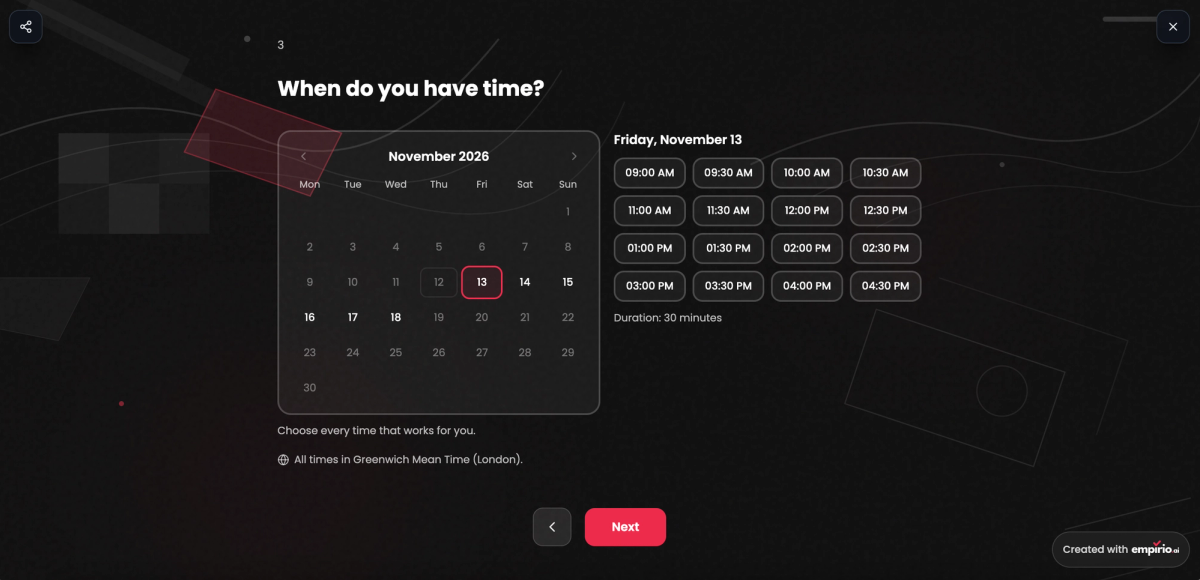
Here's how a scheduling poll looks to the people taking part: they pick a day in the calendar and then click every time they can make.
Scheduling poll or appointment booking: which one do you need?
A parish council of nine wants an evening when every councillor can come to the next meeting. Mr Hughes, a Year 4 teacher, needs something else entirely for parents' evening: 24 separate ten-minute chats, with each family choosing its own slot.
Both are part of scheduling, yet they follow completely different logic. In the first case a group is hunting for one date together, in the second a group spreads itself across lots of individual appointments. So before you set up your survey, it pays to know which of the two you're after.
Scheduling poll: everyone looks for one shared date
In a scheduling poll you suggest several times and each person marks all the ones that suit them. Several people can pick the same time, which is exactly the point. The option with the most yeses wins. Typical uses include committee meetings, team catch-ups, school reunions, a meal out with friends or the office Christmas do.
Appointment booking: each person books their own slot
With appointment booking you lay out free slots and each person books exactly one. Once a slot has gone, nobody else can choose it. That suits drop-in surgeries, parents' evenings, advice sessions or workshops with limited places. For a workshop with eight places, the same slot takes several bookings until it's full.
How to create a scheduling poll in 3 steps
Gemma is organising the annual dinner for her running club. Twelve members are invited, three weekends in March are possible and the club's two joint chairs have to be there whatever happens. A situation like hers shows quickly what makes a scheduling poll work.
The three steps build on one another. Most problems start right at the beginning, because badly chosen options are very hard to rescue later on.
1. Decide on your date options
Before setting anything up, answer three questions: how long will it last, over what period should it happen and who absolutely has to be there? Your options follow from those answers. Three to five dates are plenty for most groups. More choice sounds generous, but it spreads the votes so thinly that no date ends up clearly in front. It's worth checking beforehand with the people you can't do without whether the options are even possible for them.
2. Set up the poll and ask for names
In your survey tool, enter each option with a day and a time. One setting is easy to overlook: allow multiple answers, so people mark every date that works rather than just their favourite. Put a short question asking for a first name in front of it as well. Otherwise you'll know that seven people can do the Saturday, but not whether both chairs are among them. A line about the occasion, venue and length in your survey welcome text saves a round of questions later.
Tip
Suggest specific times rather than whole days. “Saturday” means the morning to one person and the evening to another. List “Saturday, 3pm” and “Saturday, 7pm” as separate options and you'll know exactly what everyone signed up for.
3. Share the link and set a deadline
Post the link wherever your group already chats, whether that's a WhatsApp survey in the club group, an email or the monthly newsletter. For a notice in the clubhouse or the staffroom, print the link as a QR code. Add a deadline straight away, such as “please vote by Friday”, and nudge anyone who's still missing the day before.
Finding the best date: how to analyse your scheduling poll
By Friday evening, ten of Gemma's twelve runners have replied. Saturday 13 March has eight yeses, Saturday 20 March only seven. Gemma still goes for the 20th, because one of the two chairs can't make the 13th. The highest count doesn't always settle it on its own.
Work through the results in this order and you'll usually have the best date within a few minutes:
- Key people first: Cross off every date when someone is missing without whom the meeting makes no sense.
- Then the majority: From the dates that remain, take the one with the most yeses.
- Run a decider if it's a tie: If two dates are level, send a quick second round with just those two. If you're all in the same room anyway, a live poll breaks the tie in a minute.
- Announce it quickly: Share the date the same day if you can and follow up with a calendar invitation, so nobody books something else for that evening.
If one reply is still outstanding after the deadline, waiting around rarely pays off. Ask that person directly whether either of the two front-runners works for them, then make your decision.
Create a survey for free
With empirio.ai you can create a modern online survey in minutes — with hosting in the EU.
- AI-built survey
- Adjust by drag & drop
- Real-time analysis
Creating a free scheduling poll with empirio.ai
Gemma needs one date for twelve runners, Mr Hughes needs 24 separate slots for parents' evening, and with empirio.ai both start the same way: you drop a scheduling question into the editor like any other question. Participants get a calendar, choose a day and click the times that suit them, without creating an account.
The scheduling question comes in two versions. With the Scheduling poll, everyone marks the times they can make, and the shared date emerges from that. With Appointment booking, each person secures a slot of their own, for a parents' evening chat or a drop-in surgery, for instance. You'll find both in the Choose question type window under Text & Input, and both are included in the free plan.
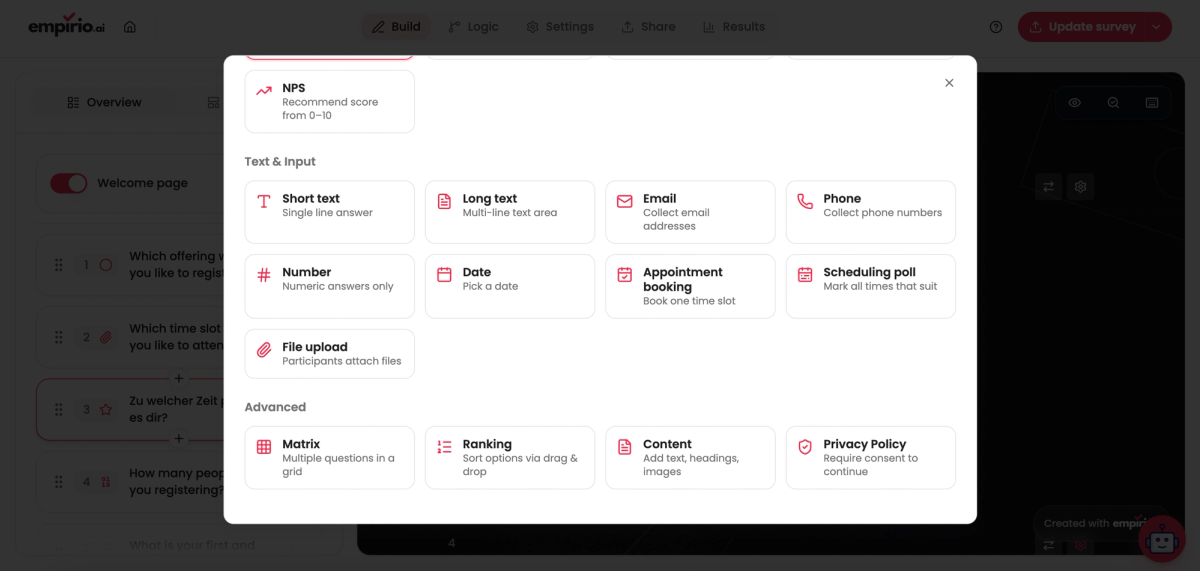
The settings for a scheduling question
Once the question sits in your questionnaire, the Question settings decide how it behaves and which times are on offer. Most options apply to both versions, while Several times can be chosen only exists for the scheduling poll:
- Required question: the survey can't be sent off until a time has been picked.
- Show subtitle: adds a line of small print under the question, handy for the venue or running time.
- Several times can be chosen: lets people tick all their free slots instead of a single favourite.
- Choice: Day and time when the hour matters, or Day only for full-day events such as a club trip to the coast.
- Slot length: from 10 minutes up to an hour per slot. Pick 30 minutes and the slots begin at 9:00, 9:30, 10:00 and so on.
- Weekdays and Times: choose which days of the week are open and give one or more time ranges, perhaps 9am to 12pm plus 2pm to 5pm. Add time range gives you another.
- Period: Rolling for something like the coming 4 weeks, or Fixed period with a start and end day.
- Excluded days: block out bank holidays, half-term or your own fortnight in Cornwall so nobody can pick them.
- Time zone: all times are shown in this zone, for example Europe/London. New questions take it over from your browser automatically.
Scheduling poll: everyone marks when they're free
Each participant ticks every time they can make. Your results then put a count beside each time, such as 8 of 10, and Best times lists the options with the most yeses first. Click a field and empirio.ai tells you exactly who is free at that moment.
Appointment booking: each person claims a slot
Appointment booking revolves around People per time, the number of bookings each slot can take. Set it to 1 and the slot vanishes after a single booking, or raise it to eight places for a workshop. Notice rules out bookings at the last minute, for instance by asking for at least a day's warning. To stop two people grabbing the same time, empirio.ai holds a slot briefly while someone is mid-booking. All bookings then land in an overview that shows the Next appointment, and All as calendar file (.ics) downloads them in one go.
Need a name, email address or dietary requirements alongside the slot? Combine appointment booking with other fields to make an online form, for course sign-ups, say. The free plan covers up to 50 participants a month, and bigger groups can move to a paid plan, starting with Lite at €19 a month.
Common mistakes when finding a date
Twelve options, one answer allowed and no deadline: a poll set up like that usually ends with everyone back in the chat by Wednesday. When a scheduling poll falls flat, the tool is rarely to blame. More often it's a few small choices made during setup. These five mistakes come up most:
- Too many options: twelve dates spread the votes so widely that none stands out. Three to five is enough.
- Only one answer allowed: if everyone can choose just one date, you see favourites instead of real availability.
- No names collected: without a name field you can't tell whether the key people are coming.
- No deadline: without a closing date, replies trickle in for weeks while the event creeps ever closer.
- Result never announced: people who voted and then hear nothing will fill that evening with something else.
Teams spread across several countries add a sixth mistake, and a particularly annoying one, because nobody notices until someone is sitting alone on a video call an hour early.
Watch out for time zones
Write “3pm” in your poll and a colleague in Berlin will read it as 3pm her time and turn up an hour early. So set the time zone explicitly and mention it in the question text. With empirio.ai you set it directly on the question, and every participant sees the times in that zone.
Data protection: what to bear in mind when you collect names
A first name like “Priya” tells a stranger very little, but on a parish council of nine it points to exactly one person. As soon as you ask for names, you're processing personal data. Article 4(1) of the UK GDPR covers any information relating to an identified or identifiable person, and the ICO guide What is personal information explains that whether a name identifies someone depends on the context. For a scheduling poll at a club, a school or work, that's no problem as long as you stick to a few simple rules:
- Ask only for a first name, and leave out the email address if you don't need it.
- Say briefly in the welcome text what the names are for.
- Delete the poll once the date is fixed or the event has taken place.
- Use a tool that stores the data in the EU.
When a club or a business runs the poll, you'll also need a data processing agreement with the tool provider. With empirio.ai you can download it on the free plan, and the data sits on servers in the EU.
Conclusion
Compared with endless back-and-forth in the group chat, a well-prepared scheduling poll gets you a date in a day or two: a few clear options with times, names collected, multiple answers allowed and a firm deadline. When the results come in, check the key people first and the majority second. If you need lots of individual conversations rather than one shared date, appointment booking is the better fit.
Where to go next
- Looking for other occasions to run a survey? What you can use surveys for
- Want to show follow-up questions only to certain people? Logic and branching in surveys
- Curious which other question types there are? Question types in a questionnaire
- Wondering what works without an account? Create a survey without signing up
Want a scheduling poll ready in a few minutes?
With empirio.ai you set up scheduling polls and appointment bookings for free, and your participants don't need an account.