

Twelve people, three evenings that might work and one harmless question in the group text: “When is everybody free?” Forty-eight hours later you’re scrolling through 40 messages, three people never answered and nobody remembers which evening was ahead.
A scheduling poll turns that same back-and-forth into a single link. Everyone checks the times that work for them, and a day later you can see at a glance which option suits the most people. Finding a time stops being a group chat marathon.
To create a scheduling poll, you set up several date and time options in a survey tool, send the link to everyone involved and let each person mark every slot they can make. Then you pick the option that works for the most people, including everyone who has to be there.
We show you how to set up your scheduling poll in 3 steps and how to choose the best date afterward. With empirio.ai it’s free, and you get dedicated question types both for finding one shared time and for letting people book individual appointments.
📌 The key points at a glance
- A scheduling poll replaces endless back-and-forth in the group text.
- Three to five date options are enough for most groups.
- A clear deadline gets everyone to vote on time.
- empirio.ai has question types for scheduling polls and appointment booking.
- With empirio.ai, you create your scheduling poll for free.
Create a survey for free
With empirio.ai you can create a modern online survey in minutes — free to start.
- AI-built survey
- Adjust by drag & drop
- Real-time analysis
What is a scheduling poll?
A regular survey asks people what they think. A scheduling poll asks them when they’re free. Put more formally, it’s an online survey in which a group looks at several proposed dates and times and marks every option they can make, so the answers reveal the time that works for the most people.
Instead of percentages, you end up with an overview showing how many people can make each option. And because you usually want to know exactly who’s available, a scheduling poll is almost never an anonymous survey.
You’ll run into a handful of related terms that sound alike but mean slightly different things. Here’s how they fit together:
| Term | What it means | Typical example |
|---|---|---|
| Scheduling poll | the tool: a survey with proposed dates and times | a link with five possible evenings |
| Group scheduling | the process of everyone voting on dates | the HOA board picking its meeting night |
| Finding a time | the goal: one date that works for everybody | the book club’s annual dinner |
| Scheduling | organizing appointments and events in general | the board’s meeting calendar for the year |
| Scheduler | a tool or calendar for planning appointments | an online scheduler, a paper planner |
The upshot for you: if all you need is one shared date, you don’t need a full scheduler with calendar sync and reminders. A scheduling poll does the job.
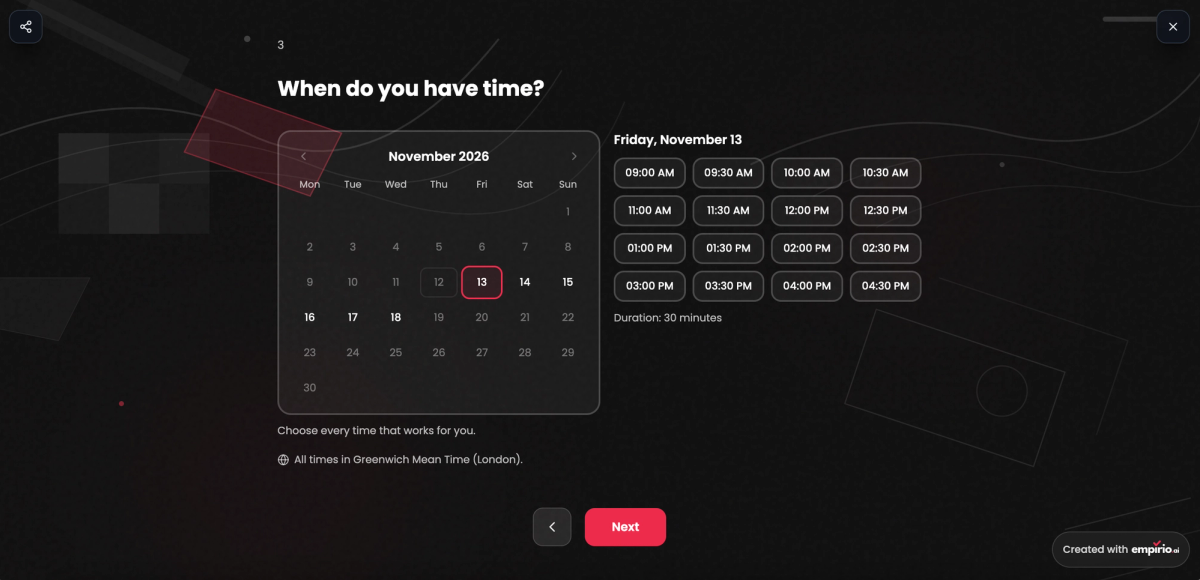
Here’s what your participants see. They pick a day in the calendar and then click every time slot that works for them.
Scheduling poll or appointment booking: which one do you need?
The HOA board needs one evening when all nine members can make it to the quarterly meeting. Ms. Alvarez, who teaches third grade, needs something else entirely for parent-teacher conferences: 24 separate ten-minute slots, with every family picking its own.
Both count as scheduling, but they follow opposite logic. In the first case, a group looks for one time together. In the second, a group spreads out across many individual times. So before you set anything up, figure out which kind you’re dealing with.
Scheduling poll: everyone looks for one shared time
In a scheduling poll, you propose several times and each person marks all the ones that work. Several people can and should pick the same time, since overlap is the whole point. The option with the most yeses wins. Typical uses are board meetings, team check-ins, high school reunions, dinner with friends or the office holiday party.
Appointment booking: everyone grabs a time of their own
With appointment booking, you set up open time slots and each person books exactly one. Once a slot is taken, nobody else can choose it. It’s the right fit for office hours, parent-teacher conferences, consultations or workshops with limited seats. For a workshop with eight seats, the same slot keeps taking bookings until it’s full.
How to create a scheduling poll in 3 steps
Keisha is planning the annual dinner for her book club. Twelve members are invited, three weekends in April are in play and the club’s two co-founders absolutely have to be there. Cases like hers show what separates a good scheduling poll from one that ends in yet another round of texts.
The three steps build on each other. Most problems start in step one: if the options are poorly chosen, there’s little you can do to fix it later.
1. Pick your date options
Before you create anything, settle three questions. How long will it last, in what window should it happen and who can’t be missing? Your options follow from the answers. Three to five dates are plenty for most groups. More choice sounds generous, but it splits the votes so thinly that no option clearly comes out on top. If certain people are essential, check with them first that your options are even possible for them.
2. Set up the survey and ask for names
In your survey tool, enter the options with day and time. One setting often gets missed: allow multiple answers so people mark every date that works and not just their favorite. Also add a short question asking for first names up front. Otherwise you’ll know that seven people can do Saturday, but not whether both co-founders are among them. One sentence about the occasion, place and length in your survey welcome text saves you a pile of follow-up questions.
Tip
Suggest specific times rather than whole days. To one person “Saturday” means brunch, to another it means 7 p.m. With “Saturday, 3 p.m.” and “Saturday, 7 p.m.” as separate options, you know exactly what everyone agreed to.
3. Share the link and set a deadline
Send the link wherever your group already talks, whether that’s the group text, email or the club newsletter. If your members chat on WhatsApp, a survey link in WhatsApp works just as well. For the bulletin board at the community center or in the teachers’ lounge, print the link as a QR code. Name a deadline right away, like “please vote by Friday,” and nudge anyone who’s still missing the day before.
Finding the best date: how to read your scheduling poll results
By Friday evening, ten of Keisha’s twelve members have voted. April 10 has eight yeses, April 17 only seven. She still goes with the 17th, because one of the two co-founders can’t make the 10th. The highest count doesn’t always settle it.
Check your results in this order and you’ll usually have the best date within a few minutes:
- Key people first: Cross off every date where someone is missing without whom the get-together makes no sense.
- Then the majority: Of the dates left, take the one with the most yeses.
- Break ties with a quick runoff: If two dates are neck and neck, run a short second round with just those two. If you’re all in the same room anyway, a live poll settles the tie in a minute.
- Announce it fast: Share the date the same day if you can and follow up with a calendar invite so nobody makes other plans.
If someone still hasn’t answered after the deadline, waiting around rarely pays off. Ask them directly whether one of the top two dates works for them, then decide.
Create a survey for free
With empirio.ai you can create a modern online survey in minutes — free to start.
- AI-built survey
- Adjust by drag & drop
- Real-time analysis
Create a free scheduling poll with empirio.ai
Whether you’re Keisha looking for one shared evening or Ms. Alvarez handing out conference slots, with empirio.ai you add a scheduling question in the editor just like any other question. Your participants see a calendar, pick a day and click the times that work. Nobody needs an account to vote.
The scheduling question comes in two versions. With Scheduling poll, everyone marks the times they can make, and the shared date emerges from that. With Appointment booking, each person secures a slot of their own, say for a parent-teacher conference or office hours. You’ll find both in the Choose question type dialog under Text & Input, and both are included in the free plan.
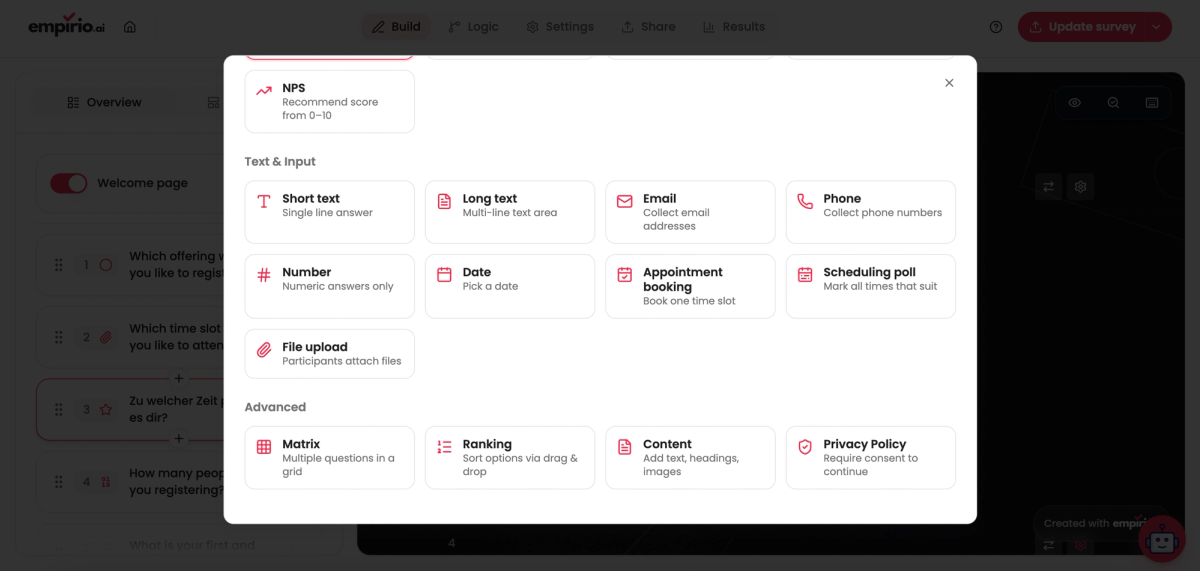
Settings for the scheduling question
Once the question sits in your questionnaire, the Question settings control how it behaves and which times are on offer. Most options apply to both versions, while Several times can be chosen only exists for the scheduling poll:
- Required question: nobody can submit the survey without choosing a time.
- Show subtitle: a short note appears under the question, for example the location or how long the meeting runs.
- Several times can be chosen: people mark every time they’re available, not just their favorite.
- Choice: Day and time for meetings at a set hour, or Day only when whole days are at stake, like a club outing.
- Slot length: how long each slot runs, from 10 minutes up to an hour. At 30 minutes, slots start at 9:00, 9:30 and 10:00 a.m.
- Weekdays and Times: pick the days of the week and set one or more time ranges, such as 9 a.m. to noon and 2 to 5 p.m. Further ranges go in with Add time range.
- Period: Rolling, for example the next 4 weeks, or a Fixed period with a first and last day.
- Excluded days: block federal holidays like Memorial Day or Thanksgiving plus your own vacation, and nobody can pick a time on those days.
- Time zone: everyone sees the times in this time zone, for example America/New_York. A new question picks it up from your browser automatically.
Scheduling poll results: who can make it when
One Thursday slot shows 8 of 10, and the rest trail behind. In a scheduling poll, each person marks every time they’re free, and the results show for each slot how many people can make it. Under Best times, the options with the most yeses sit at the top. Click any cell and empirio.ai shows you who’s available at that time.
Appointment booking: everyone claims a slot
Ms. Alvarez sets People per time to 1, so each conference slot disappears after the first booking. For a workshop, you’d set eight seats instead. With Notice you stop last-minute bookings, for example by requiring at least one day’s notice. While someone is booking, empirio.ai briefly holds the chosen slot so it can’t be taken twice. Afterward, all bookings appear in an overview with the Next appointment, and you download them via All as calendar file (.ics).
Need a name, email address or meal preference along with the time? Combine appointment booking with extra fields to create an online form, for example for class or workshop sign-ups. The free plan covers up to 50 participants a month, and paid plans for bigger groups start at €19 a month.
Common mistakes when finding a time
The HOA board’s first poll offered 14 dates, let each member pick only one and had no deadline. Three weeks later the meeting still wasn’t on the calendar. When a scheduling poll falls flat, the tool is rarely the problem. Small choices during setup are what send everyone back to the group text, and these five come up most often:
- Too many options: A dozen dates spread the votes so wide that none stands out. Three to five are enough.
- Only one answer allowed: If people can choose just one date, you see favorites instead of real availability.
- No names collected: Without a name field, you can’t tell whether the key people are in.
- No deadline: Without an end date, answers trickle in for weeks while the event creeps closer.
- Result never announced: People who voted and then hear nothing make other plans for that evening.
Teams spread across several time zones run into a sixth mistake, and it’s a sneaky one, because nobody notices until someone joins the video call two hours early.
Watch the time zone
Write “3 p.m.” in a poll you set up in Denver, and a colleague in New York reads 3 p.m. Eastern, two hours before you’re actually online. Set the time zone explicitly and mention it in the question text. With empirio.ai, you set it right on the question, and all participants see the times in that time zone.
Privacy: what to keep in mind when you ask for names
A first name like “Linda” hardly feels like personal data. On a nine-member HOA board, though, it points to exactly one neighbor, and the poll also shows which evenings she’s free. As a US group, you generally don’t have to deal with Europe’s GDPR, but the basics of handling personal information still apply. The Federal Trade Commission sums them up in its guide Protecting Personal Information with principles like “Keep only what you need” and “Properly dispose of what you no longer need.” The guide is written for businesses, yet it translates neatly into a checklist for your scheduling poll:
- Ask for first names only, and skip email addresses unless you actually need them.
- Tell people in your welcome text why you’re asking for names.
- Delete the poll once the date is set or the event has happened.
- Choose a tool that’s upfront about where your data is stored.
If an HOA, a nonprofit or a company runs the poll, a data processing agreement with the tool provider spells out who handles the data and how. With empirio.ai, you download the DPA on the free plan, and all data is stored on servers in the EU.
The bottom line
Forty texts in a group thread or one link with a few options: a scheduling poll spares you the endless back-and-forth, as long as you prepare it well. Offer a few clear options with times, collect names, allow multiple answers and set a firm deadline. When you read the results, check the key people first and the majority second. And if you need lots of individual meetings instead of one shared date, go with appointment booking.
Where to go next
- Looking for more ways to put surveys to work? Survey use cases
- Want to show follow-up questions only to certain people? Survey logic and branching
- Curious which other question types exist? Question types in a questionnaire
- Wondering what works without an account? Create a survey without signing up
Ready to set up a scheduling poll in minutes?
With empirio.ai, you create scheduling polls and appointment booking for free, and your participants don’t need an account.