

Your survey is running and the first responses are coming in. Then someone from the Amsterdam office gets in touch: nobody there is filling it in, because it only exists in English. Now you have to choose between a second survey and a proper multilingual version.
You create a multilingual survey by finishing the questionnaire in your source language first, activating the target languages in your survey tool, having all the text translated, and then clicking through every language version once from start to finish, including the one in the language you do not speak yourself. How much work this turns into depends on the order.
📌 Key takeaways
- Finish the questionnaire first, then have it translated.
- One survey with language versions saves you the merging.
- With empirio.ai the AI translates the whole questionnaire in one go.
- Six languages are available, and the editor lets you switch.
- Later changes are applied across all languages automatically.
Create a survey for free
With empirio.ai you can create a modern online survey in minutes — with hosting in the EU.
- AI-built survey
- Adjust by drag & drop
- Real-time analysis
What makes a survey multilingual
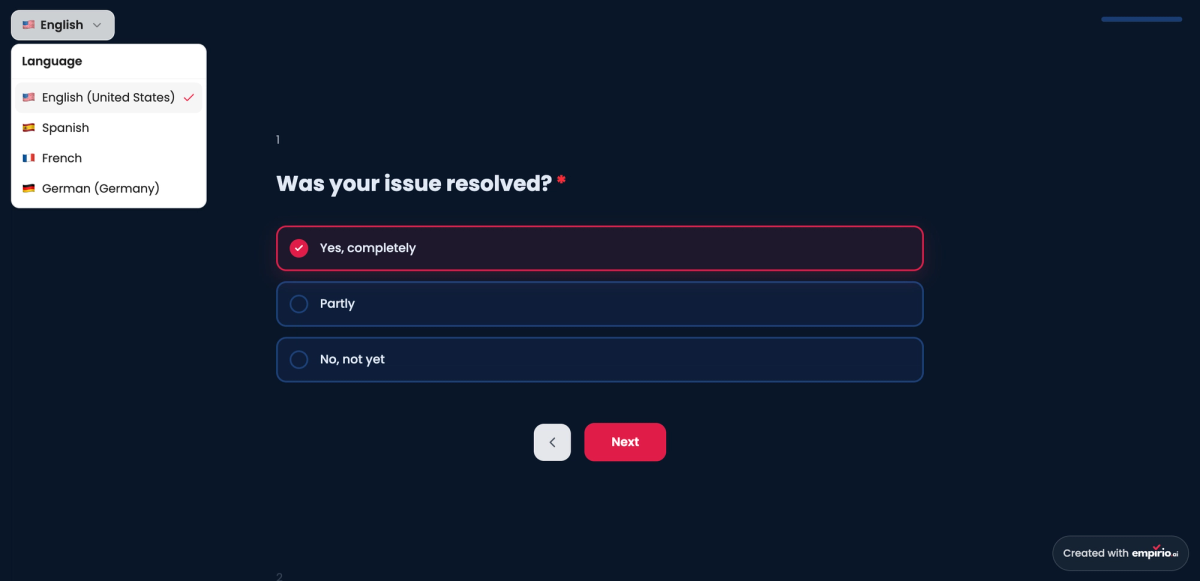
A multilingual survey is a survey that offers the same questionnaire in several languages and still collects the answers in one shared dataset. Respondents either pick their language themselves or are assigned it automatically.
The point where most guides get vague is that a questionnaire has two layers. The interface is one: next buttons, required-field notices, error messages. In many tools those follow the language of the person answering, without you doing anything. Your own text is the other: title, questions, answer options, closing message. That is where the work sits, and that is what people mean when they say multilingual survey.
The second distinction decides how your analysis will go. A proper multilingual survey is one survey with several language versions: one link, one analysis, one column for the language. Set up a separate survey per language and you end up with three separate tables to merge by hand. Both get you there. Only the work afterwards is different.
Translating costs you an hour. Merging two tables by hand afterwards costs you an afternoon.
When a multilingual survey is worth it
Not every survey that crosses a border needs several languages. The question is not where your respondents sit, but which language they answer honestly in. For a technical survey among developers, English usually does the job. For anything that asks about opinion, satisfaction or feeling, it does not.
Three cases come up again and again. In all three, the mother tongue is more than a courtesy.
- The employee survey in a team spread across several countries. Anyone asked to rate a manager in a foreign language answers more cautiously and more briefly.
- The customer survey across several markets. Open text answers are the most valuable part. Hardly anyone writes those in a language they feel unsure in.
- The dissertation with an international sample. Here the language often decides whether you reach the sample size you need at all. How to get enough people in the first place is covered in how to find participants for your survey.
There is a cost on the other side, and it matters just as much: every language is a version you carry along with every change. Two to four languages cover almost any project. Anyone who adds seven because they can ends up maintaining seven questionnaires.
Four steps to a multilingual survey
The order matters more than the tool. Anyone who translates first and then changes questions does the work twice, once in every language.
That is why the source version comes first and sending it out comes last.
Step 1: Finish the source version
Build the questionnaire in the language you are most confident in, and build it completely: every question, every answer option, the branching logic, the introduction and the closing text. Only once you have nothing left to change does the translation begin. How a solid questionnaire is put together is covered in our guide on how to create a questionnaire.
Step 2: Decide on the target languages
Only take the languages you actually have respondents in, and check beforehand whether your tool offers them at all. That decision belongs before the translation, not after. Every language you add later means another pass through the whole questionnaire and another round of proofreading.
Step 3: Translate and have it read back
The translation itself takes seconds these days, the proofreading is the actual work. Every translated question goes past the eyes of someone who genuinely speaks the language. For twenty questions that takes ten minutes, and it heads off exactly the misunderstandings that make your markets impossible to compare later.
Step 4: Click through every version once
Open each language version in a browser and fill it in completely, including the one whose language you do not speak. You are not checking the wording here, you are checking the mechanics: does the logic jump correctly, are all answer options there, is nothing cut off. Longer languages such as French happily break a layout that the English text still held together.
Translating questions is more than swapping words
A translated question has to measure the same thing as the original, not just mean the same thing. No translation solves this part on its own, because it depends on the country rather than the language.
Three places go wrong most often. All three only show up when you analyse the results:
- Scales are not the same everywhere. A school-grade logic running from excellent to inadequate triggers a different expectation elsewhere. Agreement scales are the safer route, because the Likert scale works comparably across countries.
- Levels of formality change answering behaviour. If one version is formal and the other casual, you end up comparing two different surveys.
- Categories often do not fit. Qualifications, job groups and regions are cut differently in every country, and a literal translation produces options that do not exist there.
When it has to be precise, back translation helps: a second person translates the finished version back into the source language without knowing the original. If the result drifts, you have found your problem spot. Which question types suit that at all is covered in our overview of question types in surveys.
Create a survey for free
With empirio.ai you can create a modern online survey in minutes — with hosting in the EU.
- AI-built survey
- Adjust by drag & drop
- Real-time analysis
Creating a multilingual survey with empirio.ai
With empirio.ai one button handles the whole third step. You build the survey in your own language as usual, activate the multi-language setting and have the entire questionnaire translated. There is nothing to build a second time.
Getting there is three clicks in the settings. After that you carry on working exactly as before.
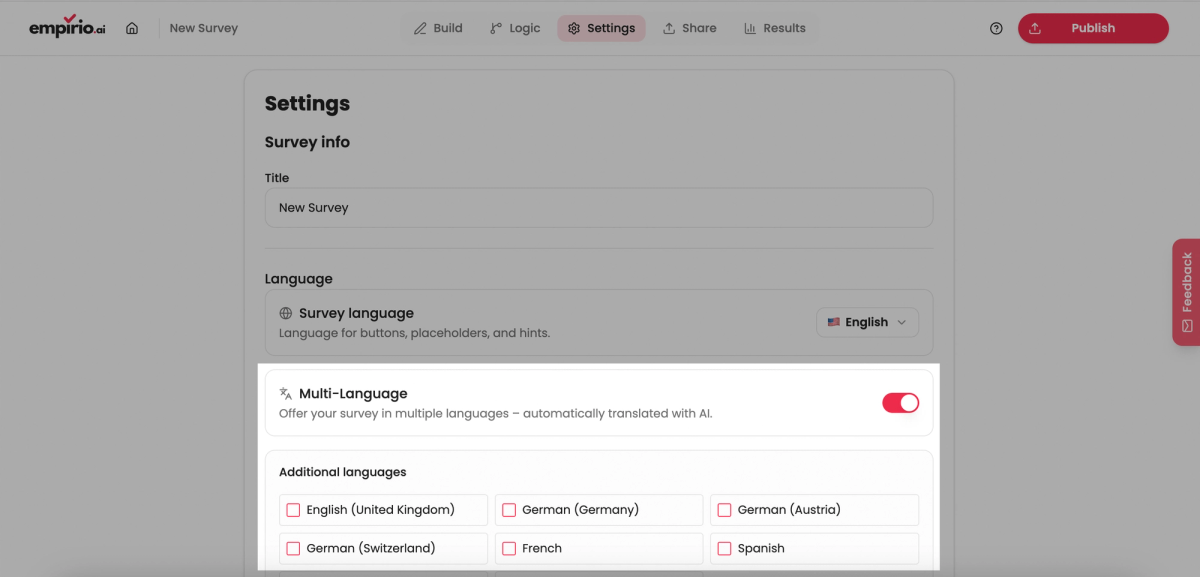
Activating multiple languages
Open the finished survey, go to Settings and then Language. The switch activates multiple languages and lets you choose from six: German, English, French, Spanish, Italian and Dutch. The AI then translates the entire questionnaire, meaning questions, answer options and text, in a single pass.
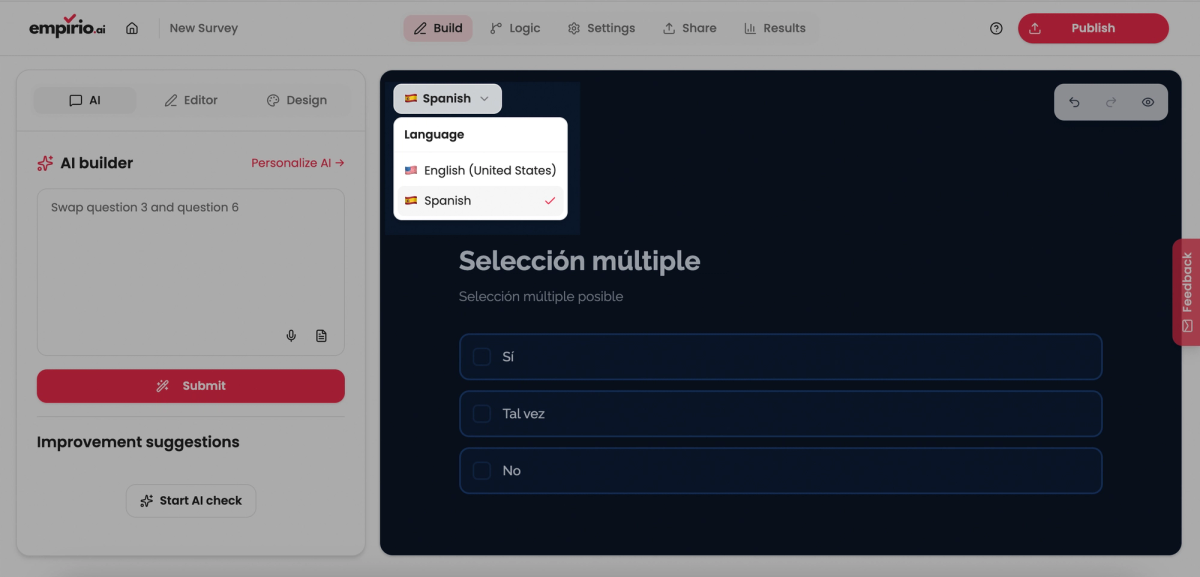
Switching between language versions
Under Edit you then get a dropdown that switches between the language versions. You see every translation in the same place where you edit the original, and you can adjust individual wordings directly. This is exactly where the eyes of someone who speaks the language belong.
Adding questions afterwards
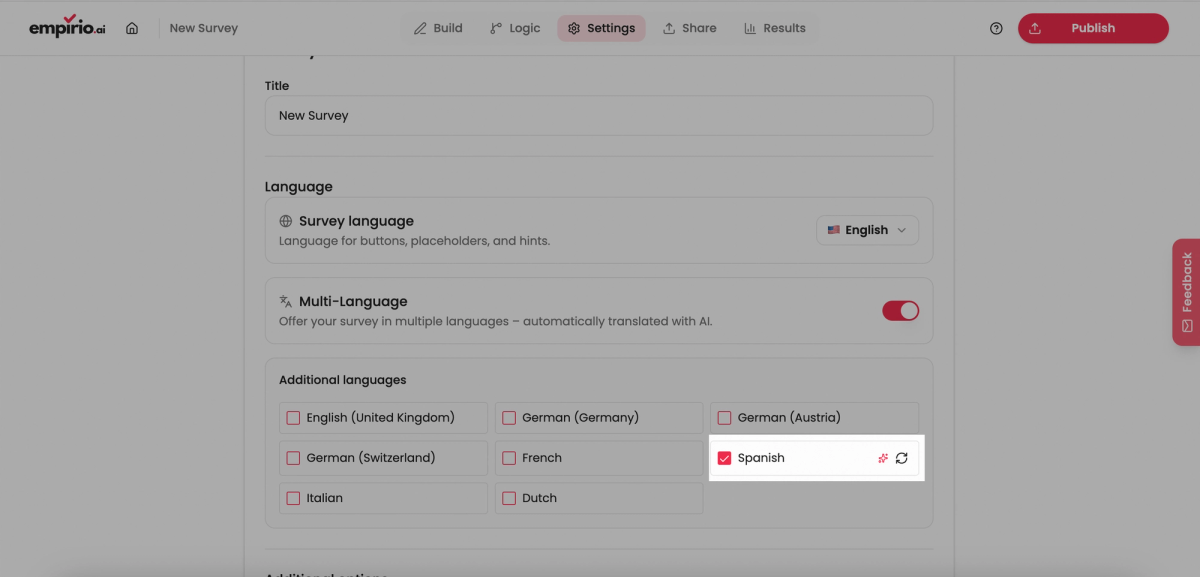
The real advantage only shows up later. Add a question or change a setting and it happens across all languages automatically. The new elements can then be translated again at the push of a button, without touching the rest. So you keep maintaining one survey rather than six.
Two honest limits belong here. Multilingual surveys and automatic translation are part of the Pro plan at empirio.ai, not of the free one (as of September 2026). And those six languages are the set: anyone who needs Polish, Turkish or Portuguese needs a different tool. For the European core market they are enough, beyond that they are not.
Typical mistakes with multilingual surveys
Three mistakes come up again and again in multilingual surveys. All three only surface once the survey is live. By then the correction is expensive.
The pattern behind them is always the same. Treat the language versions as separate projects and you lose the very advantage you set them up for.
Translating too early
Start the translation before the source version is settled and you pay for every later change multiplied by the number of languages. One extra question in four languages is four entries, four checks and four chances to forget one of them. Finish first, then translate.
Not recording the language
If you cannot tell afterwards which answer came from which language version, you cannot see differences between markets. Make sure the language ends up in the dataset. If the column is missing, a question about the country belongs at the start of the questionnaire, not at the end.
Translating only the questions
Invitation text, subject line, reminder and thank-you page get forgotten regularly. Send a French survey with an English invitation email and you lose respondents before the first question. The translation does not end at the questionnaire, it ends at the last piece of text someone reads from you.
Conclusion
Running a survey in several languages is no longer a question of budget, it is a question of order. Finish the source version, decide the target languages, have it translated, click through every version once. What used to be a project of its own is now the button between step two and step four. The time you save there is better spent on proofreading.
What to read next
- Still looking for the right tool? The 5 best survey tools compared
- Want to know what it costs? How much does a survey cost?
- Writing the questionnaire right now? Survey templates and examples
One survey, six languages?
Build your survey with empirio.ai in your own language and have the questionnaire translated. Create a survey online