

You’ve answered the last question and clicked “Submit.” Now what? In a lot of surveys, what comes next is a bland “Thank you for your participation” or nothing at all.
Yet this is the one page of your survey that everyone who made it to the end is guaranteed to see. The catch: because the data is already in the system by then, it’s the last page you write and the first one you forget.
A survey closing page needs one sentence thanking people for taking part and a note on what happens with the results. Depending on the survey, you can add a way to ask questions and a pointer to where people go next. Anything that requires contact details, such as a prize drawing, also belongs here and not among the questions.
📌 The key points at a glance
- Every closing page needs a thank-you and a note on the results.
- The thank-you only appears on the end page after people hit submit.
- Ask for contact details for a prize drawing only after submission.
- Two to four sentences are enough for your closing message.
- A promise about results only counts if it comes with a date.
- In empirio.ai, you turn on the end page with one click.
Create a survey for free
With empirio.ai you can create a modern online survey in minutes — free to start.
- AI-built survey
- Adjust by drag & drop
- Real-time analysis
Why the last page matters more than you think
For the answers in this survey, the closing message really doesn’t matter. For your next survey, it does. People who feel they were thanked properly will click the link again next time.
That applies to more people than you might expect. Clubs survey their members every year, companies survey customers after every purchase and colleges evaluate their courses every semester. Your closing page lays the groundwork for a strong turnout next time around.
There’s a practical reason, too. Many respondents still have something to say after the last question: a follow-up question or a comment that didn’t fit into any answer field. Without a way to reach you, that gets lost, even though these are often the most revealing responses you get.
In short, the closing page isn’t a polite formality. It’s a handoff. It tells people what happens now and who is taking care of it.
What belongs on the closing page
The five points below cover almost any survey. You won’t always need all of them. The page never needs more than two to four sentences anyway, since the real work is already done at this point.
- One sentence of thanks, specific and free of boilerplate.
- What happens with the results, and when.
- If needed, a way to get in touch with questions. In an employee survey, people usually know who to ask anyway.
- If there is one: how to enter the prize drawing or claim the reward.
- If you like: where people go next, such as back to your website or to the internal dashboard.
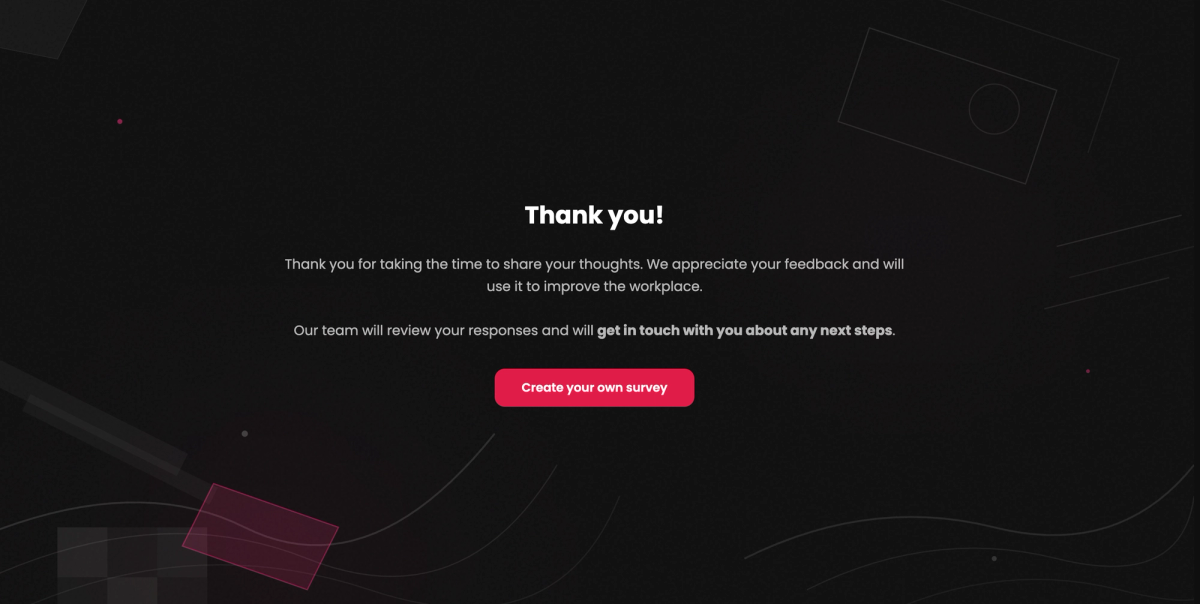
The end page of this employee survey says thank you and announces that the team will follow up on next steps. The only thing missing is a date. That’s what turns a friendly sentence into a promise people can hold you to. A contact address isn’t necessary here, because everyone already knows who is behind the survey.
The second point in particular has the biggest impact and still gets left out all the time. “We’ll post the results in the members’ area in December” is a promise people can check. “We will carefully review your feedback” is not.
The privacy notice and consent don’t belong on the closing page. They come before the first content question, as our overview of how to structure a survey shows. On the last page, a note on where to find that information is all you need.
Four closing messages you can adapt
These four examples cover the most common cases. You can use them word for word and only need to replace the details in brackets.
All four have two things in common: the thank-you comes in the first sentence and the promise about results includes a date. What differs is the tone and whether you need contact details at all.
Customer survey with a prize drawing
In a customer survey with a prize drawing, two things come together: the thank-you and the drawing. What matters is that the email address is a separate, optional step and not simply question number fifteen. Anyone who doesn’t want to enter should be able to leave the page without typing anything. Right next to it goes a note that the address is stored separately from the answers.
Thanks for taking two minutes out of your day! [Name] reads your feedback personally.
We’ll go through all the responses in early [month].
If you’d like to enter the drawing, follow the link below and add your email address there. It’s stored separately from your answers.
You’ll find the matching questions ready to go in our customer survey template.
Employee survey
In an employee survey, people read the closing especially closely, because everyone wants to know whether anything will actually happen. A date and a setting, such as the all-hands meeting, are worth more here than any thank-you phrase. Keep that promise once and you’ll usually get much more candid answers the next time you run the survey.
Thank you for your time and for your honest answers!
We’ll present the results at the all-hands meeting on [date], along with the steps we’re taking in response. Individual answers won’t be shown.
If you have questions about the survey, HR is happy to help at [email address].
For a complete survey with an introduction, questions and an end page, see our employee satisfaction survey template.
Survey for your thesis
In a survey for your thesis, there’s one point the other texts don’t include: deleting the data. Half a sentence is enough to answer the question many people have in the back of their minds while filling it out. If you offer to send the results later, a surprising number of people will take you up on it.
Thank you so much for completing my survey! Your answers will help me with the analysis for my thesis on [topic].
I’ll delete all data once I turn in my thesis in [month].
If you’d like to read the results, just send me a quick note at [email address].
To see what a rigorous questionnaire looks like from start to finish, check out our thesis questionnaire template.
Club or group survey
In a club, people know each other, so your message can sound personal. This is also where asking people to pass the link along works, since members can often reach each other more easily than you can. In a customer survey, the same request tends to come across as pushy.
Thanks for pitching in!
We’ll use your answers to set next year’s schedule and share the results at the annual meeting on [date].
If you know someone who hasn’t voted yet, feel free to forward them the link.
For a bigger survey in your club, there’s our member survey template.
What none of the four texts include: an apology for the length. Apologizing for the effort at the end only confirms that the survey was too long. And that’s exactly what people will remember.
Prize drawings and contact details without breaking anonymity
As soon as you need an email address for a prize drawing, anonymity is at risk. If the field sits among the questions, the address ends up in the same record as the answers. The promise you made in the introduction no longer holds.
This isn’t a matter of interpretation. Recital 26 of the EU’s General Data Protection Regulation (GDPR) says that account should be taken of all the means reasonably likely to be used to identify a person. An address in the same record is exactly that kind of means.
The fix is simple: ask for contact details only after people submit, separately from their answers. By the time they reach the closing page, the questionnaire has already been sent, so no link between address and answers is ever created.
In practice, you set up a second, very short form for the drawing and link to it from the closing page. It sounds like extra work, but it’s the safest way to keep both promises. For what anonymous actually means, see our article on anonymous surveys.
Whether a drawing is worth it at all and which incentives really make a difference is a separate question. You’ll find more on that in our guide on how to find survey participants.
Create a survey for free
With empirio.ai you can create a modern online survey in minutes — free to start.
- AI-built survey
- Adjust by drag & drop
- Real-time analysis
Common mistakes at the end of a survey
Most of the five mistakes below won’t cost you data, but they will cost you trust. You’ll see that lost trust in your response rate by the next survey at the latest. The first mistake, however, can even cost you entire responses.
These mistakes usually come from time pressure. The closing page is the last step before the survey goes out, when patience is often running thin.
The thank-you comes before the submit button
The last page of questions already says “Thank you for participating,” but the submit button only comes after that. At this point, many people assume the survey is over and close the window without clicking “Submit.” Then their response isn’t complete. So save your thank-you for the end page that appears after submission.
A promise about results with no date
“We’ll let you know about the results” is a commitment nobody has to keep, which is why hardly anyone does. Name a date and a place, even if both are only rough. “In December in the members’ area” is enough and is something you can actually deliver on.
The prize drawing is tied to the answers
The email field sits as the last question in the questionnaire, even though the introduction promised anonymity. You can’t have both. So ask for the address only after submission and separately from the answers. If you don’t want to set that up, you’re better off skipping the drawing and giving people another reason to take part, such as access to the results.
The thank-you is boilerplate
“Thank you for participating in our survey” isn’t real gratitude. It’s a stock line that shows up in so many surveys that nobody really reads it anymore. A specific sentence lands very differently, for example: “Thanks for taking ten minutes out of your day.”
Nothing happens after people hit submit
Without a closing page, people are left looking at an empty form after they click, or the survey jumps back to the start. Respondents then don’t know whether their answers went through. Some fill out the survey a second time, which leaves duplicate responses in your analysis. So a confirmation at the end isn’t just polite. It also makes technical sense.
Setting up the end page in your survey
In most survey tools, the closing page isn’t a question but a separate page after the questions. That matters, because a text-only question at the end can show up in your results as an unanswered question and skew your completion rate.
In empirio.ai, you turn on the end page in the editor with the toggle at the very bottom of the sidebar, right below your last question. Then you edit the heading and text directly in the preview and can add an image if you like.
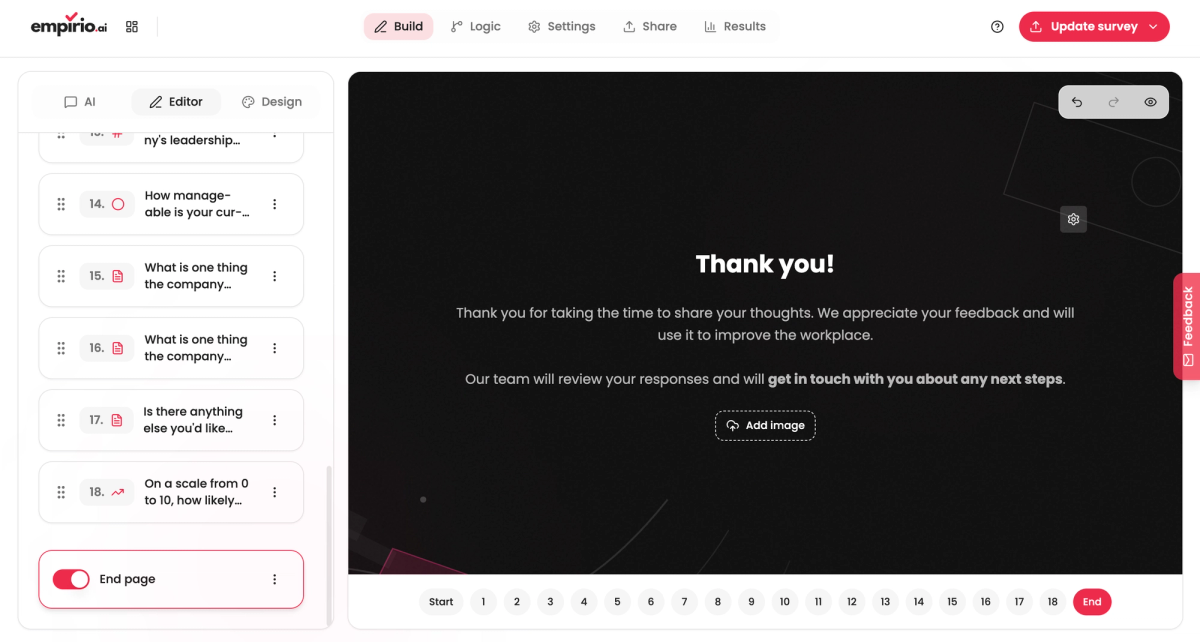
Make a point of using this end page for your thank-you rather than a regular page at the end of the questions. Ideally, write it right after the introduction instead of leaving it for last. That way you still remember what you promised at the start and the two texts fit together.
Redirecting after the survey
From the end page, you can send respondents back to where they came from or on to wherever they’re headed next. In a customer survey, that’s usually your website or online store. In an employee survey, it’s the internal dashboard or the intranet. For a prize drawing, it’s the separate form for the email address.
What matters is that you announce the redirect. A sentence like “Use the button below to head back to our website” is enough. An unexpected redirect, on the other hand, looks like an error and leaves people wondering whether their answers went through.
Note
In empirio.ai, the end page automatically follows your last question and only appears after the answers have been submitted. You can turn it off again at any time without changing anything in your questions.
Conclusion
A closing page takes very little effort and makes sure people take part again next time. All it takes is a few sentences: a specific thank-you, a promise about results with a date and, where needed, an email address for questions.
Two points even affect the data itself. The thank-you belongs on the end page after submission, not on the last page of questions. And you ask for contact details for a prize drawing only after submission, never in the questionnaire itself.
Where to go next
- Working on the text before the first question? Survey welcome message
- Want to see the whole flow? How to structure a survey
- Revising the questions themselves? How to create a questionnaire
Want an end page without building one yourself?
In empirio.ai, the end page is part of your survey from the start. All you do is fill in the heading and text.