

Sixteen people in the group chat, three possible dates for the potluck, and fifty messages later nobody has committed to anything. WhatsApp built the poll for exactly that stalemate, and it behaves almost identically on iPhone, on Android, and on a computer.
You create a WhatsApp poll by opening a chat, tapping the plus or paperclip icon, choosing Poll, typing a question and up to twelve answers, and deciding before you send whether people may pick more than one option and whether the names of voters stay hidden. We clicked through every setting ourselves until each limit was clear.
📌 The key points
- A WhatsApp poll carries two to twelve answer options.
- WhatsApp Web and the desktop app create polls too.
- The hidden-names switch shows up in group chats only.
- After the first vote a WhatsApp poll is locked.
- WhatsApp polls accept no free-text answers at all.
Create a survey for free
With empirio.ai you can create a modern online survey in minutes — free to start.
- AI-built survey
- Adjust by drag & drop
- Real-time analysis
What is a WhatsApp poll, and when does it fit?
A WhatsApp poll is a message that carries one question and several preset answers. Everyone in the chat sees the question, taps an option, and the votes tally up live underneath.
It is closer to a show of hands than to a real survey, and that is precisely where the value sits. No account, no extra app, no link anyone has to dig for. The poll lands where the conversation is already happening.
Situations where a WhatsApp poll works well
- Picking a date with friends, a team, or a PTA committee
- Who brings what to a birthday, a cookout, or a road trip
- A quick read on a decision in the work chat
- Choosing among a handful of options with no analysis afterward
One caveat worth naming up front: WhatsApp is far less universal in the United States than SMS and iMessage, so before you build the poll, check that everyone you need is actually in the group. For a survey for a thesis or capstone project a chat poll is not enough either way.
Using a WhatsApp poll to pick a date
Picking a date is the job a WhatsApp poll does best, and it hinges on one switch: turn on “Allow multiple answers” and enter every candidate date as its own line. Each person then checks everything that works for them, and you can see at a glance which date has the broadest support.
Four to six dates is the sensible ceiling. With twelve lines the votes scatter so thinly that nothing comes out ahead. Put the time inside the line itself, so “Friday, 7 p.m.” rather than just “Friday.” And WhatsApp sends no reminder to the people who have not voted yet, so that nudge is on you.
How to create a WhatsApp poll on iPhone
On iPhone the poll sits behind the plus icon to the left of the text field. It is available in one-on-one chats and group chats alike, provided your WhatsApp version is reasonably current.
Building a poll takes under a minute once you know which answers you want to offer. That is the whole game, because the answers cannot be corrected after you hit send. Fewer than two lines is refused, more than twelve is refused, and two identical lines are refused as well.
Creating a poll on iPhone step by step
Eight taps take you from an empty chat to a finished poll. Everything up to the last step can still be changed, and after it nothing can. If dates are the subject, settle on them first and type them in afterward rather than the other way around.
- Open the chat. Pick the one-on-one or group chat the poll should run in.
- Tap the plus icon. It sits to the left of the message field.
- Choose Poll. The entry is in the attachment menu among the other options.
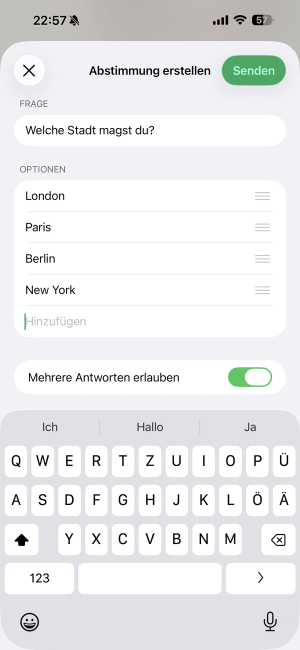
- Type the question. For example: Which night works for the potluck?
- Enter the answers. Two to twelve lines, each different from the others.
- Sort the order. Drag and drop the answers into the order you want.
- Check both switches. Multiple answers, and in groups also hidden names.
- Send. The poll shows up in the chat right away.
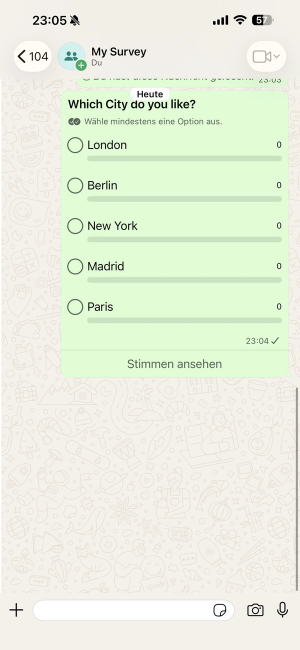
Here is what it looks like in the app, on the left while creating and on the right from the voters' side:
 |
 |
Cast your own vote right away, because it actually helps. A poll that already shows one vote reads as under way and tends to pull in the next ones faster.
How to create a WhatsApp poll on Android
On Android the path is identical and only the icon changes. Depending on the manufacturer and your WhatsApp version, the message area shows either a paperclip or a plus, usually on the right side.
Everything after that behaves the same on both systems, and the limits match too: twelve answers, no duplicate lines, no free-text fields. An iPhone walkthrough therefore transfers to Android without any rethinking.
Creating a poll on Android step by step
Six steps are enough on Android. The only genuine difference is the icon that opens the attachment menu, plus its position on some manufacturer skins. Once the menu is open the screen looks exactly like the iPhone one, down to the order of the fields.
- Open the chat. One-on-one or group chat, both work.
- Tap the paperclip or plus. The icon sits next to the message field.
- Choose Poll. The entry is in the attachment menu.
- Type the question and answers. Two to twelve lines, each one distinct.
- Set the switches. Multiple answers, and in groups also hidden names.
- Tap the green send arrow. That posts the poll.
When the Poll option is missing from the menu
If Poll does not appear in the attachment menu, one of three causes is almost always behind it, and all three take two minutes to rule out. The usual culprit is an outdated app: a glance at the Play Store or the App Store shows whether an update is waiting. On very old Android and iOS versions the feature disappears entirely, because WhatsApp no longer supports those systems.
The third cause trips most people up. If a group has “Send messages” set to “Only admins” under group settings, nobody except the admins can post anything at all, which includes starting a poll. No update fixes that; asking whoever runs the group does.
Creating a WhatsApp poll on a computer: Web and desktop app
A WhatsApp poll can be created on a computer as well, both in WhatsApp Web in the browser and in the desktop app for Windows and macOS. The path mirrors the phone: open the chat, click the plus or paperclip icon beside the message field, choose Poll, type the question and the answers, send.
The larger screen starts paying off from the fourth answer line onward. Eight dates type out on a real keyboard in a fraction of the time, and every line is visible at once instead of behind a scroll. For longer polls the computer is simply the more comfortable place to work.
💡 Tip
Type the answer lines into an empty note first, then paste them into the poll one at a time. On a computer that is Ctrl and V or Cmd and V, and you get to read every line side by side before sending. Since nothing can be fixed afterward, that is the only round of corrections you will get.
Two things do not change on a computer. Twelve answers remain the ceiling, and both switches are only available while you are creating the poll (as of September 2026). WhatsApp Web is also tied to your phone or to a linked device; there is no separate account on the computer.
Create a survey for free
With empirio.ai you can create a modern online survey in minutes — free to start.
- AI-built survey
- Adjust by drag & drop
- Real-time analysis
The two settings that decide the result
WhatsApp offers exactly two switches while you create a poll: “Allow multiple answers” and “Hide voter names.” Both shape the outcome more than the wording of the question does, and neither can be changed once the poll is sent.
The second one matters more, and it is also the one most people miss. It does not show up in every chat.
Allow multiple answers
With the switch off, each person picks exactly one option. With it on, they can check as many as they like. For a date poll it almost always belongs on, since otherwise you force everyone into a single choice when several dates would work for them. For a real decision you leave it off, or the result spreads out and nobody ends up any wiser.
Hide voter names
With this switch set, the others in the chat see only the number per option, not who voted for what. One detail goes unexplained by WhatsApp: the switch appears in group chats only. Start a poll in a one-on-one chat and the setting is missing entirely, so the vote is always open (as of September 2026).
⚠️ Careful
Neither switch can be changed after sending. If you forget multiple answers, or decide afterward that names should have been hidden, the only route is to delete the poll and set it up again. A quick look at both switches before sending saves that detour.
Viewing results, editing, or deleting a poll
The results of a WhatsApp poll sit inside the message itself: a bar grows under each option, the number of votes stands beside it, and both update the instant somebody votes. There is no separate results screen anywhere, the chat is the result.
Editing, on the other hand, is barely possible, and that is where most polls come apart. Knowing the order of the three options saves the trouble.
Who voted for which option?
Tap “View votes” beneath the poll, or the number next to an option. WhatsApp then lists, for each answer, everyone who chose it. If the hide-names switch was set when the poll was created, only the bare number remains. No notification arrives for each new vote either, so checking is on you.
What can still be changed afterward
A sent WhatsApp poll can only be corrected inside a very narrow window: the question can be edited as long as nobody has voted. From the first vote onward the question is fixed too, and the answer options were fixed from the start. In a busy group the first vote often lands within seconds.
What is still possible and what is not
- The question can be edited, but only before the first vote.
- Answer options can never be changed or added to.
- The order of the answers is fixed the moment you send.
- Neither of the two switches can be flipped afterward.
- Your own vote can be changed or withdrawn at any time.
Deleting a poll and starting over
If the mistake sits in the answers, deleting and starting over is the only route. Press and hold the poll, tap the trash icon, then choose “Delete for me” or “Delete for everyone.” The second option only exists inside WhatsApp's usual deletion window, and the votes cast so far disappear along with the poll.
There is no function for closing a poll, and no deadline either. Once the matter is settled, post a short message in the chat so that nobody keeps voting.
Are WhatsApp polls anonymous?
By default WhatsApp polls are open, and anyone in the chat can see who voted for what. In group chats that can be switched off with “Hide voter names,” while in a one-on-one chat the option does not exist.
The gap between hidden and anonymous is wider than the word suggests. Hidden means the other people in the chat cannot see the link between person and vote. It does not mean the link is gone. Votes still travel with phone numbers attached, and WhatsApp belongs to Meta.
Hidden is not anonymous. Anonymous means nobody can restore the link. Not even the provider.
For a group of friends or a neighborhood association the switch is entirely sufficient. As soon as the subject is a manager, pay, or anything else people would rather not sign their name to, a WhatsApp poll is the wrong tool, because real anonymity cannot be guaranteed technically. How to set up a genuinely anonymous survey turns on exactly this distinction.
Privacy and WhatsApp polls
WhatsApp belongs to Meta and processes data across borders. For a private poll among friends that barely matters. The moment an employer, a nonprofit, a school, or an agency is behind the poll, the picture changes, and the United States handles that differently from Europe.
There is no single federal privacy law covering polls of this kind. What applies instead is a patchwork: state laws such as the California Consumer Privacy Act and its successors, sector rules like HIPAA for health information, and the Federal Trade Commission's authority over unfair and deceptive practices. The FTC sets out what it expects of businesses in its privacy and security guidance for businesses.
That last point is the one that bites here. Telling a group a poll is anonymous when the app still shows who voted is a promise the product does not keep, and a broken privacy promise is the classic shape of a deceptive practice. Whether a specific poll crosses that line depends on the facts, so anything beyond a casual group chat is worth running past counsel.
Where it gets risky
- Polling employees through personal messenger accounts
- Customer polls over WhatsApp Business without consent
- Questions about health, ethnicity, or political opinion
- Anything where you promise anonymity you cannot deliver
On sensitive subjects a second problem sits alongside the legal one: an open poll produces the socially acceptable answer rather than the honest one. The full picture sits in the guide to privacy and data protection in surveys. This article is not legal advice.
Where WhatsApp polls hit their limits
The limits are quickly listed: one question per poll, twelve answers at most, no free-text fields, no duplicate options, and no analysis beyond counting votes.
What stands out while testing is how strict WhatsApp is about the answers. Two identical lines are refused outright, with the clash flagged as you type. So anyone offering Friday twice has to make the lines distinguishable, for instance “Friday morning” and “Friday evening.”
One question per poll
WhatsApp allows exactly one question with up to twelve answer options. Anyone wanting to cover several aspects has to send several polls in a row. The chat gets cluttered fast, because other messages land in between, and participation drops noticeably with every extra poll. By the third one, half the group has usually stopped answering.
No free-text answers
People can only choose from the options you set out. There is no field for their own wording. Anyone collecting opinions and reasons gets them as loose chat messages underneath at best, and those are nearly impossible to attribute cleanly later. This is exactly where feedback questions in a chat fall apart.
No real analysis
The number of votes per option is all you get. There is no export, no chart to pass along, and no way to filter by subgroup. Anyone who has to document the result types it out by hand. For a quick decision that is fine; for analysis it is not.
The poll is a chat feature
A WhatsApp poll lives in the chat it was sent to: a one-on-one chat, a group, or a channel. Anyone running a channel can share a poll there as well, whereas Status has no poll function. A poll cannot be handed out by link to people outside the chat, and it cannot be embedded on a website. Anyone who needs to reach customers or members beyond the group needs a different tool.
Common mistakes with WhatsApp polls
The most frequent mistakes with WhatsApp polls happen not while writing but in the second of sending: switches left untouched, too many options, and answers that cannot be corrected afterward.
All five can be caught with one look before you send. That look is worth taking precisely because correction is not on offer.
Too many answer options
Twelve options are allowed, but from roughly the fifth onward the chat becomes hard to read. The votes spread so thinly that no clear direction emerges. Three to four options are the best compromise in practice between choice and a usable result.
Forgetting multiple answers
The switch is off by default, so each person gets exactly one vote. For a date poll that is nearly always wrong, because several dates would work for several people. It usually only surfaces when the first few start asking, and by then the only route left is a new poll.
Answers not thought through
Because the options are fixed once sent, every forgotten answer costs an entirely new poll. When in doubt, write the lines into a note first and transfer them afterward. Two identical answers are refused by WhatsApp anyway, and adding a line such as “either works” tends to absorb half the follow-up questions that would otherwise pile up underneath.
Assuming anonymity
Plenty of people take WhatsApp polls to be anonymous because the hide-names switch exists. Hidden is not anonymous, though, and in a one-on-one chat the switch is missing altogether. Promising anonymity in the invitation and failing to deliver it costs the group's trust, and not only for that one poll.
Wrong chat
It sounds trivial and happens constantly: the poll lands in the wrong group. Anyone typing in the family chat and the team chat in parallel can easily catch the wrong one. A glance at the chat name before sending saves both the deletion and the explanation afterward.
WhatsApp poll or survey tool: which one fits?
Choosing between WhatsApp and a survey tool comes down to three questions: how many questions are you asking, how sensitive are the answers, and does the result have to be analyzed afterward?
The table sorts the most common cases. Where two rows apply, the one with the more sensitive data decides.
| Use case | WhatsApp poll | Survey tool |
|---|---|---|
| Picking a date with friends | ideal | overkill |
| A quick opinion in the group | ideal | overkill |
| Several questions in a row | awkward | ideal |
| Answers in people's own words | not possible | standard |
| Genuinely anonymous answers | not possible | standard |
| Surveying employees or customers | unsuitable | ideal |
| A survey for a thesis or capstone | unsuitable | ideal |
| Analysis and export | not possible | charts included |
As of September 2026, subject to change.
What stands out is that WhatsApp wins the first two rows and then loses every single one after that. Which describes the feature rather well: fast and unbeatably convenient, right up to the point where something depends on it.
When the switch is worth it
Moving to a survey tool pays off from the moment you ask more than one question, need answers in people's own words, or have to document the result. For picking a date quickly, WhatsApp stays the better choice, and no tool changes that. Which tools exist and how they differ is set out in the overview of the common survey tools.
We build one ourselves, so here is the disclosure: empirio.ai, an online survey tool from Germany, is ours. The free plan includes 50 participants per month, the number of questions is not capped, and the data stays on servers in the EU (as of September 2026). You then send the finished survey link in the chat, which keeps the convenient part of WhatsApp. Ready-made questionnaire templates take the blank page away.
Conclusion
For the job it was built for, the WhatsApp poll is a good tool: one question, a handful of options, a fast answer. It takes half a minute, everyone joins in, nobody needs anything extra, and it works on a computer just as it does on a phone.
The price is a set of hard limits, and the important one is that the answers cannot be corrected after sending. So give the options five seconds of thought before you hit send. Anything beyond that, several questions, open answers, real anonymity, belongs in a survey tool.
Where to go next
- Want to know which tool fits your case? The best survey tools compared
- Need your survey to be genuinely anonymous? Creating an anonymous survey
- Looking for ready-made questions to reuse? Questionnaire templates
- Want to structure the questionnaire properly? How to create a questionnaire
Need more than one question?
With empirio.ai you build a questionnaire with several questions, open answers, and anonymous participation, and the data stays on servers in the EU. You can still share the link over WhatsApp afterward. Create a survey for free