

Your survey is finished and you would rather not send it out as a bare link, but show it right inside your website? Every extra click costs you respondents.
You embed a survey on your website by generating an embed code in your survey tool, choosing a display format such as a fixed field in the text or an overlay, settling what you have to disclose, and pasting the code into the right spot on your page.
At empirio.ai, an online survey tool from Germany, embedding a survey is free. For this piece we worked through the five display formats and the privacy side of embedding in the US.
📌 The key points
- Embedding saves the click on an external link.
- Iframe or script: the build decides height and overlays.
- State privacy laws ask you to disclose what the embed collects.
- Check every embed once on a real phone.
- At empirio.ai the code sits under Share > Embed.
Create a survey for free
With empirio.ai you can create a modern online survey in minutes — free to start.
- AI-built survey
- Adjust by drag & drop
- Real-time analysis
What embedding a survey actually means
An embedded survey is a questionnaire that still runs at the survey tool but is displayed inside somebody else's website. The browser fetches it through a small piece of code and renders it as though it belonged to the page.
For respondents an embedded survey therefore does not feel like a foreign service. They stay on your page, see your surroundings and answer the questions in the same window. The responses still land in the same data set as the ones coming through the link.
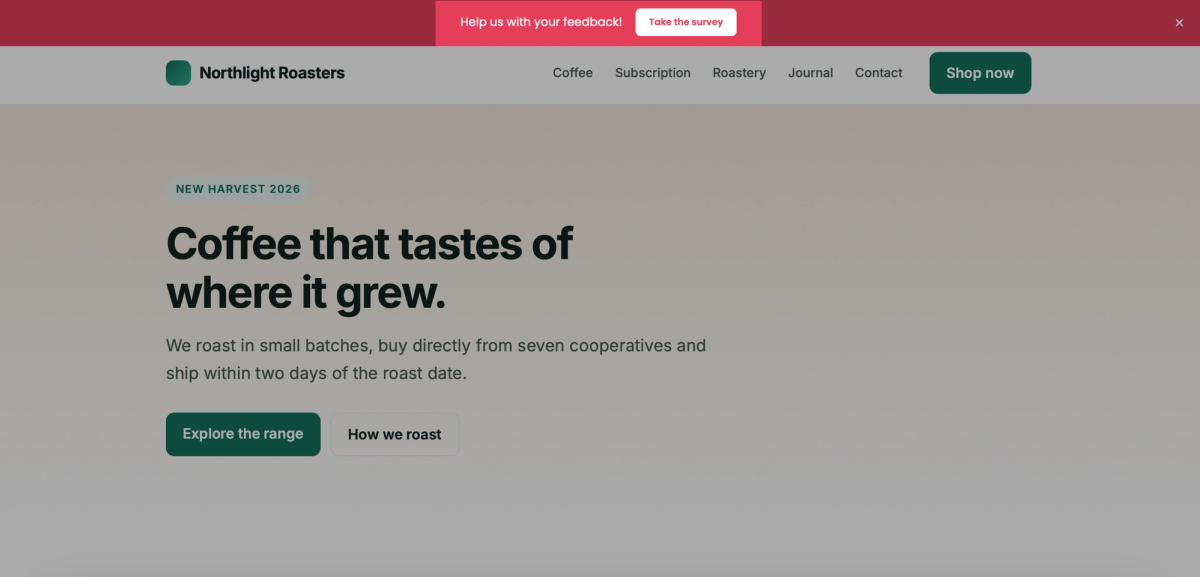
Which display formats you get differs from tool to tool, and there are usually several. They sort into two groups. A fixed field sits at one place in the text and scrolls along. An overlay lies on top of the page and announces itself, as a banner at the top, as a panel sliding in from the side or as a floating icon. The difference is not the technology but when and how the survey appears.
When embedding pays off
The detour through a link costs respondents. Someone who has the survey right in front of them decides faster, and that is the gain. There is a flip side: a survey on the page only reaches the people who visit that page anyway.
In four cases embedding beats sending the link out.
- Feedback on a page you are trying to improve.
- A customer survey right after a purchase or booking.
- A sign-up or vote that belongs to the page content.
- Ongoing feedback with no fixed collection period.
The other way round: if you need a certain number of responses by a deadline, sending the survey out is more reliable. How to reach people on purpose is covered in how to find participants for your online survey.
Iframe or script: which embed code does what
Embed codes come in two builds, and the one you pick decides how the survey behaves on your page. Many tools hand out both, but they do not present them as a decision, only as two fields to copy.
One word tells them apart. If the code says iframe, the questionnaire runs in its own small document inside your page. If it says script, your provider's code runs along inside your page. Everything else follows from that single difference.
What an iframe can and cannot do
An iframe is a window in your page, and whatever happens in it stays in it. The browser treats the questionnaire as a document of its own, one that cannot read your page and is not read by it. That makes the embed predictable, but it costs flexibility: a window has a fixed size.
What an iframe gives you
- The questionnaire runs separately from your page.
- Your page cannot read the questionnaire, and it cannot read your page.
- An error in the questionnaire does not take your page down.
- A single line shows exactly what is being loaded.
What you accept in return
- The height of the field is fixed and does not grow.
- Long questionnaires scroll inside the field.
- Banners, panels and floating icons are not possible this way.
What a script embed adds
A script embed does precisely what the iframe cannot. It measures the height of the questionnaire and resizes the field, and it lays a banner, a panel or a floating icon over the page. The price is trust: code running inside your page can read that page and store data in the browser under your own domain.
So before a script embed comes the question of who you are granting that access to. With a provider that makes no clear statement about it, the iframe is the quieter choice. If you need an overlay, the script is the only route, and then the provider belongs in the same review as any other tool running on your page.
The four attributes every iframe should carry
An iframe is a single line of code, but four attributes in it decide accessibility and loading time. Tools often supply only one of them, and then the other three are missing from your page as well.
- src: the address of the questionnaire. The one attribute the provider has to set.
- title: a description of the content, for example “Customer satisfaction survey”. Screen readers read it out, and without it blind visitors only hear that a frame is there. Technique H64 of the W3C WCAG 2.2 techniques asks for exactly this.
- width and height: the width at 100 percent so the field fits your column, the height as a fixed number so the page does not jump.
- loading with the value lazy: the browser only fetches the questionnaire once the visitor scrolls near it. Worth having on any field that is not right at the top.
Tip
Here is how to find the right height: open the preview link of your survey, drag the browser window to phone width and see how tall the longest page of the questionnaire gets. That number plus about ten percent is a good starting height for the iframe.
What to settle before you embed
The embedding itself takes two minutes. The questions before it decide whether it works in the end and whether it is allowed.
Five points belong on the table before the code goes into the page.
Disclosure and opt-out under state privacy laws
The rule in the US is different from Europe. There is no single federal law that demands prior consent before an embedded element may set a cookie. What you have instead is a patchwork of state privacy laws, led by California's CCPA and CPRA and joined by Virginia, Colorado, Connecticut and others, that ask you to disclose tracking in your privacy policy and, in several states, to give visitors a way to opt out of tracking or targeted advertising.
On top of that, the FTC treats hidden or misleading data collection as an unfair practice. So the honest steps are to know what the embed collects, name it in your privacy policy, and honor the opt-out signals your visitors send. Ask your provider what the embed sets before you build it in. This is not legal advice, and your counsel has the last word.
Why the click is still the better solution
None of that forces you to load the questionnaire on page view, and two reasons argue against it. The first is reach: if any of your visitors are in Europe, the GDPR applies to them on top, and there consent has to come before the first access. The second is trust: an overlay that opens by itself reads as something done to the visitor rather than for them.
So the clean route is the same one Europe requires. If your embed stores something in the browser, you load the questionnaire only after a click, behind a button such as “Show the survey”. That satisfies both sides at once and spares you the question of which country a given visit is coming from.
A window nobody opened was never a service anybody asked for.
What else matters for privacy in surveys is covered in data privacy and consent in surveys.
What embedding does to your loading time
An embedded questionnaire is a second document with its own HTML, its own CSS and its own fonts. That costs loading time, though less than many fear, because the browser does not have to fetch the field right away in every case. What decides it is where the field sits and whether it carries loading with the value lazy.
The more common damage is not the loading time but the jump. If the questionnaire loads late without its height reserved in the layout, the content below slides down while somebody is reading. So reserve the height for the field from the start. That keeps the page calm and protects the loading scores Google uses in its assessment.
Worth knowing
What counts most for the assessment of your page is what happens in the visible area. A field further down carrying loading with the value lazy is only fetched once the visitor scrolls near it, so it barely registers. An overlay that appears right away always loads with the page.
How it looks on small screens
An embedded questionnaire often comes with a fixed width and a fixed height. On a phone that leads to sideways scrolling or a cut-off submit button. Check every embed on a real device, not just in a shrunken browser window.
Where it sits on the page
A fixed field belongs where the content matches the question, so below the article, below the order confirmation, at the end of the service page. An overlay interrupts. It works where the page itself is not the point, and it gets in the way wherever somebody is reading.
Create a survey for free
With empirio.ai you can create a modern online survey in minutes — free to start.
- AI-built survey
- Adjust by drag & drop
- Real-time analysis
Four steps to an embedded survey
The sequence is the same in every tool, only the menu items are named differently. The order matters: first the survey stands, then the format is decided, then the code follows.
Four steps lead from the finished survey to a running embed.
Step 1: Finish and test the survey
Create the questionnaire in full and fill it in once yourself before you think about embedding. Changes are possible later, but each one means checking the embedded page again. How a solid questionnaire comes together is covered in how to create a questionnaire properly.
Step 2: Choose the display format
Decide between a fixed field in the content and an overlay that announces itself. The question behind it is not technical but editorial: should the survey be part of the page or an offer on top of it. Doing both on one page is the safe way to make both ineffective.
Step 3: Copy the code and paste it in
In the tool you generate the embed code and copy it into your page. In a builder like WordPress that goes through a custom HTML block, on a hand-built page straight into the template. Change nothing in the code except the dimensions the provider explicitly offers for adjustment.
Step 4: Check it on every device
Open the page afterwards on a computer, on a phone and once in a private window. The private window shows you what visitors see without a stored consent. Fill the survey in completely while you are there and delete the test response afterwards.
Watch out
Many consent tools only block services they already know from their own list. A survey embed is rarely on that list, so it loads immediately despite the banner. The way out: register the code in your consent tool as a service of its own, or only output it after consent is given.
Embedding a survey in WordPress and other site builders
In a site builder the embed code does not go into a file but into a field. Every system has its own element for it, and on the hosted systems your plan also decides whether an iframe is let through at all.
Three widespread systems, three names for the same field, and one restriction many people only notice when they hit save.
| System | Where the code goes | What to watch |
|---|---|---|
| WordPress, self-hosted | custom HTML block, widget area or theme template | no plan limit, recheck the display after every theme update |
| WordPress.com | the same custom HTML block | iframe only on a paid plan with hosting features on |
| Squarespace | Code Block | iframe and JavaScript only from Core, Plus or Advanced |
As of November 2026, subject to change.
WordPress: block, widget or theme template
In WordPress you paste the embed code into the custom HTML block. If the survey should sit in the sidebar or the footer, you use the same block in a widget area. If it should appear on many pages at once, the code belongs in your theme template, ideally in a child theme so the next update does not overwrite it.
Do you need a plugin for a survey in WordPress?
Not for embedding. The custom HTML block is part of WordPress, and an embed needs nothing more. A plugin only pays off if the survey itself is meant to live in WordPress, with questions, responses and analysis in your own database. On WordPress.com it is the other way round: the help page for the custom HTML block states that iframe and script need a paid plan with hosting features activated, and that at least one plugin has to be installed for that.
If your builder calls it something else
In Squarespace the element is the Code Block, and the Squarespace help on custom code names the Core, Plus and Advanced plans for it. Other builders call it Embed, HTML element or Custom Code. Look in the editor for an element whose description contains the word HTML or Embed, then check in a private window whether the code is really served. Some systems strip iframe and script silently.
Embedding a survey with empirio.ai
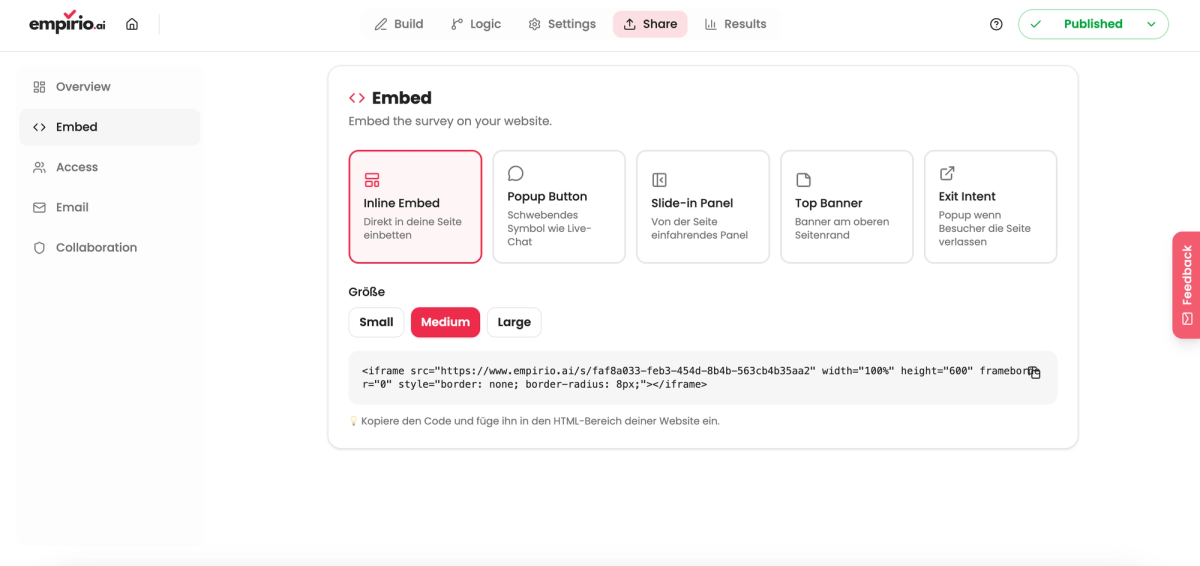
At empirio.ai you find the embedding options inside the survey itself under Share > Embed. There you pick a format, copy the code and paste it into your page.
Five formats are available, and both groups are covered.
| Format | How it appears | When it fits |
|---|---|---|
| Inline Embed | fixed in the page content | survey belongs to the page topic |
| Popup Button | floating icon like a live chat | ongoing feedback without interrupting |
| Slide-in Panel | panel sliding in from the side | a prompt after a while on the page |
| Top Banner | banner at the top of the page | a short vote for every visitor |
| Exit Intent | window when visitors leave | asking why someone is bouncing |
Four of the five formats are overlays, only the Inline Embed is a fixed field. If you are torn between the two groups, start with the Inline Embed: it interrupts nobody and can be swapped for an overlay later at any time.
The size of the Inline Embed
For the fixed field in the content there are three set sizes: Small, Medium and Large. Freely adjustable dimensions are not provided, you pick one of the three. The choice follows the length of the questionnaire and the space at the intended spot: a short vote with three answer options does not need a large field, a questionnaire with ten questions does.
Putting the code in place and reading the responses
Once you have chosen under Share > Embed, the finished code is ready. You copy it and paste it where the survey should appear. From then on the survey runs inside your website, and the responses land in the same data set as those coming through the link. So there is nothing to merge before you analyze your questionnaire.
One point matters for the disclosure question: the embed from empirio.ai sets no cookies.
You can start without payment details. You set up a free account, create the survey and pick up the embed code under Share > Embed. If you would rather begin there, you can also make a survey online for free straight from the home page.
The honest limit: the free plan at empirio.ai covers 50 responses a month (as of September 2026). A survey sitting permanently on a busy page reaches that limit faster than one sent out once.
Common mistakes when embedding
Four mistakes turn up again and again. All four come from treating the embed as a piece of installation rather than as part of the survey.
They only show once the survey is already running.
Showing the overlay on every page
A window that appears on all pages and on every visit gets clicked away before anyone reads the question. Limit the overlay to the pages the question actually belongs to.
Embedding two surveys on the same page
Two questionnaires on one page do not halve the responses, they prevent both. If you have two questions, put them in one survey. With script embeds a technical problem comes on top: two embeds of the same script get in each other's way while measuring the height.
Assuming it is anonymous because it is embedded
Whether a survey is anonymous is decided by its settings, not by the place it appears in. Check that inside the survey before you promise anonymity. What belongs to it is covered in how to create an anonymous survey.
Never checking again after installing
A survey on a page often keeps running unwatched for months. Put a date in your calendar to look whether responses still come in and whether the display still holds after a theme update.
Conclusion
Embedded, the survey saves exactly the click where many people otherwise drop out. The price is that it only reaches the visitors of that page. The decision therefore follows the occasion: feedback on a page belongs on that page, a survey with a deadline belongs in an active send-out. Everything else is a question of the build, of what you disclose and of checking it on a phone.
Where to go next
- Want to reach people on purpose? Find participants for your online survey
- Prefer to hand it out offline? Create a survey with a QR code
- Should visitors see different questions? Logic and branching in surveys
- Want the privacy side settled? Privacy and consent in surveys
- Does your page have an international audience? Create a multilingual survey
A survey right on your own page?
Create your survey with empirio.ai, an online survey tool from Germany, and pick up the finished embed code under Share > Embed. Set up a free account