

Google Forms and Microsoft Forms are the two form builders most people meet first — not because they are the best, but because they are already there: Google Forms in every Google account, Microsoft Forms in every Microsoft account. Both cost nothing to start with, both run in the browser. That is exactly why the question lands on the table again and again as soon as a team or a class needs a survey.
The difference between Google Forms and Microsoft Forms lies less in the feature list than in the surroundings: Google Forms collects unlimited responses and writes them to Google Sheets, Microsoft Forms caps responses by account type and writes them to Excel. We read both help centers side by side in August 2026, checked the interfaces and compare them here against the same 55 criteria as in our other comparisons.
📌 The key points at a glance
- Google Forms collects unlimited responses, Microsoft Forms does not.
- Microsoft branches to individual questions, Google only to whole sections.
- Microsoft brings matrix, ranking, and NPS as dedicated question types and roughly twice as many templates, Google none of these question types.
- Only Google has a public API, only Microsoft a ready-made route into automation.
- A data processing agreement is available from both only on a paid plan.
Create a survey for free
With empirio.ai you can create a modern online survey in minutes — with 100% data protection from Germany.
Start for freeGoogle Forms and Microsoft Forms at a glance
Before we get to the differences, it is worth looking at what Google Forms and Microsoft Forms actually are. Neither is a standalone product; both are add-ons to a large office suite, and that explains a good part of what turns up in the tables later.
Google Forms
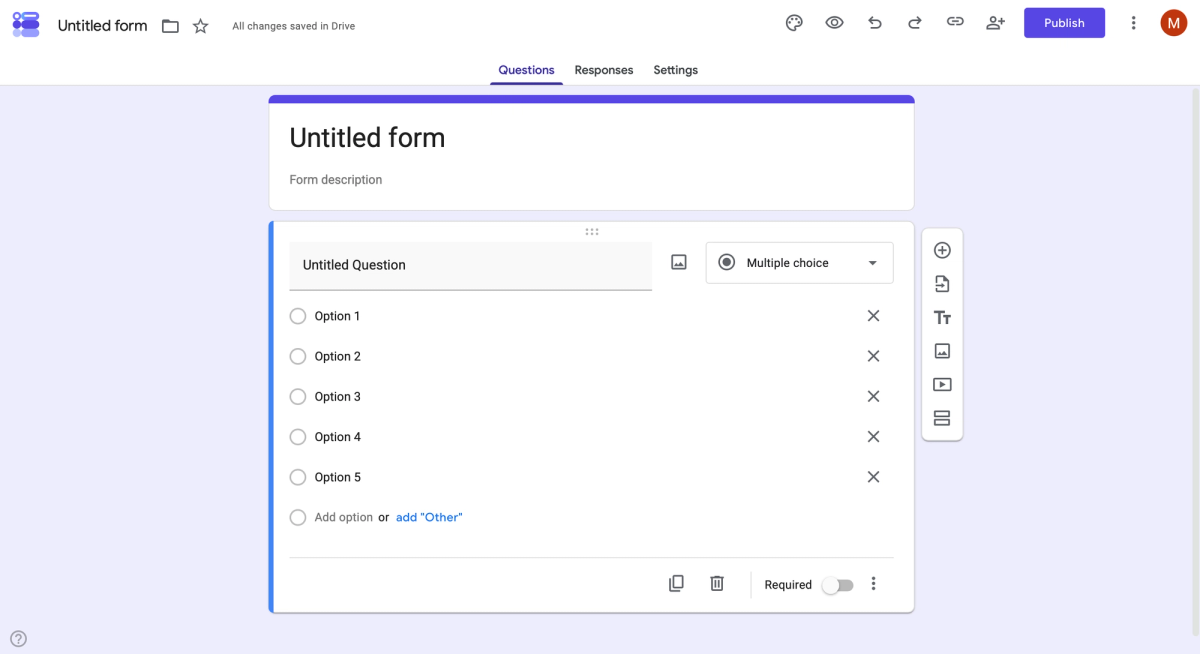
Google Forms is the form builder from Google Workspace. It sits in every Google account, costs nothing and knows no upper limit on responses. The editor builds the questionnaire question by question through drop-down menus, and the results go straight into Google Sheets if you want them to. It is meant for sign-ups, requests and quick feedback, not for large studies.
Microsoft Forms
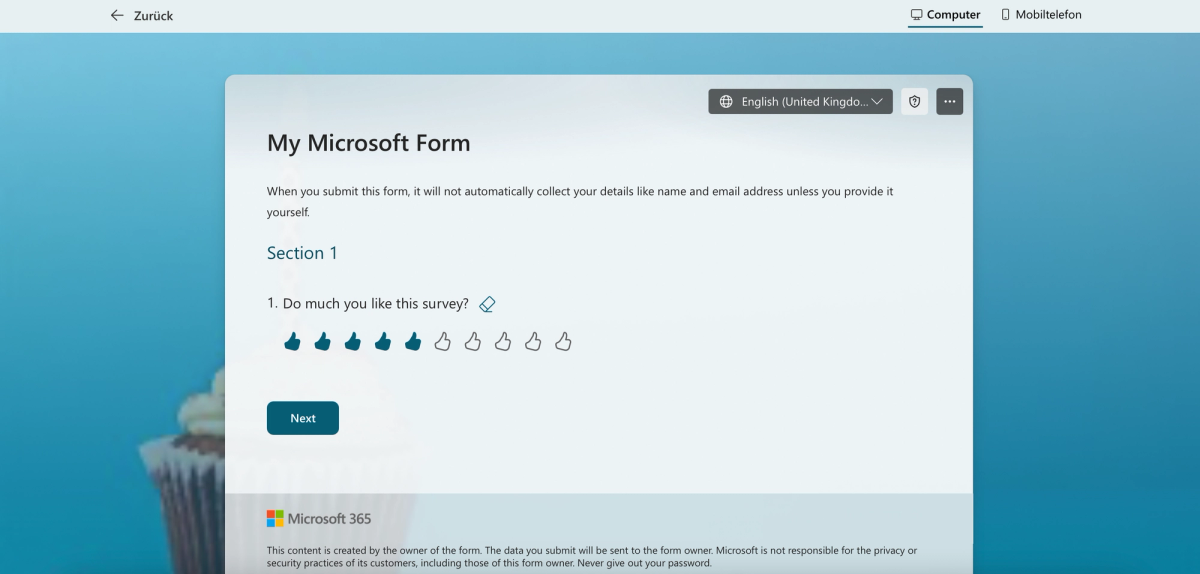
Microsoft Forms is the counterpart from Microsoft 365. It belongs to every Microsoft account, meshes with Teams, Outlook and Excel, and is the only one of the two to bring a quiz mode with automatic grading. How many responses you may collect does not depend on the plan here but on the account type: 200 per form with a personal account, five million with a work or school account.
Google Forms and Microsoft Forms share the same limit, and it only becomes apparent once the responses are in: the analysis stops at charts and an export to the spreadsheet. Anyone who wants to go further ends up with a specialist survey tool. What that changes in practice is set out in our comparisons Google Forms alternatives and Microsoft Forms alternatives.
Google Forms or Microsoft Forms: which one fits you?
The short answer fits into a table. It holds the four points people ask about first — languages, EU hosting, the data processing agreement and price — plus a sense of what the two were built for.
| Google Forms | Microsoft Forms | |
|---|---|---|
| Perfect for | open surveys with lots of responses, no license needed | surveys inside your own Microsoft 365 environment, quizzes and teaching |
| Strengths | no response limit, a public API, analysis straight in Google Sheets | Matrix, ranking, and NPS as dedicated question types, fine-grained branching logic, quiz with automatic grading, Power Automate |
| Weaknesses | branching only to whole sections, a single design, no QR code, no advanced survey features | responses capped per form, no public API, AI only with a Copilot license, no advanced survey features |
| Languages | ✅ in every language of the Google account | ✅ over 80 languages |
| EU hosting | ❌ storage region only selectable from Business Standard | ❌ only with Microsoft 365 and a tenant in the EU or EFTA |
| Data processing agreement | ❌ only with a paid Google Workspace plan | ❌ only from the first Microsoft 365 contract |
| Price | Free; Workspace from around $7, $14, or $22 per user per month on an annual plan | Free with a Microsoft account · Business Basic from $7.00 per user per month on an annual plan |
As of August 2026, subject to change.
Two observations from this table carry the whole article. The first: the two win in different places, and neither of them wins the two rows that get checked first in any professional setting — neither Google Forms nor Microsoft Forms delivers EU hosting or a data processing agreement on a free account.
The second reads the same in both weaknesses cells: no advanced survey features. Both are form builders, not survey tools. Cross-tabulation, drop-off rate, comparison mode, an export to presentation formats — none of that exists in either. Anyone who only needs a form will never notice. Anyone who wants to analyze a survey notices in the week after it goes out.
What is free in Google Forms and Microsoft Forms?
Both are free to start with, but they draw the line in different places. Google does not cap responses at all, Microsoft ties them to the account type. And neither sells data privacy on its own, only as part of the larger package.
| Google Forms | Microsoft Forms | |
|---|---|---|
| Number of surveys | ✅ unlimited | ✅ 400 per account |
| Questions per survey | ✅ unlimited | ✅ 200 |
| Respondents per month | ✅ unlimited | 200 per form |
| Create without signing up | ❌ Google account mandatory, even to test | ❌ testing without an account is possible, publishing only with a Microsoft account |
| Languages | ✅ in every language of the Google account | ✅ over 80 languages |
| EU hosting | ❌ storage region only selectable from Business Standard | ❌ only with Microsoft 365 and a tenant in the EU or EFTA |
| Data processing agreement | ❌ only with a paid Google Workspace plan | ❌ only from the first Microsoft 365 contract |
| Price | Free; Workspace from around $7, $14, or $22 per user per month on an annual plan | Free with a Microsoft account · Business Basic from $7.00 per user per month on an annual plan |
As of August 2026, subject to change.
The decisive row is the third, and it is misread almost everywhere. Google Forms does not count responses. Microsoft Forms does, and the limit applies per form rather than per month: 200 with a free Microsoft account, 1,000 with a paid personal account and five million with a work or school account. So do a rough count of your distribution list beforehand. If the expected number is above 200 and there is no license, the question is settled before the first editor is opened.
The two data privacy rows show two red crosses side by side, and that is no accident. Both providers tie EU hosting and the data processing agreement to a paid contract for the surrounding package. For a purely private survey among friends and family none of this matters. As soon as a survey runs for a club, a company, a university or a thesis it does, and then it turns on whom you survey rather than only on where you sit: for respondents in the EU or the UK, Article 28 GDPR requires a written contract with the provider that processes the data on your behalf, and in the United States several states — California most clearly — require a contract with service providers as well. Who decides how strictly that applies is your organization's privacy counsel or compliance team, and at a university your advisor. At empirio.ai EU hosting and the data processing agreement are part of the free plan — on this point the two large providers are equally far behind.
Create a survey for free
With empirio.ai you can create a modern online survey in minutes — with 100% data protection from Germany.
Start for freeCreating a survey: which editor offers what?
This is where the two differ most clearly. Microsoft has the richer set of question types, the finer logic and more templates, Google the freer design.
| Feature | Google Forms | Microsoft Forms |
|---|---|---|
| Question types | ✅ 12 | ✅ 8 |
| Matrix, ranking, and NPS | ❌ | ✅ all three as dedicated question types |
| Drag-and-drop editor | ✅ | not documented |
| Edit as a draft without changing the live survey | ❌ changes are visible immediately | ❌ only the “Accept responses” toggle |
| Text formatting | ✅ | ✅ |
| File uploads | ✅ only with a Google account | ✅ only with a work or school account for respondents |
| Start from a template | ✅ 17 templates | ✅ 40+ templates |
| Exclusive templates | ❌ | ❌ |
| Design options | ✅ 1 | ✅ 6 layouts |
| Own colors and logo | ✅ font, background, header image | ✅ hex color and background image, logo not documented |
| Remove provider branding | ❌ | not documented |
| Own subdomain | ❌ | ❌ |
| Complex logic jumps | ❌ only to whole sections | ✅ per question and per section, forwards only |
| Multilingual surveys | ❌ | ✅ up to 11 languages per form, manually |
| Quiz with automatic grading | ✅ | ✅ points and a model answer |
| Export the questionnaire | ❌ only via the print function | ❌ only printing the blank form |
As of August 2026, subject to change.
Two rows decide more here than all the others. The first is matrix, ranking, and NPS: Microsoft Forms brings all three as dedicated question types, Google Forms none of them. Anyone wanting to build a satisfaction survey with a Likert matrix has to assemble it from individual questions in Google and loses the analysis that makes a matrix useful in the first place. The second is the logic: Microsoft branches to a single question, Google only to a whole section — but Microsoft knows no jumps backwards.
On getting started Microsoft is ahead as well: a good forty templates against seventeen at Google. Anyone who does not want to begin with a blank form will more often find something suitable there. Microsoft does not publish a counted catalog, however, so the number may change. What a good template looks like in the first place is shown by our questionnaire templates.
On design the balance comes out the other way round, but at a low level. Google lets you change the font, the background and the header image, Microsoft offers six layouts, one hex color and a background image; a logo of your own is not documented on the design page. A form that looks like your own brand comes out of neither. At empirio.ai there are eight designs ready to go, four of them free, and your own colors and logo from the Plus plan.
One row goes to both equally, and it surprises most people: neither Google Forms nor Microsoft Forms can be edited as a draft while the survey is running. At Google, changes are visible immediately; at Microsoft, all that is left is the “Accept responses” toggle.
Analyzing a survey: who delivers more than a pie chart?
This table is the shortest answer to the question of why specialist survey tools exist at all.
| Feature | Google Forms | Microsoft Forms |
|---|---|---|
| Analysis tools | ✅ summary | ✅ summary |
| Review answers individually | ✅ | ✅ |
| Results as charts | ✅ | ✅ |
| Real-time updates | ✅ | ✅ |
| Cross-tabulation and filters | ❌ | ❌ |
| Comparison mode | ❌ | ❌ |
| Drop-off rate | ❌ | ❌ |
| Download individual raw data | ✅ CSV and Google Sheets | ✅ Excel |
| Download results | ❌ | ❌ |
| Export to presentation formats | ❌ | ❌ |
As of August 2026, subject to change.
The first four rows are green, the last six tell the real story. Both tools show the same four things: a summary, the individual responses, charts and all of it in real time. And both lack the same thing as soon as someone asks a question that goes beyond reading off a number. Cross-tabulation — the question “do the under-30s answer differently from the over-50s?” — exists in neither. Nor does a drop-off rate that shows at which question people bail out.
The way out is the same for both: export the data and carry on in the spreadsheet, to Sheets at Google, to Excel at Microsoft. That works, but it costs exactly the time an analysis tool is supposed to save. At empirio.ai cross-tabulation and filters are included from the Plus plan, comparison mode and drop-off rate from Lite, and the AI summarizes open answers instead of dumping them as a column of text.
Which tool has the better AI features?
Microsoft wins here — but only with a license that costs extra.
| AI feature | Google Forms | Microsoft Forms |
|---|---|---|
| AI writes the questionnaire | ❌ | ✅ only with a Copilot license |
| AI improves individual questions | ❌ | ✅ only with a Copilot license |
| AI checks the whole questionnaire | ❌ | ✅ only with a Copilot license |
| AI summarizes the results | ❌ | ✅ only with a Copilot license |
| Analyze free-text answers with AI | ❌ | ✅ word cloud without a license |
| Translate automatically with AI | ❌ | ❌ |
| MCP server for AI agents | ❌ | ❌ |
As of August 2026, subject to change.
In August 2026 Google Forms has no AI feature inside the form itself. Microsoft Forms has five, but four of them require a Copilot license that is paid on top of the Microsoft 365 subscription. Without a license what remains is the word cloud for open answers — pleasant to look at and worth little as analysis, because it counts frequencies and not statements.
The last two rows are red on both sides. Neither can translate automatically, and neither has an MCP server through which a language model such as ChatGPT or Claude would create and analyze the survey itself. At empirio.ai the AI assistants cover the whole process — from writing the questionnaire to the analysis — on the free plan, with no extra license.
Create a survey for free
With empirio.ai you can create a modern online survey in minutes — with 100% data protection from Germany.
Start for freeSharing and managing: who may take part, who may help?
On distribution and on working together the two lie close to each other. The differences are small but noticeable day to day.
| Feature | Google Forms | Microsoft Forms |
|---|---|---|
| Share by link | ✅ | ✅ |
| Preview link | ✅ | ❌ not documented |
| Embed the survey | ✅ | ✅ not in the Government plans |
| QR code generator | ❌ | ✅ |
| Email distribution | ✅ only to Google email addresses | ✅ up to 100 recipients per send |
| Restricted access | ✅ via a Google account | ✅ only with a work or school account |
| Restricted access with anonymous answers | ❌ | ✅ “Record name” can be switched off |
| Invite people (viewer, editor) | ✅ | ✅ up to 100 co-authors |
| Single sign-on | ✅ via Google Workspace | ✅ via Microsoft Entra ID |
| Two-factor authentication | ✅ | ✅ via Microsoft Entra ID |
As of August 2026, subject to change.
Two rows are worth reading more closely. The QR code goes to Microsoft: Google Forms has no generator, the code has to be produced from the link by hand. Anyone planning posters, table tents or flyers saves a step with Microsoft.
More important is the row below it: restricted access with anonymous answers. Both can limit the circle of respondents to your own organization. Only Microsoft lets you switch off the “Record name” option at the same time, so that it is checked who may take part without recording who answered what. In Google Forms the two things hang together. For an anonymous survey inside a company that is the decisive difference — and one of the few points where Microsoft Forms clearly beats Google Forms.
APIs and integrations: what can be connected?
Most surveys need no API at all. But as soon as the responses are supposed to land somewhere automatically — in a CRM, a ticketing tool or a workflow — this point becomes the most important on the whole list. And here the two solve the same task from opposite ends.
| Feature | Google Forms | Microsoft Forms |
|---|---|---|
| REST API | ✅ Google Forms API, Google Cloud project required | ❌ no public API for content or responses |
| CLI | ❌ | ❌ |
| Webhooks | ❌ only indirectly via Google Apps Script | ❌ |
| Integrations with automation services | ✅ connectors available for the common services | ✅ Power Automate |
As of August 2026, subject to change.
Google Forms has a public API: the Google Forms API lets forms and responses be read and written programmatically, given a Google Cloud project. Microsoft Forms does not have that. Anyone who needs the responses from Microsoft Forms in an application of their own cannot get at the data directly.
With the ready-made route into the workflow it is exactly the other way round. Microsoft Forms hangs on Power Automate, and that puts the path from response to action within reach without a line of code: a response comes in, a Teams message goes out, a row is added to a list, an approval starts. In Google Forms the comparable route runs through Google Apps Script, that is, through code you write yourself — or through connectors from the common automation services.
The rule of thumb: Google if the data is meant to go somewhere else. Microsoft if something is meant to happen because of the answer. At empirio.ai the REST API, CLI and webhooks are included from the Pro plan, while ready-made connectors to n8n, Zapier or Make do not exist yet.
All features compared
The full comparison, 55 criteria in one table, in the order of the chapters above: the basics first, then creating, analyzing, AI, sharing and managing, and the APIs at the end.
| Feature | Google Forms | Microsoft Forms |
|---|---|---|
| Number of surveys | ✅ unlimited | ✅ 400 per account |
| Questions per survey | ✅ unlimited | ✅ 200 |
| Respondents per month | ✅ unlimited | 200 per form |
| Create without signing up | ❌ Google account mandatory, even to test | ❌ testing without an account is possible, publishing only with a Microsoft account |
| Languages | ✅ in every language of the Google account | ✅ over 80 languages |
| EU hosting | ❌ storage region only selectable from Business Standard | ❌ only with Microsoft 365 and a tenant in the EU or EFTA |
| Data processing agreement | ❌ only with a paid Google Workspace plan | ❌ only from the first Microsoft 365 contract |
| Price | Free; Workspace from around $7, $14, or $22 per user per month on an annual plan | Free with a Microsoft account · Business Basic from $7.00 per user per month on an annual plan |
| Question types | ✅ 12 | ✅ 8 |
| Matrix, ranking, and NPS | ❌ | ✅ all three as dedicated question types |
| Drag-and-drop editor | ✅ | not documented |
| Edit as a draft without changing the live survey | ❌ changes are visible immediately | ❌ only the “Accept responses” toggle |
| Text formatting | ✅ | ✅ |
| File uploads | ✅ only with a Google account | ✅ only with a work or school account for respondents |
| Start from a template | ✅ 17 templates | ✅ 40+ templates |
| Exclusive templates | ❌ | ❌ |
| Design options | ✅ 1 | ✅ 6 layouts |
| Own colors and logo | ✅ font, background, header image | ✅ hex color and background image, logo not documented |
| Remove provider branding | ❌ | not documented |
| Own subdomain | ❌ | ❌ |
| Complex logic jumps | ❌ only to whole sections | ✅ per question and per section, forwards only |
| Multilingual surveys | ❌ | ✅ up to 11 languages per form, manually |
| Quiz with automatic grading | ✅ | ✅ points and a model answer |
| Export the questionnaire | ❌ only via the print function | ❌ only printing the blank form |
| Analysis tools | ✅ summary | ✅ summary |
| Review answers individually | ✅ | ✅ |
| Results as charts | ✅ | ✅ |
| Real-time updates | ✅ | ✅ |
| Cross-tabulation and filters | ❌ | ❌ |
| Comparison mode | ❌ | ❌ |
| Drop-off rate | ❌ | ❌ |
| Download individual raw data | ✅ CSV and Google Sheets | ✅ Excel |
| Download results | ❌ | ❌ |
| Export to presentation formats | ❌ | ❌ |
| AI writes the questionnaire | ❌ | ✅ only with a Copilot license |
| AI improves individual questions | ❌ | ✅ only with a Copilot license |
| AI checks the whole questionnaire | ❌ | ✅ only with a Copilot license |
| AI summarizes the results | ❌ | ✅ only with a Copilot license |
| Analyze free-text answers with AI | ❌ | ✅ word cloud without a license |
| Translate automatically with AI | ❌ | ❌ |
| MCP server for AI agents | ❌ | ❌ |
| Share by link | ✅ | ✅ |
| Preview link | ✅ | ❌ not documented |
| Embed the survey | ✅ | ✅ not in the Government plans |
| QR code generator | ❌ | ✅ |
| Email distribution | ✅ only to Google email addresses | ✅ up to 100 recipients per send |
| Restricted access | ✅ via a Google account | ✅ only with a work or school account |
| Restricted access with anonymous answers | ❌ | ✅ “Record name” can be switched off |
| Invite people (viewer, editor) | ✅ | ✅ up to 100 co-authors |
| Single sign-on | ✅ via Google Workspace | ✅ via Microsoft Entra ID |
| Two-factor authentication | ✅ | ✅ via Microsoft Entra ID |
| REST API | ✅ Google Forms API, Google Cloud project required | ❌ no public API for content or responses |
| CLI | ❌ | ❌ |
| Webhooks | ❌ only indirectly via Google Apps Script | ❌ |
| Integrations with automation services | ✅ connectors available for the common services | ✅ Power Automate |
As of August 2026, subject to change. The Microsoft Forms response limit applies per form, not per month, and depends on the account type. Where Microsoft publishes no figure, the table says so instead of giving an estimate.
Create a survey for free
With empirio.ai you can create a modern online survey in minutes — with 100% data protection from Germany.
Start for freeWhy empirio.ai instead of Google Forms or Microsoft Forms?
A note in our own interest first: empirio.ai is ours. That is why it deliberately does not appear in the tables above — anyone who compares two other tools and writes themselves into every row loses exactly the credibility the comparison is read for. What is interesting is only where both tables show the same gap.
Data privacy. EU hosting and a data processing agreement sit behind a paid contract for the surrounding package at both Google Forms and Microsoft Forms. At empirio.ai both are part of the free plan, explicitly including the UK and Switzerland.
Analysis. Cross-tabulation, comparison mode, drop-off rate and an export to presentation formats are missing from both tables entirely. At empirio.ai comparison mode and drop-off rate are part of the Lite plan, cross-tabulation and filters from Plus.
Questionnaire design. Google has one design, Microsoft six layouts, and a logo of your own works at neither. At empirio.ai there are eight modern designs ready to go, four of them free, with your own colors and logo from Plus.
AI. Google Forms has no AI in the form, Microsoft four features behind a Copilot license. At empirio.ai the AI assistants write, check and translate across the whole process — from the questionnaire to the analysis — and getting started costs nothing.
What empirio.ai is not. It is not meant for panel studies with quota control, there are no ready-made connectors to n8n, Zapier or Make, and the data export starts with the Lite plan. Anyone who only needs a sign-up form for the next team breakfast is well served by the tool that is already sitting in their account.
Which tool fits you?
The decision is rarely made on the feature list. It comes down to two questions: which house do you work in anyway, and how many responses do you expect?
- Microsoft 365 in use and the survey goes inward: Microsoft Forms.
- More than 200 responses without a license: Google Forms.
- A questionnaire with fine branching logic, a matrix or a quiz: Microsoft Forms.
- The responses are meant to end up in an application of your own: Google Forms.
- Something is meant to happen automatically because of an answer: Microsoft Forms.
- The form should match the brand or be analyzed more deeply: neither of the two.
If the last case is the one left over, the road leads to a specialist tool. How the tools sort out overall is set out in Survey tools compared.
One point often turns up late in practice: the distribution list. Do a rough count beforehand of how many people will get the link and how many of them usually answer. If the result is above 200, the question is already settled on a free Microsoft account, however much you like the editor.
Conclusion
Google Forms and Microsoft Forms solve the same task with the same means, and the choice is almost always made by the surroundings. Anyone with Microsoft 365 stays with Microsoft Forms and gets the finer branching logic, matrix, ranking, and NPS as dedicated question types and the quiz mode in return. Anyone who surveys openly and expects many responses takes Google Forms, because no limit is built in there and the data is reachable through a public API. On design and analysis there is little between them, and both hit the same wall as soon as the survey is meant to work outwards or be analyzed more deeply.
One point belongs at the end of a comparison and not in a side note, and it turns on whom you survey rather than only on where you sit. If you survey people in the EU or the UK, the GDPR and the UK GDPR apply to you regardless of where your organization is based, and Article 28 GDPR requires a written contract with the provider that processes the data on your behalf. In the United States there is no general federal duty of that kind, but several states do require a contract with service providers, California most clearly of all. There is one clear exception: a purely private survey among friends and family, whose answers never leave that circle. Who decides is neither us nor the tool — that call belongs to your organization's privacy counsel or compliance team, and at a university to your advisor. Neither Google Forms nor Microsoft Forms delivers such a contract on a free account — at empirio.ai it is included.
Where to go next
- Looking for something else? Microsoft Forms alternatives compared
- Coming from Google? Google Forms alternatives compared
- Looking for an overview of every provider? Survey tools compared
- Should your survey stay anonymous? Create an anonymous survey
Neither Google nor Microsoft?
With empirio.ai, an online survey tool from Germany, you build the questionnaire with AI support, in a modern design and with your data in the EU. Try it for free
Frequently asked questions
Create a survey for free
With empirio.ai you can create a modern online survey in minutes — with 100% data protection from Germany.
Start for free