

You're about to face 40 people in a workshop, a PTA meeting or a lecture hall, and you want to know what the room actually thinks? A show of hands is quick, but it's never anonymous, and the loudest voices set the tone. A live polling tool lets everyone vote from their phone and puts the result on the big screen right away.
The best tool for live polls in 2026 comes down to three questions: how many people can join for free, whether you can pay month to month or only for a full year or a single event, and where the responses are stored. empirio.ai, a tool from Germany for surveys, forms, quizzes and live polls, can be canceled monthly and keeps data in the EU, while Mentimeter and Slido sell only annual plans or event packages.
We put three polling tools side by side: empirio.ai, Mentimeter and Slido. By the end, you'll know which one fits your next meeting or event and where the free plan stops.
📌 The key points at a glance
- empirio.ai runs votes by QR code without app or account.
- empirio.ai shows open answers live as a word cloud.
- Mentimeter does not sign a data processing agreement.
- Slido's free plan allows 100 participants but only three polls.
- Mentimeter and Slido offer no month-to-month plan.
Create a survey for free
With empirio.ai you can create a modern online survey in minutes — free to start.
- AI-built survey
- Adjust by drag & drop
- Real-time analysis
What really matters in a polling tool
A polling tool for live polls is software your audience uses to vote on their phones during a session, while the results show up in real time on the screen. Unlike a poll you send out as a link that runs for days, every second counts here: if joining takes longer than ten seconds, you lose the room.
Six points decide whether a polling tool works in front of a crowd. You'll only notice the two most important ones once your audience is sitting there.
- Joining without an app or account: scan a QR code or type in a code, and that's it. Every extra step costs you participants.
- Participants on the free plan: how many people can join, and does the provider count per session or per month?
- Question types: multiple choice, scales, rankings and open answers that turn into a word cloud.
- Anonymity: does the screen show only the overall result, or can someone trace who picked what?
- Billing: cancel any month, annual plan or a package per event?
- Data privacy: where do the responses live, and is there a data processing agreement?
By the way, a good live poll rarely has more than five questions. Squeeze 15 questions into a talk and your audience stops listening and starts filling out forms.
The 3 best live polling tools 2026 in detail
Three tools cover live polls in meetings, workshops and lectures well: empirio.ai, Mentimeter and Slido. The order isn't a ranking, it follows the use case.
A quick note in our own interest: empirio.ai belongs to us. That's why our tool comes first, so nobody finds out in the last paragraph that we have a stake in this. What empirio.ai can't do is listed just as clearly as what it can.
empirio.ai: live polls, quizzes and surveys in one tool
empirio.ai, a tool from Germany for surveys, forms, quizzes and live polls, has offered a live mode since November 2026. Your audience votes on their phones in the browser, with a room code at empirio.ai/live or a QR code, no app and no account required, in the room or in a video call. Its strengths in one line: modern design, easy to use, a large free offering, many AI tools, EU hosting.
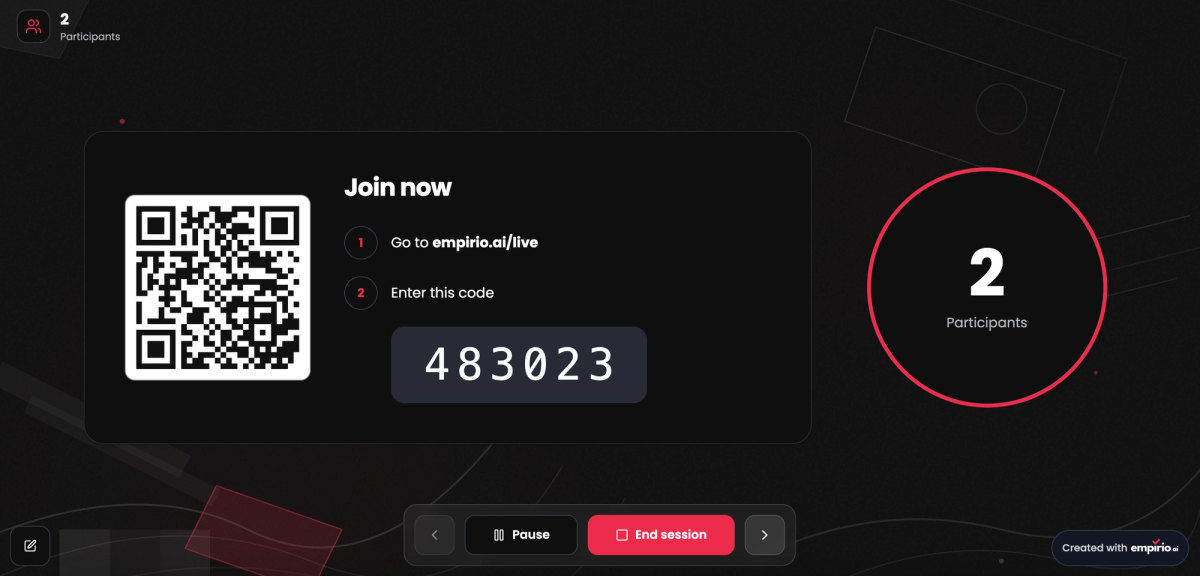
Results appear instantly in the presentation as a bar, column or pie chart. Open answers show up as a word cloud or as a list the audience can upvote and downvote, and you can hide anything inappropriate. You start, pause, end and reopen sessions, with a time limit if you want one. The presentation shows only the overall result, never names. After the session, every response sits in the results area, split by session, so you can compare and export them. The AI suggests questions based on the occasion, the audience and your goal.
On the free plan up to 50 people a month can take part, with unlimited live polls, quizzes and surveys. The prices are: Free, Lite $19, Plus $39, Pro $69 per month (cancelable monthly). Responses are stored on servers in the EU, the AI processing runs there too, and the data processing agreement is part of the free plan already (as of November 2026).
Perfect for: team meetings, workshops, PTA or HOA meetings and lectures.
Strengths
- Live polls, quizzes and surveys in one tool at no extra cost.
- Voting by room code or QR code, no app or account needed.
- Word cloud and an upvote list for open answers.
- Servers in the EU and a data processing agreement from the free plan.
- Every plan stays cancelable monthly.
Limitations
- Free for up to 50 participants a month.
- Export to Excel, CSV and SPSS only from the Lite plan.
- AI analysis only from the Plus plan.
Mentimeter: the classic for interactive presentations
Mentimeter is the best-known tool for interactive presentations and combines slides with live polls, word clouds, scales and quizzes. Menti AI drafts presentations and suggests questions. According to the provider, data is stored in the EU by default, in Ireland. Mentimeter says it does not sign data processing agreements, though, because it considers itself an independent controller for account data.
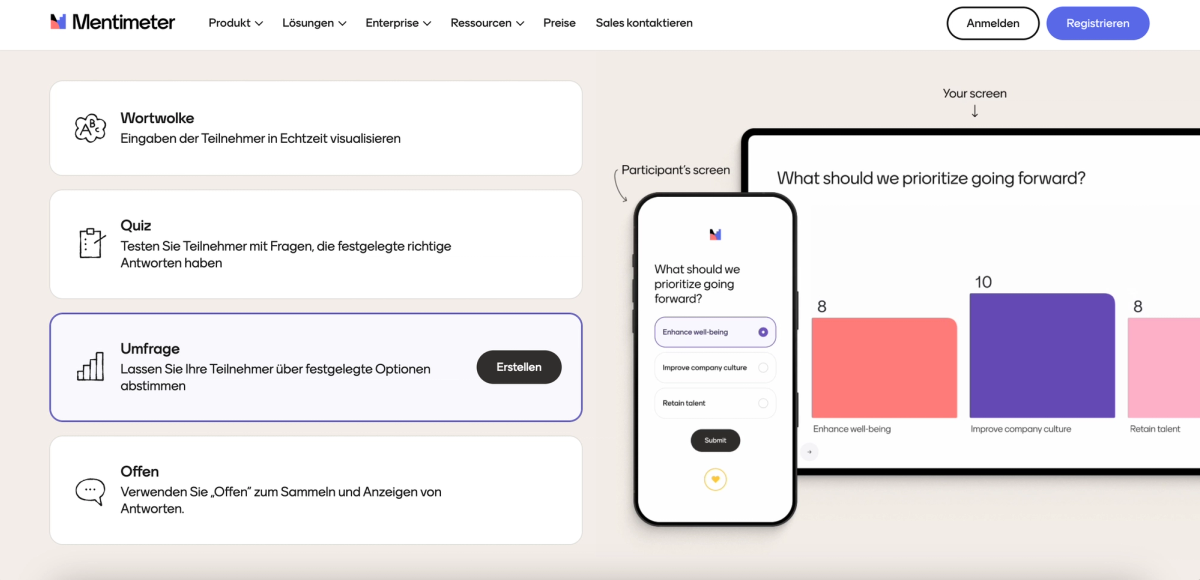
The Free plan lets 50 participants join per month, plus one presentation a month with unlimited participants. The paid plans Basic and Pro are billed per presenter and sold as annual plans only. Basic adds unlimited participants, PowerPoint import and export to Excel and PDF. Pro adds custom branding, team collaboration and moderated Q&A. Plan details are on the Mentimeter plans page, where you can also check the current price in your currency before you commit to a full year (as of November 2026).
Perfect for: presentations, training sessions and lectures with your own slides.
Strengths
- Word clouds, polls and quizzes on the Free plan already.
- Data stored in the EU, in Ireland, according to the provider.
- Menti AI helps put the presentation together.
Limitations
- Only 50 participants a month for free.
- Paid plans are annual only.
- Export only from the Basic plan.
- No data processing agreement, according to the provider.
Slido: polls and Q&A for events
Slido is part of Cisco and strongest at Q&A: the audience asks questions and pushes the best ones up with upvotes, and there are live polls and quizzes on top. Slido plugs into PowerPoint, Google Slides and Teams. For customers who need it, Slido offers hosting in the EU, in Ireland and Germany, and a data processing agreement is included.
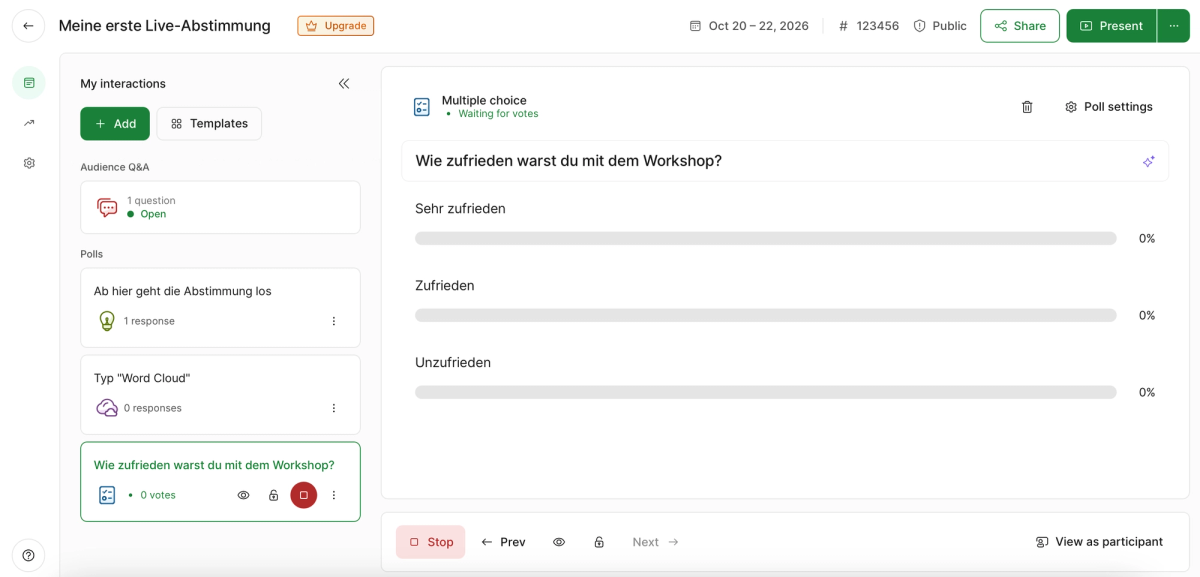
The free Basic plan allows up to 100 participants per slido, with basic Q&A, three polls and one quiz. There's no monthly subscription. You pay either for a one-time package per event that runs for up to seven days or for an annual plan. The Engage package covers up to 200 participants with unlimited polls, quizzes and data export. Schools and universities get discounted education plans, and the current packages and prices are on the Slido pricing page (as of November 2026).
Perfect for: conferences, events and lectures with audience Q&A.
Strengths
- Live polls, quizzes and Q&A with upvotes.
- Free for up to 100 participants per slido.
- Works inside PowerPoint, Google Slides and Teams.
- EU hosting available and a data processing agreement.
Limitations
- Only three polls and one quiz per slido for free.
- No monthly plan, only event packages or an annual plan.
- Data export only with the Engage package.
Polling tools side by side
Two questions are enough for a shortlist: how many people can join for free, and how are you billed after that? Both answers are in the table, and your event decides the rest.
The figures come from the providers' plan pages. Limits and packages change without notice, so it's always worth checking the pricing page before your session.
| Tool | Free up to | The main catch |
|---|---|---|
| empirio.ai | 50 participants per month | export only from Lite |
| Mentimeter | 50 participants per month | no data processing agreement |
| Slido | 100 participants per slido | only three polls on the free plan |
As of November 2026, subject to change.
Which polling tool suits you?
Which polling tool suits you comes down to three things: how often you run polls, how big your audience is and whether your slides come from another program. The table matches the most common situations.
Pick the row closest to yours. If you poll your audience every week, billing matters more than anything else.
| Your situation | What matters then | What that means for the tool |
|---|---|---|
| Weekly team standup | fast, cancel any month | empirio.ai is cancelable monthly on every plan |
| Workshop pulse check | word cloud and scales | empirio.ai and Mentimeter both include them for free |
| Vote at a PTA or HOA meeting | anonymous, no app | empirio.ai shows only the overall result, no names |
| Talk with your own PowerPoint deck | slides and questions together | Mentimeter imports slides from the Basic plan |
| Conference with audience Q&A | questions with upvotes | Slido is designed around Q&A |
| One-off company event with 150 guests | one date, lots of participants | Slido sells packages per event |
Ready-made formats for kickoffs, retros and feedback rounds are waiting in the empirio.ai templates for meetings and workshops, all of them free. To get your audience in within seconds, take a look at our tips on voting with a QR code.
Create a survey for free
With empirio.ai you can create a modern online survey in minutes — free to start.
- AI-built survey
- Adjust by drag & drop
- Real-time analysis
Live poll or survey link: what's the difference?
A live poll runs during a session and shows the result to everyone in the room right away, while a survey sent as a link stays open for days and gets analyzed afterwards. Both use similar question types but serve different goals: the live poll gets the room talking, the survey collects solid data.
That tells you which format to pick. If your workshop needs to decide which topic comes next, a live poll is the right call, because the group works with the result immediately. If you want to know how happy your team is with the new hybrid schedule, you need a survey everyone can fill out in peace, including the people who missed the meeting. At empirio.ai you choose the mode when you create it and can switch it in the editor at any time.
When a WhatsApp poll is enough
For a quick question in a group of friends or among the parents on your kid's soccer team, you often don't need a dedicated tool at all. A poll right inside WhatsApp takes seconds to set up, but it shows everyone in the group who voted for what. Once the vote needs to stay anonymous or appear on a big screen in front of an audience, WhatsApp hits its limit.
Voting anonymously
Anonymity is the real advantage of a live poll over a show of hands. At empirio.ai the presentation shows only the overall result, never names, and nobody needs an account to vote. In a small group, though, answers can often still be guessed, say with three people and one very distinctive free-text answer. How to avoid that is covered in our guide to the anonymous survey.
Common mistakes with live polls
Most live polls don't fail because of the tool but in the first 30 seconds in the room. Three mistakes come up again and again.
All three only show once your audience is already waiting. A test run the day before, with two coworkers on their phones, saves you exactly these moments.
Mistake 1: making the way in too small
A QR code tucked into the bottom right corner of a slide can't be scanned from row ten. Put the room code and the QR code on a slide of their own, large, for at least 30 seconds, and read the code out loud once. Only start the first question when the participant counter stops climbing. That way the people who had to dig their phone out of a bag still get to vote.
Mistake 2: finding the free limit on the day of the event
The free plan easily covers a team meeting with 12 people, but not an annual HOA meeting with 80 homeowners. At empirio.ai and Mentimeter the limit is 50 participants a month, at Slido it's 100 per slido, but with only three polls. Check how many people are coming beforehand, and count every session that month. Otherwise you run into a wall in the middle of the meeting.
Mistake 3: putting open questions on screen without moderation
A word cloud is the liveliest format a live poll has and also the riskiest. One inappropriate word lands on the big screen in front of everybody. Use the tool's moderation (at empirio.ai you can hide inappropriate answers) and only reveal the word cloud once enough answers are in. With five answers it looks empty, with 30 it tells a story.
Tip
Open every live poll with a question that decides nothing, like “What's your go-to coffee order?” Everyone tries joining once without pressure, and by the time the question that matters comes up, the whole room is already in.
Conclusion
The best live polling tool is the one your audience can join in ten seconds, and one that doesn't make you pay for a whole year when you only have a handful of sessions. If you run polls in meetings and workshops regularly and want your data kept in the EU, empirio.ai gets you there for free or on a monthly plan. If you present with your own slides, take a look at Mentimeter, and if you're planning a conference with audience Q&A, look at Slido.
One point decides things in practice more often than it comes up in comparisons. In the US, whether you need a contract with your polling tool depends on whom you ask and what you ask: student records, health information and residents of certain states each come with their own rules. The picture changes once your live poll reaches people in Europe. The GDPR can then apply to a US organization too, for example when it offers its services to people in the EU, as the European Commission explains (accessed October 20, 2026). In that case the tool provider processes personal data on your behalf, and that requires a data processing agreement with the provider (Article 28 GDPR). The UK has the same duty under UK GDPR.
Purely private polls among family and friends are a different matter. A poll in a college class or for a research project is not private: there FERPA, your IRB and your school's rules decide. Whether your specific case falls under the GDPR is for your organization's privacy officer or legal counsel to decide, and at a university for your IRB. This article is not legal advice.
Among the three tools in this comparison, this agreement separates the providers clearly. At empirio.ai it's part of the free plan already, and Slido provides one as well. Mentimeter says it does not sign one, because it considers itself an independent controller for account data. For a US organization that mostly matters once participants in Europe join, so if yours do, settle this point with your privacy officer before the session. On storage, empirio.ai keeps all data in the EU, AI processing included, Mentimeter stores in Ireland by default according to the provider, and Slido offers EU hosting in Ireland and Germany.
What to read next
- Want to test knowledge rather than opinions? The best quiz tools compared
- Need sign-ups for your workshop? The best form tools compared
- Want to follow up in more depth after the session? The best survey tools compared
- Want to make sense of open answers? Open-ended questions in surveys
Want your audience voting live at your next meeting?
Set up a live poll at empirio.ai, show the QR code and watch the results come in as a chart or word cloud. Up to 50 participants a month, it costs nothing.