

It is Friday afternoon, your survey is live, and someone wants to see what came in this week. So you open the survey tool, download the responses, paste them into a spreadsheet, and write a short email around it. Next Friday, the same again. Besides the time it eats, the routine invites mistakes: one number mistyped, one response skipped, and the report no longer matches the data.
Zapier is built for exactly this kind of loop. A saved sequence there is called a Zap. At the top sits the event that starts it, say a new response to your survey. Everything below is what happens next, say a Slack message carrying that response. empirio.ai is listed at Zapier as its own app, and it owns one job in these sequences: the questionnaire. You build it at empirio.ai, participants type their answers there, and empirio.ai stores the responses in the EU.
Automating surveys and forms comes down to two moves. Approve the empirio.ai app once on the Connections page in Zapier, then build as many Zaps as you like: pick the New Response event at the top and hang the action that saves you work underneath, a Slack message, a row in Google Sheets, or a record in your CRM.
📌 Key takeaways
- Zapier connects empirio.ai to more than 9,000 apps and services.
- empirio.ai is the survey and form app inside your Zaps.
- Every empirio.ai integration is free on every plan.
- One approval connects empirio.ai and Zapier for good.
Create a survey for free
With empirio.ai you can create a modern online survey in minutes — free to start.
- AI-built survey
- Adjust by drag & drop
- Real-time analysis
What Zapier is, and why surveys are a good fit
Zapier is one of the oldest automation services around, and it still has the widest selection of apps you can plug into. The interface stays deliberately plain. A Zap is a list that runs top to bottom: the event that sets everything off at the top, one or more actions below it. No code anywhere.
More than 9,000 apps and services are ready to go, from Gmail to Airtable to Mailchimp. Billing runs on tasks. Every action Zapier carries out successfully costs one task (as of September 2026, Zapier pricing page). The event at the top is always free, and so are the built-in helpers like filters and Formatter. AI steps can run higher.
For surveys, that puts the whole bill on two numbers: how many people answer, and how many actions you hang under each response. A survey that fires a single message stays cheap even at high volume. Three actions per response triple the spend without bringing in one extra answer.
What you can automate around surveys and forms
Between writing the first question and reading a finished report, a survey usually passes through five phases. Each one hides manual work nobody will miss. Walk through them once and ask which phase eats the most of your time. That is where your first Zap belongs.
A few examples of what automating a survey actually looks like:
- Creating: the survey gets built on a cue from another system, with questions that match the occasion.
- Sending: the survey link travels on its own to wherever people will actually read it.
- Notifying: your team hears about a new response in the place it already watches, Slack or Google Chat for instance.
- Processing: results land straight in the spreadsheets you set up beforehand, or in the systems your team already works with.
- Analyzing: metrics and charts get produced on a schedule instead of whenever someone remembers.
empirio.ai brings one event and 16 actions to the table. New Response reports every submitted response, and the actions cover the rest, from creating the survey to a cross-tabulation. Spread across the five phases, it looks like this:
| Phase | What Zapier handles | An example |
|---|---|---|
| Creating | Create, edit, publish, and duplicate surveys | Every new course gets the evaluation that fits it |
| Sending | Pull the public link and pass it along | Whoever signs up for the workshop gets the feedback form afterward |
| Notifying | Start the Zap on every submitted response | The response is in your inbox before you open the dashboard |
| Processing | Read responses and forward them | Every piece of feedback becomes a card on the project board |
| Analyzing | Metrics, cross-tabulations, exports, and charts | On the first of the month the report is waiting as a PDF |
One limitation belongs here: empirio.ai does not send email itself inside a Zap. Your mail app does the sending, while empirio.ai supplies the link and the data.
When automation is worth it, and when it is not
A Zap only earns its keep when the same chore comes back around. Setup runs about half an hour, and after that it works without you. You glance at it now and then, nothing more. For a single survey with thirty responses, the hand analysis is long finished before the Zap has run even once.
Three signals say the effort will pay off:
- The survey stays open permanently and new responses keep arriving, as a feedback form on your website or a rating after every job.
- A response needs a prompt reaction, or someone waits longer for an answer than they should.
- The numbers get reused somewhere else, in the CRM, on the project board, or in the monthly roundup.
Zapier adds a short back-of-the-envelope check to that. It comes out friendlier than most people expect, because the trigger costs nothing. Only what happens after it gets counted. If your Zap posts every new response to Microsoft Teams, that is exactly one task per response: two hundred responses in a month are two hundred tasks. The free plan comes with a hundred, so it carries roughly a hundred responses as long as you stick to that one action. Add a second action, say the row in the spreadsheet, and the number doubles. At that point the free plan is out of the running anyway, since it allows only two steps per Zap. The full math with examples comes further down.
Only one thing really argues against a Zap: that nobody looks at it again afterward. A sequence that has been writing empty rows for three weeks because a question got reworded costs more trust in the end than it ever saved in time.
The best Zap is the one you forgot about two weeks ago, because it simply runs.
empirio.ai in the Zap: the app for surveys and forms
Inside a Zap, empirio.ai is the spot where real people type something in. Zapier moves data from A to B, but somebody has to supply it first. That is where empirio.ai sits, an online survey tool out of Germany: at the survey, at the form, at the one feedback question after the appointment.
That piece decides more about the outcome than it looks like at first. The cleanest sequence in the world returns little if too few people answer at the front of it. Four things hang on it:
- First impressions. empirio.ai templates cost nothing and look current, on a phone exactly as much as on a desktop. There is nothing to configure.
- The range of questions. With 20+ question types, from single choice to matrix and ranking to the Net Promoter Score, you can cover the unusual cases too, all of it on the free plan.
- Where the data sits. Responses are stored in the EU, and the data processing agreement comes with the free plan. Nothing in federal US law asks you for a contract like that. California asks for its counterpart, which Cal. Civ. Code § 1798.100(d) calls a service provider agreement, and only of businesses above the CCPA thresholds (CPPA FAQ). For a company, a nonprofit, or a university running the survey, this is often where the choice gets settled.
- Your choice of route. You can build the questionnaire and read the responses at empirio.ai itself, with the AI features and the interface you know. Or you can drive the same thing through Zapier, whichever suits you better.
Any time your Zap needs an opinion from actual people, after the appointment, after the purchase, or before the project kicks off, empirio.ai takes that step. Zapier handles the rest of the route.
Create a survey for free
With empirio.ai you can create a modern online survey in minutes — free to start.
- AI-built survey
- Adjust by drag & drop
- Real-time analysis
Setting up empirio.ai in Zapier, step by step
Unlike some automation services, Zapier has nothing to install. empirio.ai is already in the directory and can be picked right away. Three moves and you are running, and none of them needs admin rights.
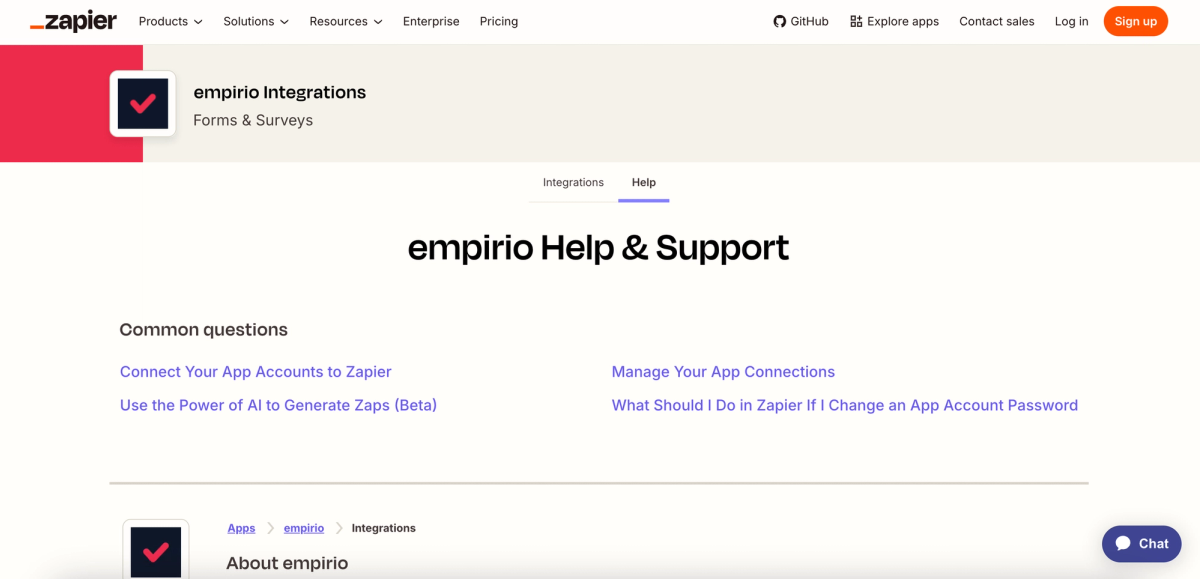
What the app brings along is listed on the empirio.ai integration page at Zapier: one event and 16 actions, sorted into surveys and responses.
Step 1: create the connection to empirio.ai
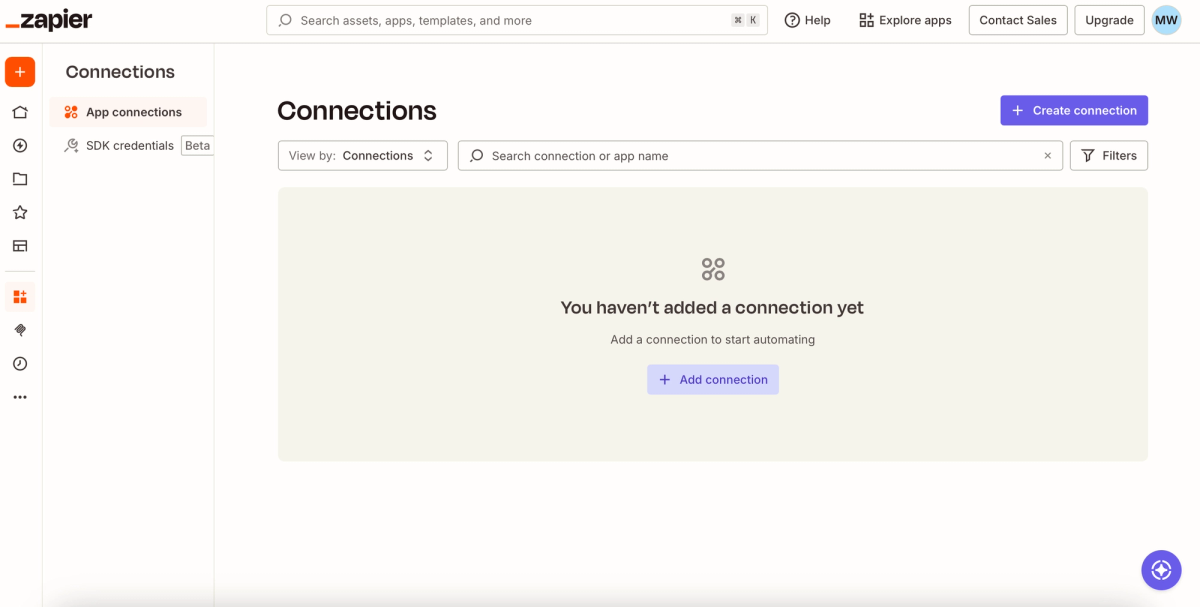
Open the Connections page in your Zapier account. If you have never connected anything there, you get an empty list and an Add connection button.
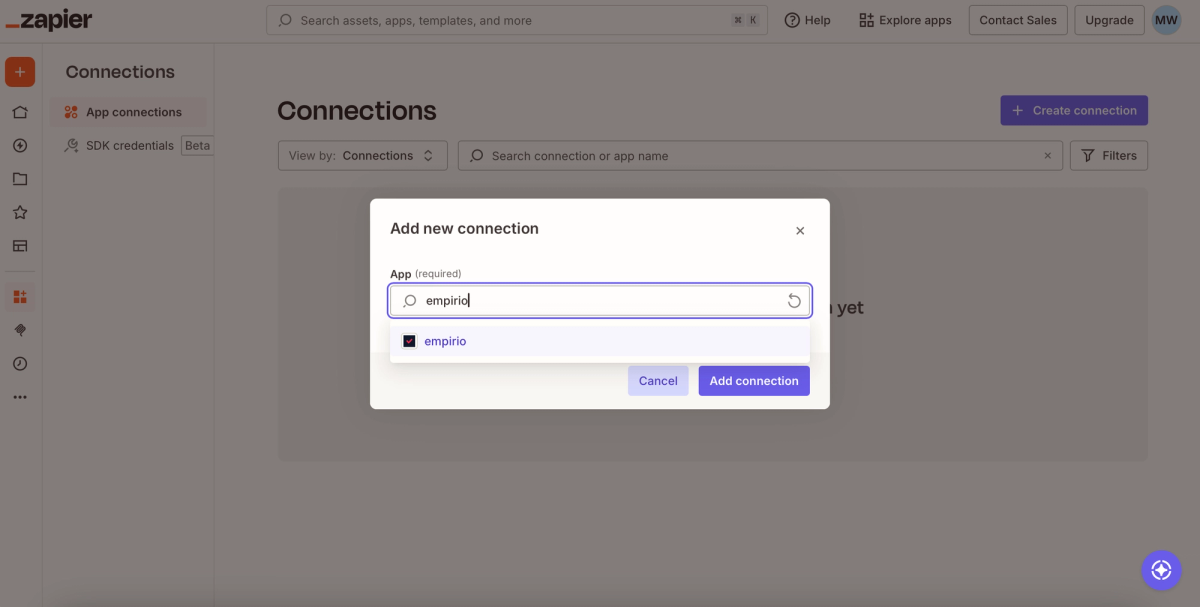
In the Add new connection window, the first few letters are enough. Type empirio, which is how the app is listed in the directory, pick the suggestion, and confirm with Add connection.
Step 2: approve the connection
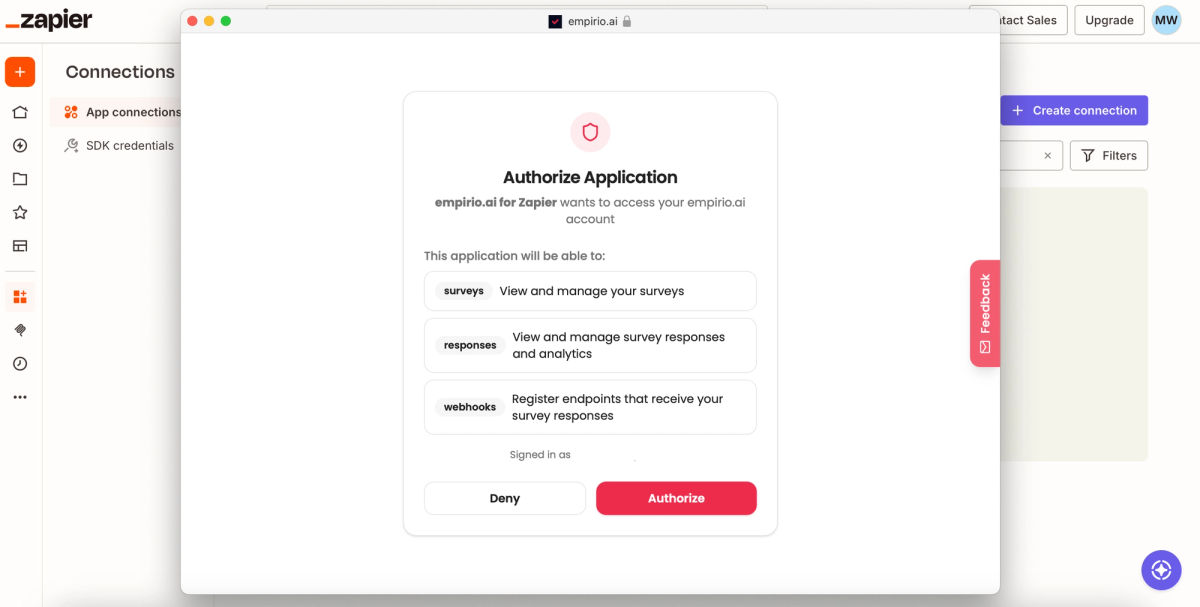
empirio.ai takes over the next step in a window of its own titled Authorize Application. It spells out what Zapier is allowed to do afterward, in three points: view and manage your surveys, read the responses along with the analysis, and register endpoints that report new responses. The access goes no further than that. Authorize confirms it, the window closes, and you can revoke it at empirio.ai whenever you want.
Step 3: pick the trigger and test it
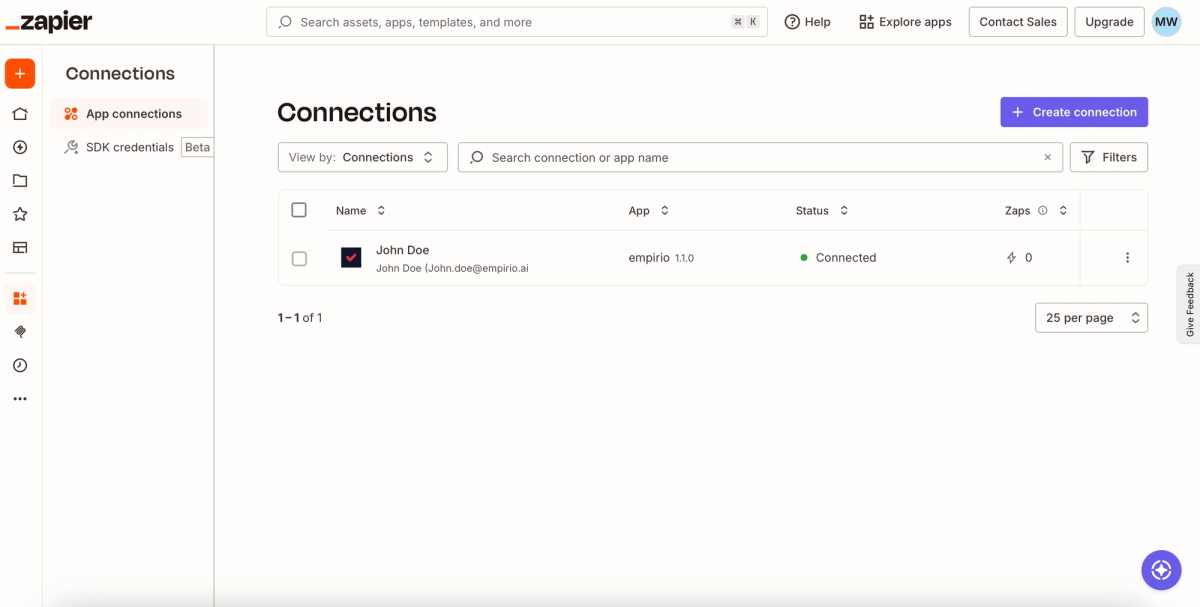
Back in the list, the connection shows up with the status Connected. From here on it applies to every Zap you create later. There is no key to copy anywhere.
In the editor, put empirio in the first position and choose New Response. This event does not poll at intervals. empirio.ai reports it the moment someone submits. Then pick your survey from the dropdown and pull a test response. It shows you every field you can work with in the steps below.
Heads-up
Two steps per Zap is all the free plan allows: the event and one action. Filters and paths are missing there entirely and start on the paid plan (as of September 2026). The moment you want to react to particular responses or do two things in a row, the paid plan is the only way through.
Nothing is charged on our side. empirio.ai integrations are included on every plan, the free one among them. An account is enough, and no credit card is needed.
Your first Zap in the editor: two steps will do
The editor arranges everything in a single column, top to bottom. The event at the very top, the actions below it in the order they should run. A plus between two cards slides another step in between.
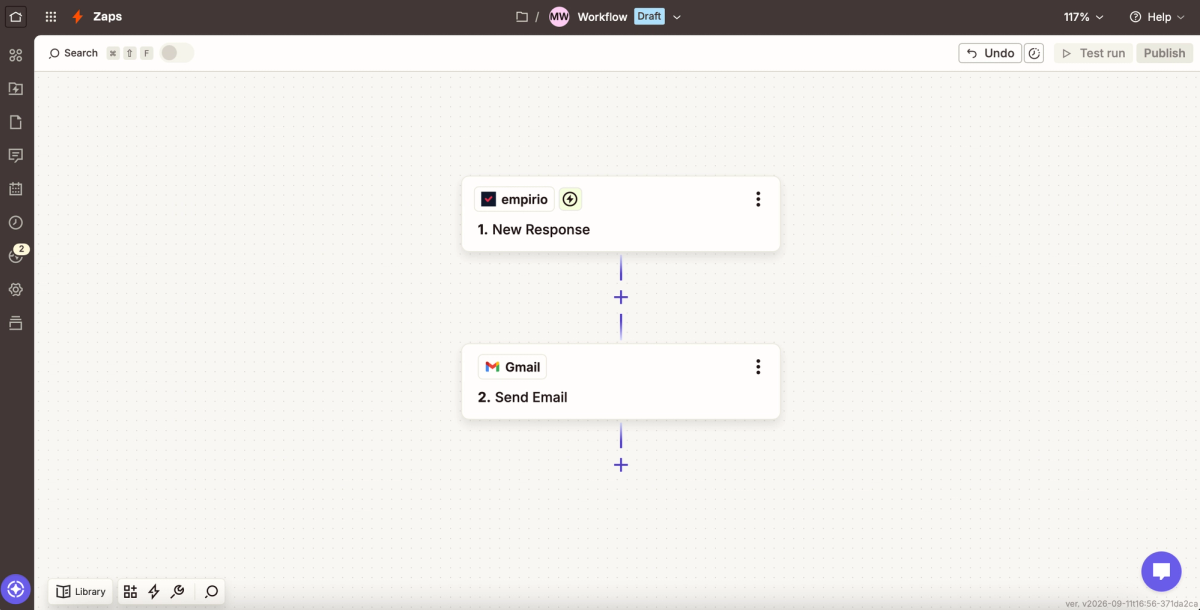
Two cards make up the Zap in the screenshot. empirio with New Response on top, Gmail with Send Email underneath. A response comes in and seconds later it is sitting in the inbox as an email. That is all it takes for nobody to have to open the dashboard again.
Up in the corner it still says Draft until then. Test run sends one pass through, Publish puts the Zap into service. After that it speaks up only when something actually arrives.
Three templates that cover almost every case
However different the occasions look, nearly all of them come down to three patterns: notify, store, report. Two start when a response arrives, the third runs on the clock. Once you have seen all three, you usually recognize your own plan in one of them.
empirio.ai publishes a finished template for each group. Take one, attach your connection, pick the survey, and that is it.
Template 1: a notification the moment someone answers
Event on top, message below, nothing in between. A useful Zap does not get shorter than that, which is exactly why it still fits inside the free plan. It pays off most on surveys that stay open for months and deliver something only now and then.
- Straight to the inbox through Gmail or Outlook. The simplest case, and the one most people set up first.
- Into the team channel through Slack or Google Chat. Handy as soon as several people should be reading along.
- Critical responses only. A filter in front checks the rating: anyone landing between 0 and 6 on the Net Promoter Score sets off the message, everyone else passes through silently. This variant needs a paid plan.
Template 2: file responses into other systems automatically
Same beginning, different continuation. Instead of notifying someone, the Zap writes the response wherever the work continues. Worth it any time somebody would otherwise be retyping it.
- Row by row into Google Sheets or Airtable. Map the fields carefully once and the spreadsheet stays tidy even when someone skips a question.
- As a contact in HubSpot or Mailchimp. Useful wherever the survey collects an email address, in a customer survey for example.
- As a task in Trello, Asana, or Notion, when a piece of feedback turns into a to-do anyway.
Template 3: recurring reports on activity
Nothing triggers this one except the calendar. Zapier pulls the results at the time you set and sends them on. If you already assemble your weekly numbers by hand, this is where you win the most time back.
- Raw data as an attachment, as CSV, Excel, JSON, or SPSS.
- Finished charts instead of columns of numbers, as PowerPoint, PDF, Word, or an image package.
- The quick status with no file at all: how often the survey was opened, how many started it, and how many made it to the end.
Tip
Point the Zap at your own inbox first and push three test responses through the survey. Once the order and the content of the fields look right, swap the destination for the CRM or the mailing list.
Alternatives to Zapier
Zapier is convenient, though not always the best pick. Teams already working with another service are better off staying there. Anyone who would rather type than click gets there faster through a chat. And if you want to connect a system of your own, go straight to the API.
All of these routes come with empirio.ai regardless of plan:
- Other automation services: n8n and Make follow the same principle. n8n counts one execution of the whole workflow rather than each individual step, which makes a noticeable difference on longer chains.
- AI assistants: the MCP server connects Claude, ChatGPT, and other agents directly. You describe in the chat what you want to know, and the analysis comes back in the same window.
- Your own systems: webhooks and the REST API will hook up practically anything, including software you wrote yourself. The empirio.ai developer documentation covers how.
For what the assistant route feels like, see the walkthrough on running a survey with Claude and the article on the empirio.ai MCP server. One difference does stay put, though: a chat answers when you ask. A Zap works while you sleep.
Zapier Forms or empirio.ai?
When you build a sequence at Zapier, at some point you need the form itself. Two options are open: Zapier Forms, which ships with the product, or empirio.ai as a separate app. Which one fits depends on what you want to ask and what should happen to the answers afterward.
Zapier Forms only picked up that name recently. Before, it went by Interfaces. It lets you build simple questionnaires in the same tool the Zap runs in, with no second account and no second login. You will find it in the menu under Automation, right beside Zaps, Tables, and Agents.
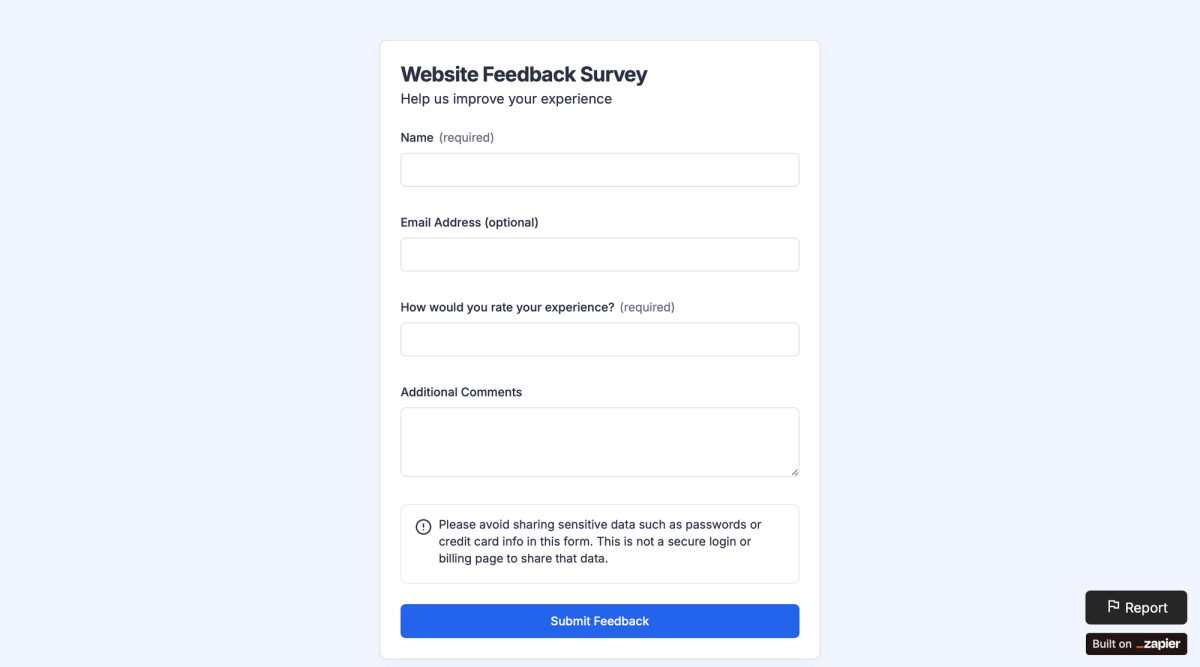
The screenshot marks the boundary pretty precisely. The rating question is a plain text field, not a scale. Anyone trying to measure something with it gets free text back and has to sort it out afterward.
What speaks for Zapier Forms
- The billing. The forms themselves consume no tasks. The number of responses is not capped either, and you pay only for what the Zap does afterward.
- The free entry point. Ten pages per account, as many form projects as you want, the basic components, and embedding on your own website are all there without a plan (as of September 2026, Zapier pricing page).
- The proximity to the sequence. Form and Zap live in the same place, so there is no switching back and forth.
Where Zapier Forms stops
- Design and logic cost money. Conditional logic, your own colors, and password protection start on the Professional plan, which begins at around $30 a month. The Built on Zapier note in the bottom right does not disappear until the Team plan.
- The question types are basic components. Scales like the Net Promoter Score, matrix questions, and ranking are not there.
- No analysis is included. You get the answers as data. Metrics, cross-tabulations, and charts happen somewhere else.
Which tool for what
| Tool | Perfect for | Drawback |
|---|---|---|
| Zapier Forms | Simple forms, and for anyone who would rather not add a second app | Basic question types, no analysis, plainer look |
| empirio.ai | Surveys and forms that look modern, are easy to fill in, and whose data is processed entirely in the EU | One more account is needed, though you connect it to Zapier in a few clicks |
A useful rule of thumb is to ask what you plan to do with the answers in the end. If you are collecting a name, an email address, and a request, and the result should become a task or an email, Zapier Forms is plenty. If you want to measure an opinion, if you need scales, a matrix, or the Net Promoter Score, if you want to filter, compare, and pass the answers on as a report, take empirio.ai as the form in the Zap.
A third point settles this more often than comparisons let on: where the data sits. Zapier processes customer data on AWS servers in the United States and explicitly offers no option to keep it in the EU only (as of September 2026, Zapier data privacy overview). At empirio.ai, survey data stays in the EU, and the data processing agreement is in place from the moment you register. If European processing is what you want for customer feedback, for employees, or for study participants, that is what empirio.ai offers.
The Zap behind it looks the same either way, by the way. You only swap out the first step.
Common mistakes when automating
A Zap rarely falls over while you are setting it up. It falls over weeks later, quietly. Five points come up often enough to be worth a look before the sequence goes into permanent service.
- Renamed question, empty field. Fields carry the question titles as their names. Reword a question and Zapier no longer finds the old name, so it writes an empty cell with no error message. Test once after every change to the survey.
- Two steps is the ceiling on the free plan. Event plus one action, and that is the end of it. Filters do not exist at all below the paid plan (as of September 2026). So if you want to react only to the bad ratings, the free route will not get you there.
- The bill grows with the responses. Three actions times a hundred responses are three hundred tasks. The event and the filters do not count, but every action that executes does, and AI steps sometimes count more than once. Run the numbers before the Zap goes live for good.
- Edited is not the same as published. Update Survey edits the draft. Leave out Publish Survey afterward and participants keep seeing the old version, while the task has already been charged.
- What comes back is a link to the file. The file itself stays with us, and the link expires after about an hour. Many file fields in Zapier fetch the file through it on their own, the Gmail attachment among them. Check on the first test run that a file actually arrives and not a link.
What does Zapier cost for surveys and forms?
The pricing question fits in one sentence: you pay for what your Zap does, not for what sets it off. The event at the top is free, and every action that executes successfully after it costs one task. Zapier Forms sits outside the calculation altogether, since the forms themselves consume no tasks at all (as of September 2026, Zapier pricing page).
Something follows from that which surprises a lot of people: whether your questionnaire lives at Zapier Forms or at empirio.ai makes no difference to the task counter. Both tools sit in the trigger position, and that costs nothing. Only the Slack message your Zap sends afterward counts as a task, and it is the same single task either way. There is one exception: run a form with no Zap behind it and simply collect the answers, and Zapier charges you nothing at all.
Five worked examples for one month
With those rules you can work out a month in advance. You need two numbers: how many responses you expect, and how many actions your Zap runs per response. Every example shows both sides, the Zapier plan and the empirio.ai plan. empirio.ai is priced in euros in every country, Zapier in US dollars, so the two totals stay separate.
Case 1: every new response brings a Slack message. Forty responses a month, one action per response.
| Units | Cost | |
|---|---|---|
| Zapier | 40 tasks | free plan, $0 |
| empirio.ai | 40 responses | free plan, 0 € |
| Total | 0 € plus $0 |
Case 2: the same Slack message, more traffic. Ninety responses a month, still one action per response.
| Units | Cost | |
|---|---|---|
| Zapier | 90 tasks | free plan, $0 |
| empirio.ai | 90 responses | Lite, 19 € |
| Total | 19 € plus $0 |
Case 3: every response fires an email through Gmail and also lands in Google Sheets. Two hundred fifty responses a month, two actions per response. That makes three steps in the Zap, and the free Zapier plan allows only two.
| Units | Cost | |
|---|---|---|
| Zapier | 500 tasks | Professional with 750 tasks, around $30 |
| empirio.ai | 250 responses | Plus, 39 € |
| Total | 39 € plus around $30 |
Case 4: every Friday an email goes out with the current results. Here the calendar starts the Zap, not the response. Four runs a month, two actions each: retrieve the results and send the email. Eighty responses come in over the same month.
| Units | Cost | |
|---|---|---|
| Zapier | 8 tasks | Professional because of the three steps, around $30 |
| empirio.ai | 80 responses | Lite, 19 € |
| Total | 19 € plus around $30 |
Case 5: a large survey with three actions per response. Three thousand responses a month, each one posting to Slack, landing in Google Sheets, and creating a contact in the CRM.
| Units | Cost | |
|---|---|---|
| Zapier | 9,000 tasks | Professional with 10,000 tasks, around $194 |
| empirio.ai | 3,000 responses | Pro, 69 € |
| Total | 69 € plus around $194 |
The fifth case shows the rule most clearly: at empirio.ai the price grows with the number of participants, at Zapier with the number of actions. Saving money there means cutting steps, not answers.
When you upgrade, and with whom
Three thresholds decide it, and genuinely no more than three. Each one belongs to a different provider. Know them and you can tell at planning time which one will reach you first:
- At Zapier you upgrade as soon as a Zap needs more than two steps, or more than a hundred tasks add up in a month. Filters, Formatter, and the webhook connection hang off the paid plan as well.
- At empirio.ai the number of participants is the only thing that decides: 50 a month are free, Lite brings 100 for 19 €, Plus 1,000 for 39 €, Pro 3,000 for 69 € (as of September 2026, empirio.ai pricing). The integration itself comes with every plan.
- At Zapier Forms it is the ten pages per account, or the wish for conditional logic, custom colors, and password protection. Professional lifts the limit to 50 pages, Team to 150.
Note
All the Zapier amounts here assume monthly billing. Professional starts at $29.99 a month for 750 tasks, and larger bundles cost more: 10,000 tasks come to $193.50. Paying a year up front saves a third, by Zapier's own account. empirio.ai bills in euros in every country, the United States included, so the two figures never merge into one number.
The cheapest split
All told, you get surprisingly far without paying anything: one survey at empirio.ai, one Zap with one action, up to fifty responses a month, free plan on both sides. And when you do eventually spend money, it is worth looking at what for. The 19 € at empirio.ai buys you more participants, logic jumps, and the response export. The roughly $30 for Professional at Zapier buys you longer sequences and better-looking forms. It changes nothing about the questionnaire itself, the question types, or the analysis.
The cheapest split almost falls out on its own from there. Zapier does what Zapier does best, namely the connection to your other 9,000 apps. empirio.ai handles the questionnaire, the look, the analysis, and the processing of the data in the EU. Each part plays to its strength, and on both sides the free plan holds out longer than you would think.
Conclusion
Automating surveys and forms pays off whenever the same routine comes back around, and that is exactly what Zapier is built for. With empirio.ai as the app inside it, you cover the whole stretch: the questionnaire looks like one coherent piece, the responses are processed in the EU, and Zapier takes everything after that. Notify, store, and report run without you, and you get back the time that used to go into downloading, copying, and retyping.
The best part is that both tools have a genuinely usable free offering. So you can try it out at your own pace, set up a first sequence, and see whether it really takes work off your hands. If it does, you automate more of it bit by bit, use more features, and upgrade exactly where things get tight first. Start small, with two steps, and add something only once the first two weeks have stayed quiet.
Two situations argue against Zapier. For a one-time survey, the setup takes longer than analyzing by hand. And on very long chains with many actions, n8n works out cheaper, because there the whole workflow counts rather than each individual step. If you would rather automate your processes with n8n anyway, connecting empirio.ai to that tool is no trouble either.
Where to go next
- Planning long chains without a task counter? Automate surveys with n8n
- Still looking for the right tool? Survey tools compared
- Want to skip questions depending on the answer? Logic and branching in surveys
- Collecting personal data? Data protection in surveys
- Want the survey on your own page? Embedding a survey in a website
Ready for your first Zap?
Create your first survey free at empirio.ai, share the link, and connect Zapier with the matching empirio.ai app. After that, notifying, storing, and reporting run on their own, and you see the results where you already work.