

You want to settle quickly where you are eating this weekend or when the next club meeting works for everyone. WhatsApp has a poll feature built in for exactly that, and it works almost identically on iPhone and Android.
You create a WhatsApp poll inside a chat through the plus or paperclip icon, type in one question and up to 12 answers, and use two toggles to decide whether several answers are allowed and whether the names of the voters stay hidden. The second setting only exists in group chats. We clicked through the feature on an iPhone and tested every limit ourselves.
📌 Key points at a glance
- WhatsApp allows one question with up to 12 answers.
- The toggle for hidden names only appears in groups.
- From the first vote onwards nothing can be changed.
- WhatsApp rejects two identical answer options.
- Free text answers are not possible in WhatsApp polls.
Create a survey for free
With empirio.ai you can create a modern online survey in minutes — with 100% data protection from Germany.
Start for freeWhat is a WhatsApp poll and when does it make sense?
A WhatsApp poll is a built-in feature that lets you send one question with several answer options inside a chat. Everyone in the chat sees the question, taps their answer, and the votes update live underneath.
It feels closer to a quick show of hands than to a real survey. That is exactly where its strength lies. It is fast, everyone can join in, and nobody has to sign up or install an app. You use what everyone has open anyway.
Typical situations where a WhatsApp poll fits
- Finding a date with friends or in a club
- Who brings what to a birthday, a cookout or a trip
- A quick opinion on a decision in the team chat
- A choice between a few options with no analysis afterwards
As soon as you want to ask more than one question or analyze the results systematically later, the feature runs into its limits. That is why it is not enough for a survey for your thesis.
Creating a WhatsApp poll on the iPhone
On the iPhone the poll feature sits behind the plus icon to the left of the text field. It is available in one-on-one chats and in group chats, provided your WhatsApp version is up to date.
The whole thing takes less than a minute if you know which answers you want to offer. And that is the catch, because the answers can no longer be changed once the poll is sent.
Step by step to a finished poll
- Open the chat. Pick the one-on-one or group chat where the poll should run.
- Tap the plus icon. It sits to the left of the text input field.
- Choose Poll. The entry sits in the attachment menu among the other options.
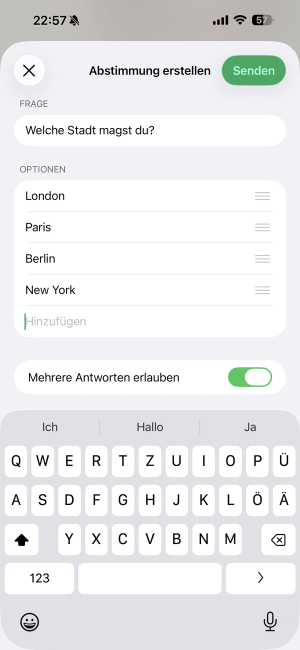
- Type the question. For example: When does our next meetup work for you?
- Enter the answers. Up to 12 options are possible, and every answer has to differ from the others.
- Sort the order. Drag and drop the answers into the position you want.
- Check the settings. Decide on both toggles before you send.
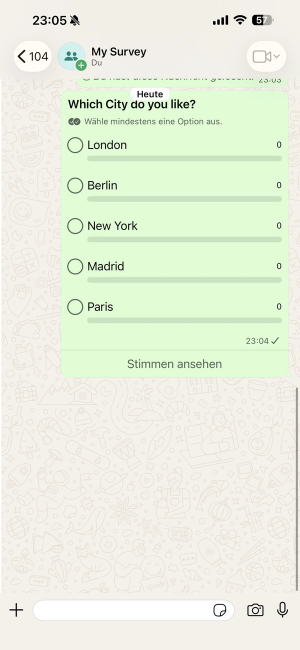
- Send. The poll appears in the chat right away.
Here is how that looks in the app, on the left while you create it and on the right from the point of view of the participants:
 |
 |
You can vote yourself, and it is worth doing. A poll that already has a first vote looks like it has started and tends to collect further answers faster.
Creating a WhatsApp poll on Android
On Android the same route gets you there, only the icon is different. Depending on the manufacturer and your WhatsApp version you will find a paperclip or a plus icon in the text input area.
Apart from that the screens are practically identical on both systems. The limits are the same too: 12 answers, no duplicates, no free text fields.
Step by step on Android devices
- Open the chat. One-on-one or group chat, both work.
- Tap the paperclip or the plus. The icon sits to the right of the text field.
- Choose Poll. The entry sits in the attachment menu.
- Enter the question and the answers. 12 options at most, and each one has to be unique.
- Set the toggles. Multiple answers and, in groups, hidden names.
- Tap the green send arrow. That sends the poll off.
If the poll option is missing, check the Play Store for an update. On very old Android versions the feature can be missing entirely, because WhatsApp no longer supports those systems.
Create a survey for free
With empirio.ai you can create a modern online survey in minutes — with 100% data protection from Germany.
Start for freeThe two settings you should know about
WhatsApp offers exactly two toggles while you create a poll: Allow multiple answers and Hide voter names. Both decide more about the result than the wording of the question does, and neither can be switched after you send.
The second toggle is the more important one, and it is also the one most people miss. It does not always show up.
Allow multiple answers
With the toggle off, each person picks exactly one option. With it on, they can check as many as they like. For scheduling you almost always want it on, because otherwise you force everyone into a single choice even though several dates would work. For a real decision you leave it off, because otherwise the result spreads out and nobody is any wiser.
Hide voter names
This toggle keeps the votes invisible for the other participants, so only the number per option stays visible. One detail matters here that WhatsApp does not explain: the toggle appears only in group chats. If you start a poll in a one-on-one chat with a single person, the setting is missing completely and the vote is always open (as of August 2026).
⚠️ Careful
Neither toggle can be changed after you send. If you forget multiple choice or decide you want the names hidden after all, you have to delete the poll and set it up again. A quick look at both toggles before sending saves you exactly that detour.
Editing, ending or deleting a poll
A WhatsApp poll that has been sent can only be corrected inside a very narrow window: you can edit the question afterwards as long as nobody has voted. From the first vote onwards the question is locked too, and the answer options were locked from the start.
In practice that means a poll freezes with the first vote. Since the first vote in an active group often arrives within seconds, there is barely any time left for corrections.
What works afterwards and what does not
- The question can be edited, but only before the first vote.
- Answer options can never be changed or added to.
- The order of the answers is fixed from the moment you send.
- The two toggles can no longer be switched after sending.
- Your own vote can be changed or withdrawn at any time.
If you got the answers wrong, or the first vote was faster than your correction, the only way out is to delete the poll and create a new one. Press and hold the poll and pick the trash icon, then either Delete for me or Delete for everyone. The second option is only available inside the usual WhatsApp deletion window.
There is no function for ending a poll. Once the vote is settled, just write a short message in the chat so that nobody votes any more.
Are WhatsApp polls anonymous?
By default WhatsApp polls are not anonymous, and everyone in the chat can see who voted for which option. In group chats you can switch that off with the Hide voter names toggle, and in a one-on-one chat that option does not exist.
The difference between hidden and anonymous is bigger than it sounds. Hidden means that the other participants cannot see who picked what. It does not mean that the connection stops existing. The votes still run through the phone numbers of the people involved, and WhatsApp belongs to Meta.
Hidden is not anonymous. Anonymous means that nobody can make the connection. Not even the provider.
For friends or a club the toggle is entirely enough. As soon as it is about employee opinions, feedback on a manager or other sensitive topics, the WhatsApp poll is the wrong choice, because real anonymity cannot be guaranteed technically. Setting up a genuinely anonymous survey hangs on exactly that distinction.
Create a survey for free
With empirio.ai you can create a modern online survey in minutes — with 100% data protection from Germany.
Start for freeWhere WhatsApp polls hit their limits
The limits of the WhatsApp poll are quickly told: one question per poll, 12 answers at most, no free text fields, no duplicate options and no analysis beyond the plain vote count.
What stands out while testing is how strict WhatsApp is about the answers. The app will not even accept two identical options, and it flags the conflict while you type. So if you want to offer Friday twice, you have to make the options distinguishable, for example Friday morning and Friday evening.
Only one question per poll
WhatsApp allows exactly one question with up to 12 answer options. If you want to cover several aspects, you have to send several polls in a row. The chat gets messy fast, and with every extra poll participation drops noticeably.
No free text answers
Participants can only choose from the options you set. There is no field for their own answers. If you want to collect opinions and reasons, you get them at best as loose chat messages underneath, and those are hard to assign cleanly later.
No real analysis
What you see is the number of votes per option, nothing more. There is no export, there are no charts and there is no way to filter by subgroup. For a quick decision that is enough, for an analysis it is not.
Reach ends at the chat
A WhatsApp poll only works inside the chat it sits in. You cannot send it to outsiders by link, you cannot share it publicly and you cannot embed it on a website. If you want to reach customers or club members outside the group, you need a different tool.
Alternatives to the WhatsApp poll
As soon as you need more than one question, want to promise real anonymity or plan to analyze the results, three alternatives come into play: a survey tool, a specialized scheduling tool or a forms service.
Which one fits depends less on the feature list than on the question of what should happen to the answers afterwards.
Survey tools
Survey tools are built for exactly what WhatsApp cannot do: several questions, different question types, anonymous answers, live analysis and export. You create the survey once, share the link and collect every answer in one place. And of course you can still send that link through WhatsApp afterwards.
Tools just for scheduling
If all you want is to find a date that works for everyone, specialized tools are often faster than any survey. In exchange they cannot do anything else, so you cannot ask any content questions with them.
Forms services from the big providers
Google Forms, the free forms tool from Google, and Microsoft Forms are an option if you work inside one of those ecosystems anyway. Both are set up quickly, but they process part of the data outside the EU. If you survey people in a professional setting, check that first, and the common survey tools in comparison show where the differences lie.
WhatsApp poll or survey tool: which one fits you?
The choice between WhatsApp and a survey tool comes down to three questions: how many questions are you asking, how sensitive are the answers, and do you have to analyze the result afterwards?
The table sorts the most common cases. If two rows fit, the one with the more sensitive data decides.
| Use case | WhatsApp poll | Survey tool |
|---|---|---|
| Scheduling with friends | ideal | overkill |
| Spontaneous opinion in the group | ideal | overkill |
| Several questions in a row | awkward | ideal |
| Answers in your own words | not possible | standard |
| Truly anonymous answers | not possible | standard |
| Employee or customer survey | unsuitable | ideal |
| Survey for a thesis | unsuitable | ideal |
| Analysis and export | not possible | charts included |
As of August 2026, subject to change.
What stands out is that WhatsApp wins the first two rows and loses every row after that. That describes the feature well: fast and unbeatably convenient, as long as nothing depends on it.
Create a survey for free
With empirio.ai you can create a modern online survey in minutes — with 100% data protection from Germany.
Start for freeCommon mistakes with WhatsApp polls
The most common mistakes with WhatsApp polls do not happen while you write the question, they happen when you send it: forgotten toggles, too many options and answers that cannot be corrected afterwards.
All five can be avoided with one look before sending, which pays off especially because correcting is simply not possible.
Too many answer options
Twelve options are allowed, but from about the fifth on the chat gets cluttered. The votes spread so thinly that no clear tendency comes out at the end. Three to four options are the best compromise in practice between choice and meaning.
Multiple choice forgotten
The toggle is off by default, so each person gives exactly one answer. For scheduling that is almost always wrong, because several dates could work. You usually notice only when the first people ask about it, and by then the only fix is a new poll.
Answers not thought through first
Because the options cannot be changed after sending, every forgotten answer costs you a completely new poll. When in doubt, write the options into a note first and then copy them over. WhatsApp will not accept two identical answers anyway.
Anonymity assumed
Many people think WhatsApp polls are anonymous because there is a toggle for hiding the names. But hidden is not anonymous, and in a one-on-one chat the toggle is missing entirely. In a professional setting this assumption regularly causes trouble.
Wrong chat picked
It sounds trivial, but it happens all the time: the poll lands in the wrong group. A glance at the chat name before sending is enough to save you the deleting and the explaining afterwards.
Privacy with WhatsApp polls
WhatsApp belongs to Meta and processes data outside the EU as well. For private votes among friends that hardly matters, but in a professional setting the picture changes.
The rule of thumb: as soon as you survey people as a company, a club or a school, you are responsible under privacy law, no matter how harmless the question looks. That includes the GDPR, if you collect data from people in the EU. If in doubt, the assessment of your privacy officer is what counts.
Where it gets tricky
- Employee surveys through private messenger accounts
- Customer surveys through WhatsApp Business without consent
- Questions about health, background or political opinion
- Anything where you promise anonymity without having it
With sensitive topics a second problem comes on top of privacy: an open vote delivers socially desirable answers instead of honest ones. The full picture is in the guide to data protection and GDPR in surveys. This article is no substitute for legal advice.
When WhatsApp gets too small for you
Switching to a survey tool pays off from the moment you ask more than one question, need answers that people write themselves or have to document the result. For quick scheduling WhatsApp stays the better choice, and no tool changes that.
We build a survey tool ourselves, so here is the disclosure: empirio.ai, an online survey tool from Germany, belongs to us. What it can do and where it does not fit are both in here anyway.
What a survey tool adds on top
- Several questions in one questionnaire instead of a single one
- Open text fields for answers in your own words
- Anonymous participation without an account for the respondents
- Live analysis with charts and export
- Distribution by link, QR code or email
You then simply send the finished survey link in the chat, which keeps the convenient part of WhatsApp. Ready made questionnaire templates take the start off your hands.
Conclusion
The WhatsApp poll is a good tool for what it was made for: one question, a few options, a fast answer. It is ready in 30 seconds, everyone can join, and nobody needs anything extra. The price for that is a set of fixed limits, and the most important one is that the answers cannot be corrected after sending.
Spend five seconds thinking about the answer options before you send. They are the only part you cannot change afterwards.
Where to go next
- Want to know which tool fits your case? The best survey tools compared
- Should your survey really stay anonymous? How to create an anonymous survey
- Looking for ready made questions to reuse? Questionnaire templates
- Want to build the questionnaire properly? How to create a questionnaire
Need more than one question?
With empirio.ai you build a questionnaire with several questions, open answers and anonymous participation, and the data stays in the EU. You then simply share the link through WhatsApp. Create a survey for free
Frequently asked questions
Create a survey for free
With empirio.ai you can create a modern online survey in minutes — with 100% data protection from Germany.
Start for free