

The flyer has been on the bulletin board for a week, the survey is live, and almost nobody has answered. No wonder: nobody types a forty-character web address off a piece of paper into their phone. A QR code removes exactly that hurdle.
You create a survey with a QR code by finishing the questionnaire first, copying the share link, turning that link into a QR code in your survey tool, downloading it in a suitable color and printing it large enough to leave clear space all around it. The code itself holds only the link, not the survey.
📌 Key points at a glance
- A QR code holds only the link, not the survey.
- The empirio.ai QR code generator is included on every plan.
- QR codes need four modules of clear space all around.
- empirio.ai offers the code in black, white and red.
- The FTC advises checking the URL before opening it.
Create a survey for free
With empirio.ai you can create a modern online survey in minutes — with 100% data protection from Germany.
Start for freeWhat a QR code does for your survey
A QR code for a survey is a two-dimensional barcode that holds the web address of your questionnaire. Anyone who scans it with a phone camera lands straight on the survey, without typing the address.
There is a concrete reason this works everywhere. The QR code has been an international standard, ISO/IEC 18004, since June 2000, and Denso Wave, the company that invented it, waived its patent rights for standardized QR codes. That is why every device reads one, and why generating one costs nothing.
The decisive point comes next: a QR code stores a link, not a survey. It is a printed reference. What sits on the other side is decided by the URL, and a URL can change.
Static and dynamic QR codes
A static QR code holds the destination address in the pattern itself. It cannot be changed: once printed, it points at that one address forever. If the link dies, the code is scrap paper.
A dynamic QR code holds a redirect address instead. The destination behind it can be repointed later without touching the printed code. The price is a dependency: if the service running the redirect shuts down, the code stops working too.
For a survey the question is usually simpler than it sounds. As long as the share link of your survey stays stable, a static code is enough. It only becomes a problem if you delete the survey after printing and set it up again, because that creates a new address.
A QR code lasts exactly as long as the link inside it.
When a QR code is worth it for a survey
A QR code earns its place wherever something printed or projected sits between your survey and the people answering it. If you are sending the link by email or in a group chat anyway, it adds nothing, because there the link itself is already the shortest route.
Three situations come up again and again, and in all three the code replaces an obstacle with a gesture.
- At the end of a talk or workshop. The code sits on the final slide, and the answers arrive while everyone is still in the room.
- On a flyer in a club, a store or the cafeteria. Whoever walks past has no keyboard, but does have a camera.
- On handouts, package inserts or a receipt. Here the code is often the only route, because nobody types an address in order to give feedback.
The other side of the ledger matters too. A QR code on its own motivates nobody. Without a line beside it saying what this is about and how long it takes, it stays a black square. What else makes the difference is covered in our guide to finding participants for your survey.
Four steps to a survey with a QR code
Whether you print the code once or three times is decided by the order you work in. Generate the code first and keep tinkering with the questionnaire afterward, and you risk exactly that second and third print run.
So the finished questionnaire comes first and the scan test comes last.
Step 1: Finish the questionnaire
Complete the survey before you think about distribution: all the questions, the order, the introduction, the closing text. The reason is purely practical. Delete a survey and set it up again and you create a new address, at which point every code you have already printed points nowhere. How a questionnaire holds together is covered in our guide to creating a questionnaire.
Step 2: Get the share link
Publish the survey and copy the link your tool offers for sharing. Take that one, not the address in your editor’s address bar. The editor address drops respondents into an editing view or an error page, and testing on your own machine often hides this, because there you are signed in.
Step 3: Generate the QR code
Turn that link into a code and save it as an image file. Two things matter: enough contrast between code and background, and a file big enough for print. A code that looks crisp on screen can turn pixelated on a poster.
Step 4: Print it and scan it from a realistic distance
Print a single copy before you order 200. Then stand exactly where the people answering will stand, and scan. A flyer that works at your desk and fails in the hallway from six feet away is the most common avoidable mistake on this topic.
Create a survey for free
With empirio.ai you can create a modern online survey in minutes — with 100% data protection from Germany.
Start for freeWhat goes wrong in print
QR codes rarely fail because of the phone and almost always because of the layout. Two technical properties explain most cases, and both come from the Denso Wave specification.
The first is clear space, the second is error correction. Knowing both means printing codes that still work in poor light.
The quiet zone: four modules all around
A QR code needs an empty area around it, known as the quiet zone. Denso Wave specifies it as four modules wide on all four sides, a module being one of the small squares in the pattern. Without that border the camera cannot find the edges of the code.
In practice this is the single most common mistake: the code is placed tight against an edge, has text wrapped around it or sits on a patterned photo. The code itself is then perfectly correct and still unreadable.
Error correction: how much damage the code tolerates
QR codes can reconstruct damaged areas mathematically. There are four levels, set when the code is generated, and they decide how robust it turns out.
| Level | Recoverable | Suited to |
|---|---|---|
| Level L | around 7 percent | clean surroundings, a lot of content in the code |
| Level M | around 15 percent | the standard case, most frequently chosen |
| Level Q | around 25 percent | stickers, outdoors, rough surroundings |
| Level H | around 30 percent | when a logo sits inside the code |
Figures from Denso Wave, Error Correction Feature.
For a survey on paper the standard level is almost always enough. The highest level only becomes interesting when a logo sits in the middle of the code, because that logo covers area the code would otherwise use to be read.
Size: no fixed number, but a simple test
There is no universal minimum size in inches, because it depends on scanning distance, print quality and how much content sits in the code. The longer the link, the finer the pattern, and the larger the code has to be printed.
The reliable route is therefore not a calculation but a test. Print the code at the size you plan to use, put it where it will actually hang, and scan it from the distance people will actually scan it. If it fails there, print it bigger.
If somebody sticks a label over your code
A flyer in a public space has a problem nobody thinks about while designing it: a QR code can be covered over. The Federal Trade Commission reports that scammers have covered up QR codes on parking meters with codes of their own, and advises inspecting the URL before opening it whenever a code turns up in an unexpected place.
For your survey that means no panic, but two small habits. Print the address of your survey in plain text beside the code so people can compare the two. And on flyers that stay up for a while, check in occasionally that the code is still the one you printed.
Creating a QR code for your survey with empirio.ai
With empirio.ai, an online survey tool from Germany, you do not need a second service for the QR code. The code is generated straight from the share link of your survey, and you download it as a finished image file.
Getting there takes two clicks inside the survey, after which you only choose the color.
Finding the QR code under Share
Open your survey and go to Share at the top. Overview then appears on the left, and there you will find three blocks underneath each other: the participation link, the document export as PDF or Word, and at the bottom the QR code area. The code always refers to this one survey, so there is nothing to copy and nothing to paste.
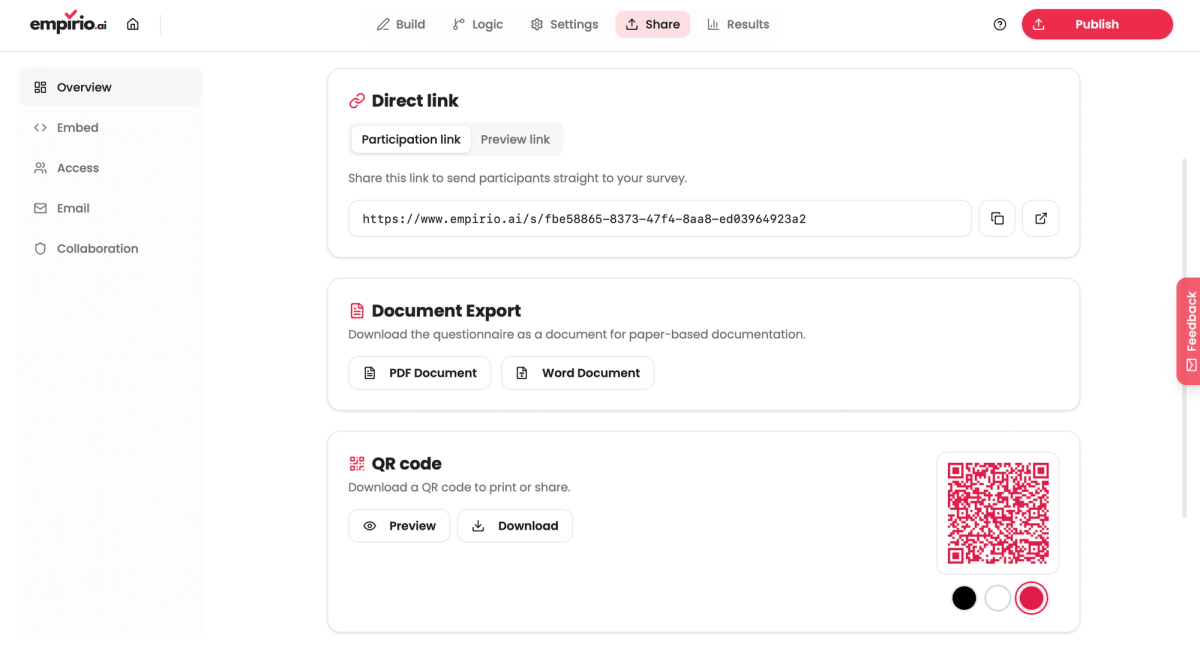
Next to the code you will see three dots. They switch the color, and the preview on the right changes with them right away. It is worth pausing here, because the color decides whether the code is scannable on your material at all.
Choosing a color and downloading
The code comes in three variants: black, white and red. Preview opens it large in its own window so you can check that it looks clean. From that window you then download it as an image file.
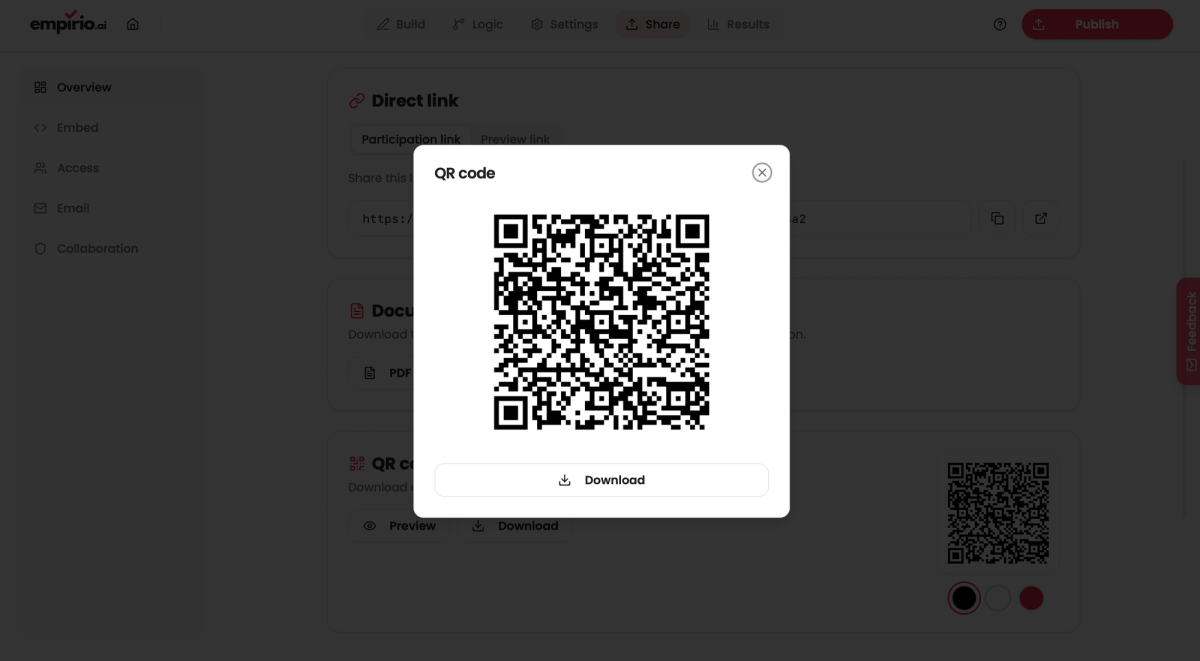
Only one thing really counts when choosing: the code has to be darker than its background, not lighter. Black is therefore the safe choice on white paper, white is for dark backgrounds only, and red suits branded material as long as it sits on a light surface. A white code on light gray paper looks good and cannot be scanned.
What the QR code costs
The QR code generator is included on every empirio.ai plan, the free one included (as of August 2026). There is no watermarked version and no cap on the number of codes.
The honest limit sits elsewhere, namely on responses. The free plan of empirio.ai allows 50 participants per month (as of August 2026). That covers a flyer in a club; it does not cover a poster campaign downtown. What surveys can otherwise cost is covered in our guide to the cost of a survey.
Common mistakes with QR code surveys
Three mistakes come up again and again with QR code surveys. All three only surface once the material has been printed.
The pattern behind them is the same: the code is treated as the last step, even though it depends on everything that happened before it.
Printing before the survey is final
Generate the code, then delete the survey and set it up again, and you are left with a stack of paper carrying a dead link. This happens more often than you would think, because many people only realize shortly before launch that they would rather rebuild the questionnaire. Finish first, generate second.
Placing the code too tightly
A QR code needs four modules of clear space on every side. Set it flush against an edge, wrap text around it or drop it onto a photo, and the camera cannot find its boundary. The code is then technically correct and still useless.
Not writing a reason to scan beside it
A square with no explanation gets ignored. Two pieces of information belong next to the code: what this is about and how long it takes. “Two minutes on the 2027 summer party” wins more scans than any amount of design. More levers for response rates are in our tips for online surveys.
Conclusion
A QR code is not a distribution channel but a bridge between paper and survey, and it is exactly as stable as the link inside it. Finish the questionnaire, get the share link, generate the code, scan it once from a realistic distance. Keep to that order and give the code its four modules of clear space, and the topic is done, leaving you free to work on what really decides your response rate: the sentence printed next to the code.
Where to go next
- Need more participants? How to find participants for your survey
- Building the questionnaire right now? Creating a questionnaire: structure and order
- Want to start without signing up? Create a survey free and without registration
- Looking for a ready-made template? Templates and examples for surveys
Survey ready, QR code missing?
With empirio.ai you generate the QR code straight from your survey and download it in black, white or red, on any plan.
Frequently asked questions
Create a survey for free
With empirio.ai you can create a modern online survey in minutes — with 100% data protection from Germany.
Start for free